
New to the MPC production world? Got a music production question that's not really specific to any particular MPC? Try your luck here and get help from our experienced members.
User avatar
By richie Sat Feb 29, 2020 2:48 am
Even if there is no hard disk installed, no big deal. You can buy a SATA to IDE adapter for under $10 and then use any SATA capable hard drive to go about your day.

Or you could use USB stick as well and still be a champion.
By cleansocks Sat Feb 29, 2020 9:28 am
richie wrote:Even if there is no hard disk installed, no big deal. You can buy a SATA to IDE adapter for under $10 and then use any SATA capable hard drive to go about your day.

Or you could use USB stick as well and still be a champion.


Perfect, I was just gonna ask this cuz I have hella fat USB sticks just laying around. Stayed up researching on MPCs all day :Sigh: again lol... I read about some issue with larger than 80 gig drives and fatal error and really put me off hard disk installation so Im glad USB only is an option

That and I pulled the trigger, $750 for a working MPC w two boards. Not bad :P
By cleansocks Sat Feb 29, 2020 9:29 am
cleansocks wrote:
richie wrote:Even if there is no hard disk installed, no big deal. You can buy a SATA to IDE adapter for under $10 and then use any SATA capable hard drive to go about your day.

Or you could use USB stick as well and still be a champion.


Perfect, I was just gonna ask this cuz I have hella fat USB sticks just laying around. Stayed up researching on MPCs all day :Sigh: again lol... I read about some issue with larger than 80 gig drives and fatal error and really put me off hard disk installation so Im glad USB only is an option

That and I pulled the trigger, $750 for a working MPC w two boards. Not bad :P


4000 I should have specified :WTF:
By cleansocks Sat Feb 29, 2020 9:35 am
I'd like to add that while I know everyone was telling me to get the newer ones and may be right about their ease of use and overall better-ness, I am very happy with my purchase and look forward to taking care of this beast and getting some proper work done with it. Plan to make it a long term piece of equipment so who knows might send it to Bruce for paint or the final expansions :lol: but that is quite a while away. For now I'm excited to learn how to sample and chop without a damn kb and mouse
By CharlesRandolph Sat Feb 29, 2020 10:39 am
cleansocks wrote:I'd like to add that while I know everyone was telling me to get the newer ones and may be right about their ease of use and overall better-ness, I am very happy with my purchase and look forward to taking care of this beast and getting some proper work done with it. Plan to make it a long term piece of equipment so who knows might send it to Bruce for paint or the final expansions :lol: but that is quite a while away. For now I'm excited to learn how to sample and chop without a damn kb and mouse


Good buy. You may find chopping much slower than Keyboard and Mouse. I normal chop using computer and then transfer everything over via ak sys.
By cleansocks Sat Feb 29, 2020 9:43 pm
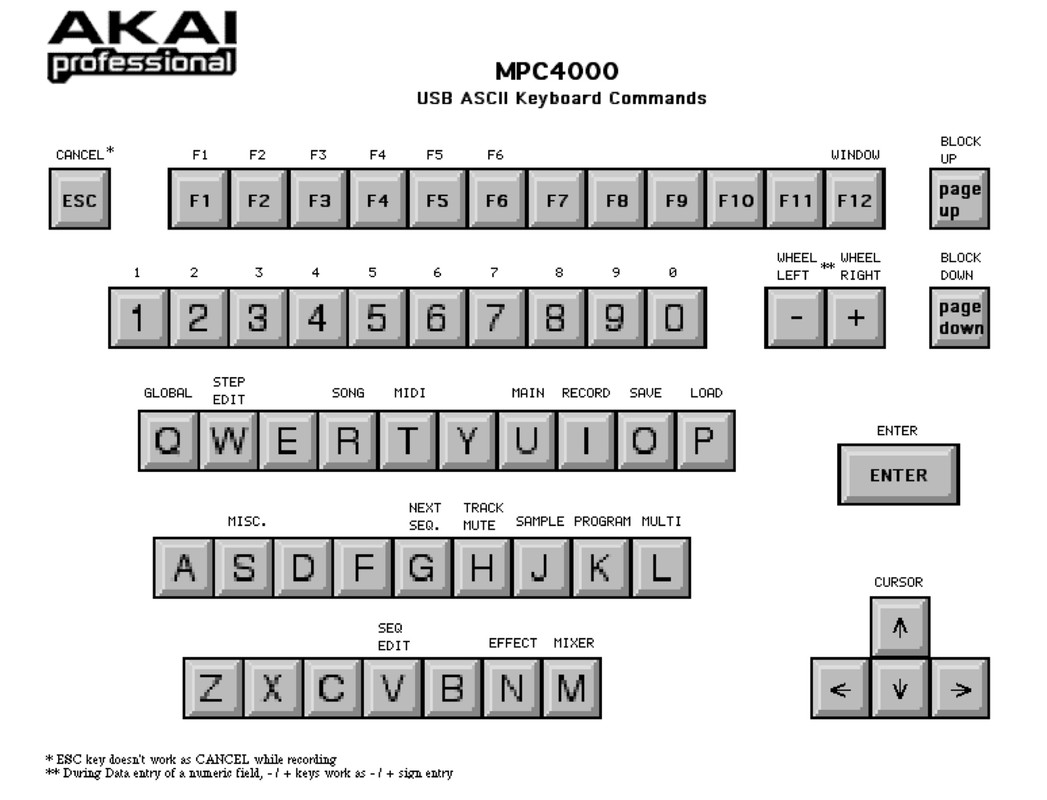
Lampdog wrote:Hold on now, you can use kybd+mouse in the 4k usb port, You can’t escape it that easily.

http://b8e57dc469f9d8f4cea5-1e3c2cee90259c12021d38ebd8ad6f0f.r79.cf2.rackcdn.com/Product_Documents/mpc4000_qwerty.zip_85d473ada8e18ffbe88d5ff173898a0c.zip

Image


Damn.. 4K really had everything huh?
side question: what exactly do I need AKAi sys for? I assumed you needed to download it on ur flash drive to transfer gigs between PC and 4000, but I read now that any FAT32 Drive (under 80 gigs I assume) will work fine? If true do I really need a CD / Hard Disk / or Aksys?
By cleansocks Sat Feb 29, 2020 9:47 pm
CharlesRandolph wrote:
cleansocks wrote:I'd like to add that while I know everyone was telling me to get the newer ones and may be right about their ease of use and overall better-ness, I am very happy with my purchase and look forward to taking care of this beast and getting some proper work done with it. Plan to make it a long term piece of equipment so who knows might send it to Bruce for paint or the final expansions :lol: but that is quite a while away. For now I'm excited to learn how to sample and chop without a damn kb and mouse


Good buy. You may find chopping much slower than Keyboard and Mouse. I normal chop using computer and then transfer everything over via ak sys.


But wouldn't that make it harder to assign a segment of a song to all 16 pads while sounding fluid? I notice it is indeed slower in the videos but it looks like you can split the sample into all your pads which sounds very cool.

Do you need Ak sys? I read on the forums here its a giant pain and a trial and error type of issue with this and the operating system on windows 10 and the newer ones in general. I was thinking about a USB or External hard drive as my main solution for transferring gigs of samples over to the 4000.
User avatar
By Lampdog Sat Feb 29, 2020 10:50 pm
No, you don’t need ak.sys. Not at all.

Ak.sys only runs on Win XP. You’d need a Win XP virtual machine specifically for ak.sys.

Ak.sys is..... an editor for the entire insides of your 4k. It’s powerful as ****.

Shout out to Ian!


User avatar
By Kalou Sat Feb 29, 2020 11:06 pm
Lampdog wrote:No, you don’t need ak.sys. Not at all.

Ak.sys only runs on Win XP. You’d need a Win XP virtual machine specifically for ak.sys.

Ak.sys is.....an editor for the entire insides of your 4k. It’s powerful as ****.

Shout out to Ian!


I remember watching these vids when Ian made them back in the day. I was rocking with a 4K then too. Good dude, heady times....
By CharlesRandolph Sun Mar 01, 2020 2:11 am
Ak Sys runs on windows 10 in compatibility mode. However, the issue is the MPC 4000 drivers, will not install on a x64 system. Window 10 Device manager can see the MPC 4000, but that's about all. :WTF: Imagine if Akai Pro supported it's USB devices like RME does. :nod:
By cleansocks Sun Mar 01, 2020 7:19 am
CharlesRandolph wrote:Ak Sys runs on windows 10 in compatibility mode. However, the issue is the MPC 4000 drivers, will not install on a x64 system. Window 10 Device manager can see the MPC 4000, but that's about all. :WTF: Imagine if Akai Pro supported it's USB devices like RME does. :nod:


hah yeah I read there being a ton of issues on 64 bit operating systems. It's kind of disappointing how AKAI does not seem to really care about their Legacy units, especially with so many people still using them. Really though , as long as I can transfer files with USB i am very happy. My only concerns now are the durability of the 4000. Biggest fear is that the machine craps out on me or gets broken easily. From reading on the forums that doesn't seem to be a large issue thankfully.
By cleansocks Sun Mar 01, 2020 7:21 am
Kalou wrote:
Lampdog wrote:No, you don’t need ak.sys. Not at all.

Ak.sys only runs on Win XP. You’d need a Win XP virtual machine specifically for ak.sys.

Ak.sys is.....an editor for the entire insides of your 4k. It’s powerful as ****.

Shout out to Ian!


I remember watching these vids when Ian made them back in the day. I was rocking with a 4K then too. Good dude, heady times....


I was just watching his sequencer tutorial! Big ups to Ian for making comprehensive videos on the 4000. I was thinking about getting an instructional DVD or just staring at the manual for hours but glad i'm glad I don't have to now
By CharlesRandolph Sun Mar 01, 2020 7:28 am
cleansocks wrote:
CharlesRandolph wrote:Ak Sys runs on windows 10 in compatibility mode. However, the issue is the MPC 4000 drivers, will not install on a x64 system. Window 10 Device manager can see the MPC 4000, but that's about all. :WTF: Imagine if Akai Pro supported it's USB devices like RME does. :nod:


hah yeah I read there being a ton of issues on 64 bit operating systems. It's kind of disappointing how AKAI does not seem to really care about their Legacy units, especially with so many people still using them. Really though , as long as I can transfer files with USB i am very happy. My only concerns now are the durability of the 4000. Biggest fear is that the machine craps out on me or gets broken easily. From reading on the forums that doesn't seem to be a large issue thankfully.


These are the things, I see that tends to need replacement.

Screen
Pad Sensor
Front USB Port
Jog Wheel
Tact Switches
Hard Drive

