Exchange tips and tricks for the Akai MPC4000
By cleansocks Sat Sep 12, 2020 9:55 am
Lampdog wrote:Why does the start of the sample sound like a part of the start is cut off?

Like if the sample was my sentence above, it would start at “y does the start.......”
That is a problem.

Also, in step edit check the duration of the sample.
Looping in trim/lp is cool and all, looping using the sequencer is a diff ballgame because you are tied to the sequencer. Retriggering requires better methods and more precision with chopping, sample tick placement.

It double plays because the sample needs to be mono so it cuts itself off when retriggered. Meaning only instance of itself is playable and/or step edit where you can dial in the duration you want the sample to play out.

Would you care to send me that project and I can attempt to help straighten it out?
If not then aiight.


Sure.

https://drive.google.com/drive/folders/ ... sp=sharing

Here are the settings and sequences used for the FIRST video, which is what the second video is built off of. The second video I was becoming increasingly frustrated and power'ed off before saving so all I got is the original from the first video, but it was having the same problems in both.
By cleansocks Sat Sep 12, 2020 10:00 am
The main objective is getting that sample.wav file to loop clean in the sequencer so i can copy it over and layer some sound effects over it. If you can get it looping cleanly in the sequencer, I will be mind blown because at this point it's starting to look like an impossible task 2 me.
User avatar
By NearTao Sat Sep 12, 2020 11:35 am
Hey man... I feel your pain :D

What I suspect you are doing is making some small mistakes that are compounding on each other into issues that can certainly become infuriating. Getting the timing right on any of these MPCs is as much art as it is science, so don’t beat yourself up when you hit the wall. We’ve all been there, and posting the videos really does help us know where your understanding is, and at be able to take the time to help you out. Keep up the good work, and we’ll be here to help you along.

Perhaps you’re thinking about this the wrong way? It sounds to me like you’re trying to get a loop, that is unlikely to hit a perfect bpm, to be triggered by the sequencer... it’s fine to try and do this, but can certainly lead to some frustrating times, because you’re now trying to drive the sequencer bpm by the effectiveness of your chops. You can absolutely learn to do what you’re looking to do, but watching your video, I’d say skill wise you’re not quite there. Definitely keep putting the time in, but I’m going to suggest you consider a different approach that might be easier for you to get a similar effect.

What I often do when I am working with a loop is to chop it up. The sample you have sounds like it would be a perfect target for chopping on the transients, and then creating a mono drum kit from each of the transient chops. Then it is simply a matter of recreating the pattern in the sequencer. Then... if you’ve got a section that sounds off or has a bad chop, you can at least go back in and replace the bum notes. Also, a great thing for putting the time in is that you can now add variations instead of having the same loop play over and over.

Now you may ask... what do you do if you have noticeable gaps in this chopped sequence? Well... given how the MPC works... you’ve got a few options... first would be to speed up the tempo of the sequencer, by making the notes play faster, you’ll basically get rid of the silence. A second option that is also fun is to drop the tuning of the chopped samples, which will cause them to play longer, and if you do this to all of your chops it will keep the piece in tune.
By CharlesRandolph Sat Sep 12, 2020 12:24 pm
cleansocks wrote:The main objective is getting that sample.wav file to loop clean in the sequencer so i can copy it over and layer some sound effects over it. If you can get it looping cleanly in the sequencer, I will be mind blown because at this point it's starting to look like an impossible task 2 me.


You need to properly trim your loop and set the best tempo. Stop getting frustrated and Start Practicing.
P.S. You owe $50 bucks for the session fee. :lol:

Sample Trim


Name: Sample 2
Start: 330 End: 251.318
Tempo. 79.2
BAR: 2 BARS

or

Name: Sample 2
Start: 660 End: 251.318
Tempo. 79.2
BAR: 2 BARS
By cleansocks Sat Sep 12, 2020 8:25 pm
NearTao wrote:Hey man... I feel your pain :D

What I suspect you are doing is making some small mistakes that are compounding on each other into issues that can certainly become infuriating. Getting the timing right on any of these MPCs is as much art as it is science, so don’t beat yourself up when you hit the wall. We’ve all been there, and posting the videos really does help us know where your understanding is, and at be able to take the time to help you out. Keep up the good work, and we’ll be here to help you along.

Perhaps you’re thinking about this the wrong way? It sounds to me like you’re trying to get a loop, that is unlikely to hit a perfect bpm, to be triggered by the sequencer... it’s fine to try and do this, but can certainly lead to some frustrating times, because you’re now trying to drive the sequencer bpm by the effectiveness of your chops. You can absolutely learn to do what you’re looking to do, but watching your video, I’d say skill wise you’re not quite there. Definitely keep putting the time in, but I’m going to suggest you consider a different approach that might be easier for you to get a similar effect.

What I often do when I am working with a loop is to chop it up. The sample you have sounds like it would be a perfect target for chopping on the transients, and then creating a mono drum kit from each of the transient chops. Then it is simply a matter of recreating the pattern in the sequencer. Then... if you’ve got a section that sounds off or has a bad chop, you can at least go back in and replace the bum notes. Also, a great thing for putting the time in is that you can now add variations instead of having the same loop play over and over.

Now you may ask... what do you do if you have noticeable gaps in this chopped sequence? Well... given how the MPC works... you’ve got a few options... first would be to speed up the tempo of the sequencer, by making the notes play faster, you’ll basically get rid of the silence. A second option that is also fun is to drop the tuning of the chopped samples, which will cause them to play longer, and if you do this to all of your chops it will keep the piece in tune.


Thanks for getting me and being patient w me lol you and everyone else reading in the thread.

I took your advice and chopped the sample to 16, and assigned it. What I got from it is strange , I don't want to make another video since all i got rn is a small snippet but when chopped into program and recorded from play start, it loops perfectly. No issue, though when I record the sound sometimes sounds delayed so Ill have to re record it sometimes but, I think I could also tinker the timing for little gaps and delays and stuff. Idk if I could recreate the original loop cuz I would have to mash the 16 buttons consecutively perfectly.. but I was able to create something that loops.

I thought my previous sequences were cutting out because they were looping into eachother or they were too close / didn't have enough room between loops. But When I chopped and start-recorded , I used up all the time on the sequence length. SO I was expecting it to play once and cut out the second time because of how close the sounds would be between loops but it looped just fine. So here's the thing that I'm not quite picking up:

If it's not the sounds in the sequence being too close or overlapping with eachother, then why do my sequences cut out if it's the full loop, as seen in my previous videos? If i want to sample generate a complete sample, don't want to chop it don't want to touch it just want to make it into a sequence to be copied over and layered some effects on it. How would you be able to do that?

" It sounds to me like you’re trying to get a loop, that is unlikely to hit a perfect bpm, to be triggered by the sequencer... it’s fine to try and do this, but can certainly lead to some frustrating times, because you’re now trying to drive the sequencer bpm by the effectiveness of your chops. You can absolutely learn to do what you’re looking to do, but watching your video, I’d say skill wise you’re not quite there. "

so if you think it's possible.. I'd be interested in knowing what I need to do . Because there's gonna be some times when I want to create something completely new from a record in which case I'd slice and dice into 16 but if it's a small section of a song I like, and I want to keep it in it's entirety to be looped and added to, i wouldn't be able to do that still.

I appreciate the advice and I am taking it as I type this my MPC is replaying that loop I was talking about, so I'll be tinkering it again real soon I just wish I could do exactly what you said up above in bold. I hear something I like, I chop it to make it sound good in a loop. On PC, it's stupid easy with audacity you're not tied to the columns (time signature) on the seq page in MPC. NOT TO SAY i want to go back to PC as many things I did not enjoy about it, but in terms of finding the MAIN loop i want to use and being able to chop and loop it, PC has that advantage. Though you are saying it is possible on the MPC so even if you don't wish to babysit me or describe to me what to do I'd appreciate if you could just give me a general idea of what is going wrong when I make sequences that cut out, and if you know anyone on youtube that knows how to get around that.

By cleansocks Sat Sep 12, 2020 8:28 pm
CharlesRandolph wrote:
cleansocks wrote:The main objective is getting that sample.wav file to loop clean in the sequencer so i can copy it over and layer some sound effects over it. If you can get it looping cleanly in the sequencer, I will be mind blown because at this point it's starting to look like an impossible task 2 me.


You need to properly trim your loop and set the best tempo. Stop getting frustrated and Start Practicing.
P.S. You owe $50 bucks for the session fee. :lol:

Sample Trim


Name: Sample 2
Start: 330 End: 251.318
Tempo. 79.2
BAR: 2 BARS

or

Name: Sample 2
Start: 660 End: 251.318
Tempo. 79.2
BAR: 2 BARS


I went to the sample page and it's end is at like 330,000. So i used those settings and all i got was an extremely tiny sample it sounded like a beep.

For real though If i wasn't a broke student i'd slide you a few dollars. Along with, near, mpc tutor, lamp, and that russian dude on my SSD thread. ya'll fr have been an amazing help since I got this thing :worthy: :nod:
User avatar
By Lampdog Sat Sep 12, 2020 8:33 pm
I think you misread CR's advice.

Start = 330
End = 251.318

or

Start = 660
End = 251.318

is how I read his post.
By CharlesRandolph Sat Sep 12, 2020 8:41 pm
cleansocks wrote:
I went to the sample page and it's end is at like 330,000. So i used those settings and all i got was an extremely tiny sample it sounded like a beep.

For real though If i wasn't a broke student i'd slide you a few dollars. Along with, near, mpc tutor, lamp, and that russian dude on my SSD thread. ya'll fr have been an amazing help since I got this thing :worthy: :nod:


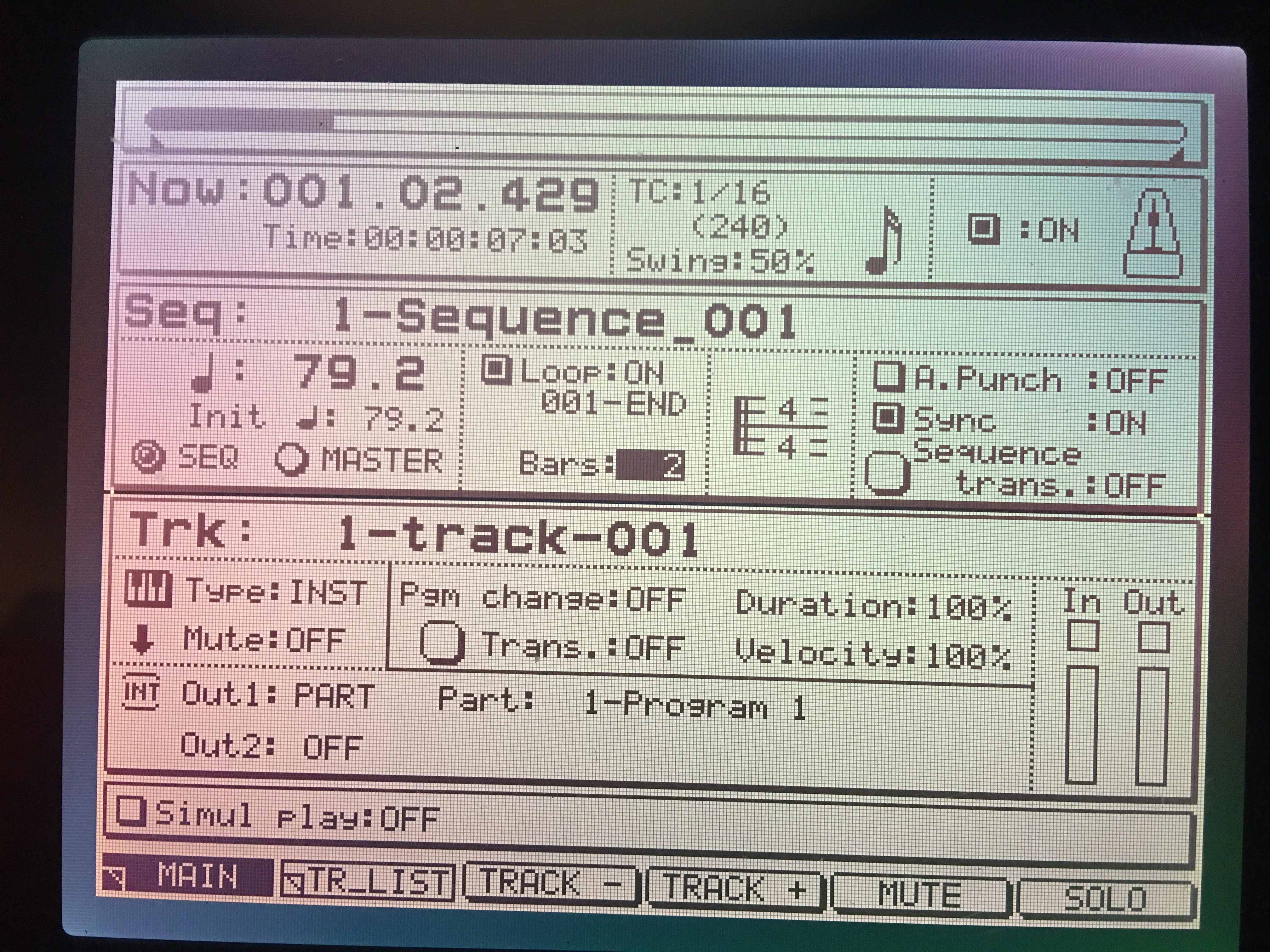
We've all been there at some point. Try to copy all the parameters, then record the sequence. :nod:


MAIN SCREEN
Image


SAMPLE EDIT SCREEN
Image
Last edited by CharlesRandolph on Sat Sep 12, 2020 8:51 pm, edited 1 time in total.
User avatar
By Lampdog Sat Sep 12, 2020 9:32 pm
I thought I had it properly shared already, I changed permissions, try it now.
By cleansocks Sat Sep 12, 2020 10:02 pm
Lampdog wrote:I thought I had it properly shared already, I changed permissions, try it now.


AHHHHH imma sound like a little girl but idc... it sounds so milky now!! I downloaded yours and it worked perfectly. Copied exact settings on my end from CR and recorded it manual through Play Start- Record and it looped perfectly as well!!!!

I noticed that you have Monitors set to Multi. I was wondering what is the usage of Multi and how is different than Sample or Program, since mine are always set to Sample for some reason. Not sure what they do different in Monitor .

Also, I tried generating a sequence with those sample settings, and then adjusting the sequence settings so they are matched with CR. But for some reason it plays perfectly and goes into the next loop perfectly but in the middle of the loop it stops like how it was with my sequences. I'm just wondering why this is such a problem with Generate sequence from the Sample page. I always used it because it's convenient but I don't think I've gotten it to work once. I'll show you what I mean in another video soon.. Very quick.

BUT my day has been made with this newfound information! thank u guys so much
By CharlesRandolph Sat Sep 12, 2020 10:08 pm
cleansocks wrote:
Also, I tried generating a sequence with those sample settings, and then adjusting the sequence settings so they are matched with CR. But for some reason it plays perfectly and goes into the next loop perfectly but in the middle of the loop it stops like how it was with my sequences. I'm just wondering why this is such a problem with Generate sequence from the Sample page. I always used it because it's convenient but I don't think I've gotten it to work once. I'll show you what I mean in another video soon.. Very quick.


Trim the sample, discard the extra, and re-record the sequence.
By cleansocks Sat Sep 12, 2020 10:34 pm
CharlesRandolph wrote:
cleansocks wrote:
Also, I tried generating a sequence with those sample settings, and then adjusting the sequence settings so they are matched with CR. But for some reason it plays perfectly and goes into the next loop perfectly but in the middle of the loop it stops like how it was with my sequences. I'm just wondering why this is such a problem with Generate sequence from the Sample page. I always used it because it's convenient but I don't think I've gotten it to work once. I'll show you what I mean in another video soon.. Very quick.


Trim the sample, discard the extra, and re-record the sequence.


SO i'd trim it further than the previous settings and then generate a sequence with the new trimmed sample?

Here is a better visualization of what I am talking about as well: