


yea i saw that
wonder what he has up his sleeve.
at this point though..i dont know how he/the whole team can top maschines 2.2
By pituchez
Sat Nov 29, 2014 1:03 am
By Jenre
Sat Nov 29, 2014 1:17 pm
What am I missing here?

By MPD MPK RAY
Sat Nov 29, 2014 6:00 pm
Jenre wrote:What am I missing here?
Pete Goodliffe @petegoodliffe · Nov 28
"MPC v1.8 teaser. "
"MPC v1.8 will bring a whole pile of useful new features. Conspiracy theorists, guess what's going on here... "

F1 babeeeeeeee!


By 83dude
Sat Nov 29, 2014 6:27 pm
To state the rather obvious:
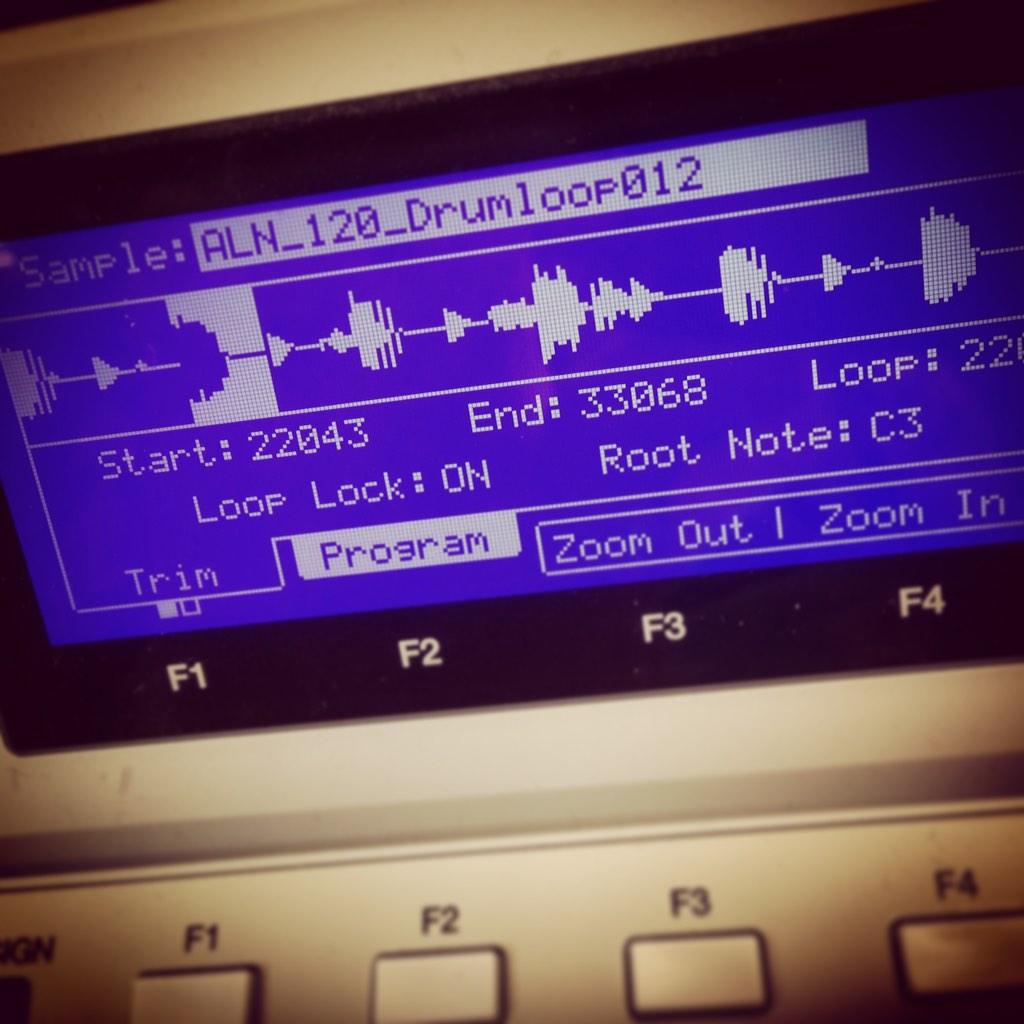
Pic 1 shows Sampling FX - applying VSTs etc. to the sample to monitor it directly?
Pic 2 shows non-destructive chopping.
F1 looks shady, though. I don't trust it.
Pic 1 shows Sampling FX - applying VSTs etc. to the sample to monitor it directly?
Pic 2 shows non-destructive chopping.
F1 looks shady, though. I don't trust it.
Yay, first album: 83 - Mad Scientist
By TT_Lab
Sat Nov 29, 2014 6:31 pm
Yeah baked fx as it seems.
And NDC plus maybe looping options for slices.
And two awesome zoom in zoom out options f3 f4 I guess vertically too. Greeeeat!
And NDC plus maybe looping options for slices.
And two awesome zoom in zoom out options f3 f4 I guess vertically too. Greeeeat!

By SimonInAustralia
Sat Nov 29, 2014 8:29 pm
83dude wrote:F1 looks shady, though. I don't trust it.
So you think that you press F1 and it changes from Sampler to Transfuser, so it records the sample and loads it straight into the Transfuser plugin, rather than the MPC sampler?
By Eyalc
Sat Nov 29, 2014 9:58 pm
Will be a major downer if 1.8 doesn't include improved plugin functionality / capability. If not, not sure it will ever get the attention it needs.
Sorry, a bit off topic, just had to say that.
Sorry, a bit off topic, just had to say that.
Blue Soul Ten - The Incredible Sound of Blue
https://ffm.to/theincrediblesoundofblue.owe
https://ffm.to/theincrediblesoundofblue.owe
By MPD MPK RAY
Sat Nov 29, 2014 10:30 pm
SimonInAustralia wrote:83dude wrote:F1 looks shady, though. I don't trust it.
So you think that you press F1 and it changes from Sampler to Transfuser, so it records the sample and loads it straight into the Transfuser plugin, rather than the MPC sampler?
YUP! I'm an Aries....Glass half FULL!
 can't help it..
We praying for Pads Follow Tempo or THAT!
Honestly, Im str8 with my Tranfusor 2 but I love choppin in the MPC4000 and V-Synth XT. The MPC4000 and XT was sold so i'm a REN junkie in need of pads that follow tempo features.

By fdodds
Sun Nov 30, 2014 2:03 am
I would have thought that hitting F1 might switch over to some kind of 'audio track' record... wouldn't it make more sense that any transfusor integration would be in chop mode? Why would you have to handle the recording of samples differently just to get it into transfusor?
and MPD I'm going to ask you the same thing I always ask... has Pete or any developer ever mentioned anything about integrating transfusor with the mpc software, or is this still just you hoping and dreaming?
and MPD I'm going to ask you the same thing I always ask... has Pete or any developer ever mentioned anything about integrating transfusor with the mpc software, or is this still just you hoping and dreaming?
By pituchez
Sun Nov 30, 2014 3:19 am
in the words of dave chappelle
"***** what the **** is TRANSFUSER"
also..
i really dont care for 1.7.2 or 1.8 or 2.0 for that matter if i dont get the chord/scale thing maschine did ;\
sorry
its just 2 good
"***** what the **** is TRANSFUSER"
also..
i really dont care for 1.7.2 or 1.8 or 2.0 for that matter if i dont get the chord/scale thing maschine did ;\
sorry
its just 2 good
By MPD MPK RAY
Sun Nov 30, 2014 4:00 am
fdodds wrote:I would have thought that hitting F1 might switch over to some kind of 'audio track' record... wouldn't it make more sense that any transfusor integration would be in chop mode? Why would you have to handle the recording of samples differently just to get it into transfusor?
and MPD I'm going to ask you the same thing I always ask... has Pete or any developer ever mentioned anything about integrating transfusor with the mpc software, or is this still just you hoping and dreaming?
Im just a guy asking the same
 I think he blocked my tweets as he never answers the good stuff like this.
BUT I THINK YOU GUESSED IT!!! Audio Tracks
So, when I sample in T2 a window will pop up asking to do something BEFORE THE EDIT SCREEN. That's why I reached so far into that dream. LOL

in the words of dave chappelle
"***** what the **** is TRANSFUSER"
also..
i really dont care for 1.7.2 or 1.8 or 2.0 for that matter if i dont get the chord/scale thing maschine did ;\
sorry
its just 2 good
You do realize we N.E.E.D. a keyboard to go with any MPC rite? Put your money where ya heart is bro. I didn't buy the MPK this time..... I ordered the KK S61 so I can do ALL THAT

but yeah Im
 waiting for the FIRST MPC EVER TO CHORD AND ARPEGGIATE PROFESSIONALLY like maschine 2. It has to happen!
By pituchez
Sun Nov 30, 2014 3:57 pm
MPD MPK RAY wrote:You do realize we N.E.E.D. a keyboard to go with any MPC rite? Put your money where ya heart is bro. I didn't buy the MPK this time..... I ordered the KK S61 so I can do ALL THAT
but yeah Im
need a keyboard? for what?
playing chords/scales? no you dont...
what are you on now if you dont has mpc'sizil?
By MPD MPK RAY
Sun Nov 30, 2014 7:11 pm
MPC 1.7 release notes: ...........in the project info list and select “Duplicate to new track”. This makes a new copy of
the program, assigns it to the next unused track, and switches to that track.
◾ MPC toolbar shows a MIDI input indicator as well as a MIDI output indicator.
◾ Support for Akai MPK keyboards.
◾ Registration information shown in a Preferences window tab.
◾ New View menu, allowing you to select MPC mode, and toggle various editor view
settings.
we here to end workflow problems for good like dilla did like frfr


go da bed bruh....take the blue pill n chill tfo
By pituchez
Sun Nov 30, 2014 8:16 pm
oh you got mpk or what ever
shouldve gotten and mpc ren yo! bwahahha
shouldve gotten and mpc ren yo! bwahahha