Support and discussion for all of Akai’s modern standalone MPCs including the MPC X / X SE, MPC Live 1, 2 & 3, MPC One / One+, MPC Key 37/61.
By kejlabal Sat Nov 07, 2020 8:54 am
Hi to all
I would like to copy FX between programs. Is there a quick way to do it ?
For the moment, when I've configured 3 fxs on program 1, I save the FX presets and apply them on program 2.
But is there a quicker way so I can have same FX on multiple programs ?

Cheers
User avatar
By MPC-Tutor Sat Nov 07, 2020 9:42 am
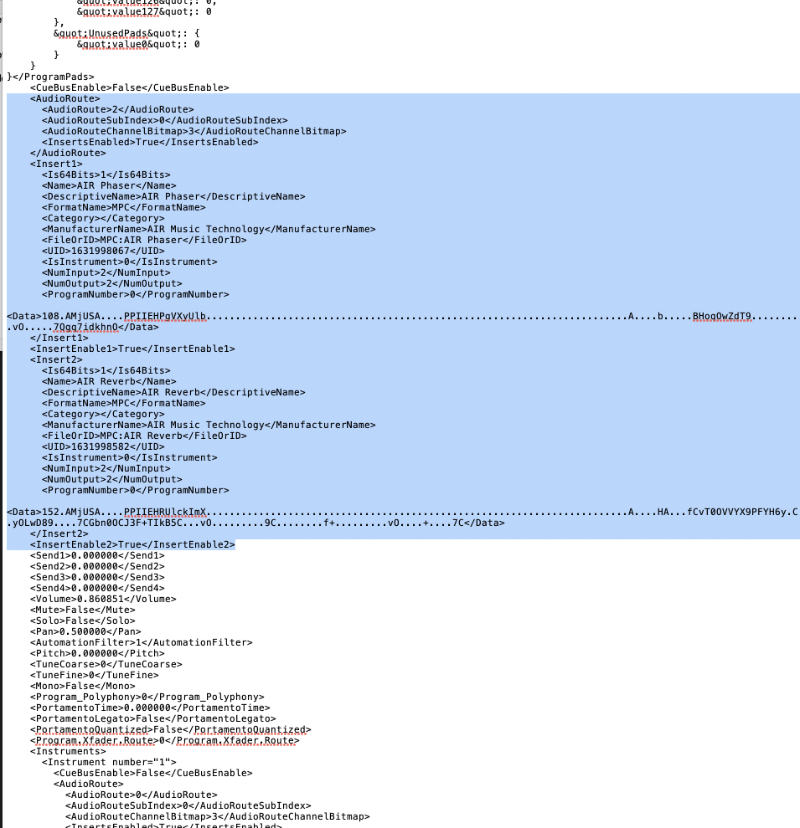
Quickest way I've found to copy program insert fx is to open up the XPM file in a text editor and literally copy the FX portion of the code and paste it into the correct place in the target program. The relevant code is near the top of the file. <AudioRoute> contains the code to enable program FX inserts.,<InsertEnable1> turns on a specific insert, and <Insert1> contains the actual plugin settings (and <Insert2>, <InsertEnable2>... etc, if relevant)

Image
User avatar
By Monotremata Sat Nov 07, 2020 5:15 pm
Dang I never thought of that but Im always standalone. I just save presets to the user drive real quick when I need them and load them that way.
By kejlabal Sat Nov 07, 2020 6:58 pm
Thanks Tutor, as Monotremata said, stand-alone too. Gold hack anyway for users that are on computer using it.

Monotremata, you talk about saving the FX presets and load them on the program needing it right ?
By Rcmusic35 Sun Nov 08, 2020 12:41 pm
Hi to all
I would like to copy FX between programs. Is there a quick way to do it ?
For the moment, when I've configured 3 fxs on program 1, I save the FX presets and apply them on program 2.
But is there a quicker way so I can have same FX on multiple programs ?

Cheers


Hello
why not use send FX ?
User avatar
By Monotremata Sun Nov 08, 2020 5:32 pm
kejlabal wrote:Thanks Tutor, as Monotremata said, stand-alone too. Gold hack anyway for users that are on computer using it.

Monotremata, you talk about saving the FX presets and load them on the program needing it right ?


Yeah just like you would in a DAW (although in Logic I can drag and drop effects til the cows come home hah). Its annoying but it is what it is for now. The shitty part about the effects presets is, there is no organization of them unless you save them all to the internal storage when it first opens up the save dialog box. If you notice the default save spot it creates the whole directory structure so your presets will show up in the plugin menus, but that is all on the internal storage which you cant backup. So anytime you wipe the MPC, you would lose your presets. When I need to move them over I just save them to the user hard drive and name them things like "Drums-Compressor", "Drone-Delay" stuff like that so I remember what track to move them too or whatnot.
By kejlabal Sun Nov 08, 2020 7:16 pm
Monotremata wrote:
kejlabal wrote:Thanks Tutor, as Monotremata said, stand-alone too. Gold hack anyway for users that are on computer using it.

Monotremata, you talk about saving the FX presets and load them on the program needing it right ?


Yeah just like you would in a DAW (although in Logic I can drag and drop effects til the cows come home hah). Its annoying but it is what it is for now. The **** part about the effects presets is, there is no organization of them unless you save them all to the internal storage when it first opens up the save dialog box. If you notice the default save spot it creates the whole directory structure so your presets will show up in the plugin menus, but that is all on the internal storage which you cant backup. So anytime you wipe the MPC, you would lose your presets. When I need to move them over I just save them to the user hard drive and name them things like "Drums-Compressor", "Drone-Delay" stuff like that so I remember what track to move them too or whatnot.

Didn't think about wiping it and losing them. Jeez an other headache :evil:

Send FX isn't exactly the same as it will add a signal. And if I want to use a filter of sa stereoizer i prefer inserts.

Well, I'll continue like I was doing, bad that akai doesn't implement that