


By Ibunshi
Fri Jul 02, 2021 7:12 pm
MPC-Tutor wrote:Ibunshi wrote:My computer is not compatible with the software either.. but I can still put it in controller mode and the mpc finds the computer.. This way I can at least transfer stuff to the hard drive that I installed in my X.
However, I had previously also been led to believe that I would not be able to use expansions, something about it needing to be installed via the software.. Which was not an option for me..
So I'm going to have to test this unzip method
If the expansion is in 'XPN' format (most third party expansions are), then you can use the zip method. If the expansion is in a computer installer format such as .exe, .dmg or .pkg then you can first install this on your computer (MPC Software not required for installation), you'll then need to locate the installed folder (on a Mac this is usually Library > Application Support > Akai > MPC) and copy the expansion contents folder to your MPC.
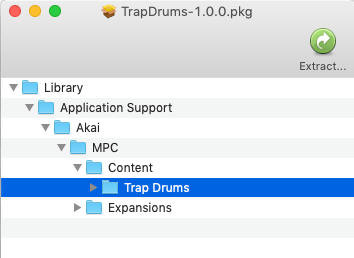
Alternatively you might be able to directly pull the expansion folder out of the .exe./.pkg file. you might need additional software to do this, there's an app called 'payloadextractor' that does this on a Mac. Seems discontinued, but you can get it here: https://www.macupdate.com/app/mac/45385 ... -extractor
Here's what it looks like when you run it on a pkg file:

Thanks for a more detailed description.. I think the ones I have are xpn, and/or pkg.. And while I could not use them before, I still transfered them to a folder on the MPC just in case there was a way, or if I'd end up with a computer I could actually install the software on
Cheers!