Support and discussion for all of Akai’s modern standalone MPCs including the MPC X / X SE, MPC Live 1, 2 & 3, MPC One / One+, MPC Key 37/61.
By mpconeplayer Thu Nov 03, 2022 1:29 pm
Hello, I have a problem, my MPC takes a long time to start when I have practically nothing in the internal memory and I have removed the sd card. When I make a new project, after load somes samples a "low memory" message appears.
I can't load an old project either.
Thanks for paying attention to my problem.
By Calcaire Thu Nov 03, 2022 10:58 pm
You maybe have filled your internal Drive with projects , samples and /or extensions ? If you have saved your projects on the internal memory of the MPC one, this kind of issues occurs.
Standalone, from your MPC browser goes to / MPC Documents / Projects
It should be empty ( also check that you have uncheck the option "Hide data folder ")

Check also the other folders in MPC DOCUMENTS

You can Delete files and folder by holding SHIFT key
User avatar
By EnochLight Fri Nov 04, 2022 3:32 pm
mpconeplayer wrote:Hello, I have a problem, my MPC takes a long time to start when I have practically nothing in the internal memory and I have removed the sd card. When I make a new project, after load somes samples a "low memory" message appears.
I can't load an old project either.
Thanks for paying attention to my problem.


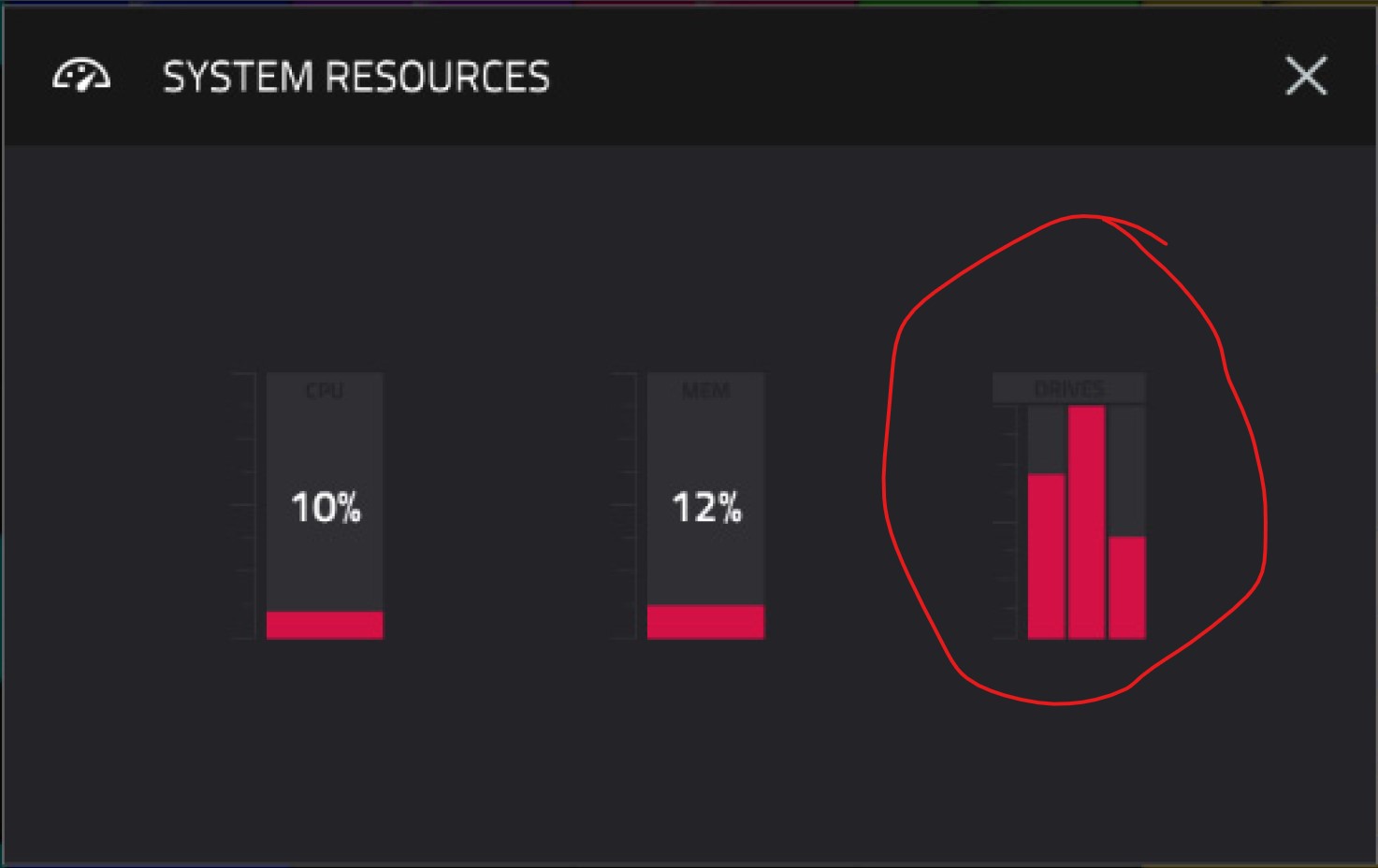
Just to clarify what we're talking about, when you start your MPC, before you load a Project or any samples, take a look at your System Resources (CPU/RAM/Drives) menu and tell us what the "Drives" icon shows. In this example, one of the 3 drives are showing about 100% full, which is a problem:

Image
By mpconeplayer Fri Nov 04, 2022 10:18 pm
thank you very much for being so responsive,
I only have 4 small projects internally and the factory content, I only have 1gb out of 4 free, the memory is at 6%, I load a very small project internally and the 47%, when the bug is produced I try to map a remote novation to make a template (not easy and long) it would have to implement automap,
in short, I noticed a folder midi learn tonight with a lot of file named m-audio keystation88 IIIcopy*****.xmm, 2035 file inside of 22kb that was created that day, is that I may have to delete them one by one (very long as with many things with the mpc) or all the file? knowing that I would lose my midi assignment and can be important files for the controller. I divorced ableton to avoid this kind of problem, my fidel pc didn't give me so much trouble, it's still an incredible machine, but badly optimized for live, thank you again for your help
By mpc_fan_2022 Sat Nov 05, 2022 7:37 am
mpconeplayer wrote: I noticed a folder midi learn tonight with a lot of file named m-audio keystation88 IIIcopy*****.xmm, 2035 file inside of 22kb that was created that day, is that I may have to delete them one by one (very long as with many things with the mpc) or all the file? knowing that I would lose my midi assignment and can be important files for the controller. I divorced ableton to avoid this kind of problem, my fidel pc didn't give me so much trouble, it's still an incredible machine, but badly optimized for live, thank you again for your help


Yes this is a known bug that AKAI never fixed. Same on the software version, it can literally kill the performances of your MPC because it copies the same setting files over and over for no reason.

Also the MPC CAN DO global MIDI learn but AKAI doesn't let you access the configuration, you have to hack your MPC in order to do so. It's a better system, the CC assignations are fix, and the controller needs to be configured, not the MPC for each project.

Unfortunately, using my MPC has been very frustrating lately due to all these issues (that + the MIDI IN/OUT note channel bugs).

Good luck.