

Support and discussion for all of Akai’s modern standalone MPCs including the MPC X / X SE, MPC Live 1, 2 & 3, MPC One / One+, MPC Key 37/61.
User avatar
By zangetsu01 Sun Jun 19, 2022 5:40 pm
Hi guy's,
I've got an Iconnectivity Audio 4C which is an dual host audio interface and I'm able to connect my MPC as well as my latop to it using USB.

This way I can stream 18 channels from the MPC to my laptop. The problem is that I keep getting pops and clicks. I've tried everything to resolve it but no succes.

Now I'm looking at the RME Fireface UFX II. As far as I've seen this interface works pops and click free.
I would like to connect it to the MPC or Force using the USB connection in class complience mode. This would let me use 16 ADAT channels but I don't know what interface to use to get those 16 ADAT chanels to the laptop.

Of coarse I could just use another Fireface II but that would set me back another 1999 euro's.

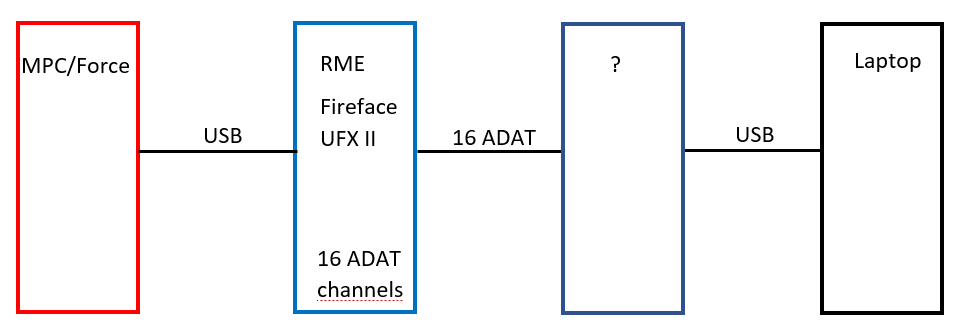
The schematic below shows what I'm trying to achieve. I only need to fill out those question marks.

Any ADAT users around?

Other solutions are welcome as well. Just know that I'm looking to stream a minimal of 16 channels from the MPC to the laptop. I just don't want a bulky mixer sollution.
Image
User avatar
By zangetsu01 Mon Jun 20, 2022 4:41 pm
Maybe the quistion mark could be filled with the RME Digiface USB. It has got 4x Adat I/O. That's 4x 8 ADAT channels = 32 ADAT channels. Two of these could be connected to the ADAT ports on the RME Fireface II (I think). And the USB port could be connected to the laptop.
By audiohack Mon Oct 10, 2022 11:36 am
Yes - I'd like to know too. I have the original RME Fireface UFX (not II or +) and it does not work well with the MPC Live II when recording. Lots of pops and clicks when recording into the MPC. The RME Babyface and UCX II, do work - playback and recording - without clicks and pops but they only have 8 channels of ADAT. I can confirm this, as I have/had both of those interfaces. I would love to upgrade to a UFX II with 16 channels of ADAT, if someone could confirm that it records into the MPC Live II without pops and clicks, but I haven't seen confirmation of this anywhere. @zangetsu01, please tell me I'm wrong.
User avatar
By zangetsu01 Tue Oct 11, 2022 4:50 am
I'm using both the Fireface UFX II and Fireface 800. I also have pops and click while recording (not so heavy but still). There are no pops and clicks in playback. For me it's not a problem because I don't record into the MPC and when I really need to I can use the default audio interface.

As for my setup:

The UFX II is connected to the MPC and the 800 to my laptop.
The UFX II is unable to stream 16 Adat chanels in CC mode.

You'll only get 24 output chanels (16 analog outputs & 8 Adat outputs). But wat I did was rerouting 8 of those analog outputs back to 8 of it's analog inputs with 8 super short wire jack cables. Those inputs can be routed to those 8 unused Adat outputs.

And suprisingly there is no lag or shift between the first 8 Adat and the last 8 Adat chanels while doing this. (must be in the micro seconds wich can't be picked up by ears). This way I have 16 Adat outputs that stream directly from the UFX II to my 800 that is connected to my laptop.

I've done this so I can use my mastering plugins on my laptop for realtime playback.

I've also got the RME USB digiface. I've now put that one between both audio interfaces for some experimental purpouses. (It's to A/B between the unprocessed sound and the processed sound).
User avatar
By Telefunky Tue Oct 11, 2022 8:26 am
Thanks for mentioning the Digiface USB, didn‘t know it existed :smoker:
(solid control software and reasonably priced)
Routing Adat channels adds almost exactly 0.5ms for a full roundtrip, hard to perceive, but you’ll care for the 18-22 samples delay in recording anyway (if required).
Analog converter delay varies with device (of course).
By pdavis33023 Fri Nov 11, 2022 10:23 pm
I got an RME Digiface USB. I connected it and got a pop-up window saying this USB device is not supported. Not sure if it is because it’s bus-powered but it’s pretty disappointing. Is there a way to reach out to them for them to address it in an update?
By BeatThat! Wed Nov 16, 2022 5:05 pm
Digiface USB doesn’t have a class compliant mode so it isn’t compatible with the MPC.

I’ve got a babyface pro hooked up to the mpc, 4 channels from that going analog in to my mixer, 8 channels digital going to a UFX, 12 UFX analog outs going to the mixer (8 fed from the babyface, 4 available for fx or Daw tracks).

I wouldn’t have thought to hook things up this way but cobbled it together because it’s what I had and the mpc didn’t work well with the UFX. But it’s actually a really flexible way to have it set up. If I want, I can just leave the computer off and be totally standalone with the MPC, with 12 channels split out across the mixer (along with my other synths and effects).

But I can also turn on the computer and have 4 daw returns for the kind of things a daw does better than the MPC (comped and submixed vocals for example). Or if I want to print more to the daw I can do that and switch some (or all) of the UFX outputs to daw returns instead of mpc outputs.

It sounds complicated but it’s pretty cool to be able to have the studio totally centered on the hands on music making elements (mpc, synths, and mixer) while still being able to integrate a computer when needed. Not sure I’d recommend going out and buying 2 interfaces and a mixer to do it but if you already have some or most of what you’d need, it’s a cool workflow.

Almost all of that would be possible with controller mode, but it would require the computer to be on and I’d lose the 4 analog channels from the fire face.

Are you sure you can’t accomplish what you’re trying to do with one big interface for the computer and the MPC in controller mode?
By BeatThat! Wed Nov 16, 2022 5:10 pm
After writing that long and somewhat off topic response I reread your initial post and am not clear why you’re looking to do this with interfaces and ADAT. Is there a reason you can’t just use controller mode? It seems like it’s designed for exactly what you’re trying to do.