


By Electro Clash
Mon Sep 23, 2024 8:33 pm
Hello, I will try to explain what I noticed on my Key 37 since the beginning.
I underlined “since the beginning” because this behavior was there also before updating to 3.40.80
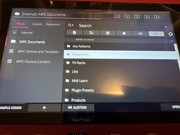
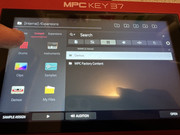
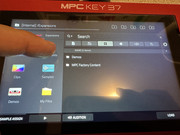
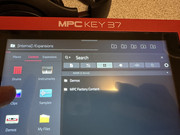
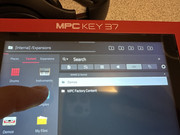
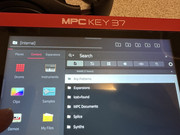
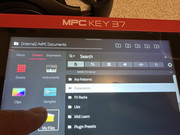
Going on browser > Content, the left direct link icons doesn’t work as expected.
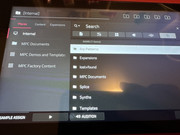
Drums, Instruments, Clips, Samples will all bring into [Internal]/Expansions folder, but…
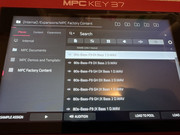
1) to enter drums I also need to click on “MPC Factory Content”, so it is not a direct link (filtered link)
2) I need to do the same for keygroups (Instruments) icon (link) but, differently from all the other MPC I owned (Live II, One and X) this will show same identical “kits” I see on drums… in other words, instruments and drums show same results.
3) same for clips (cannot search clips using left icons)
4) same for “Samples”, but in this case the “wav” icon is selected.
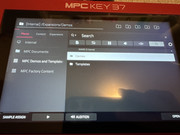
5) Demos will bring to interval generic root folder…
So..
Is there a way to “point again” these icons?
Is there a way to show instruments as it should and not only drums?
Thank you.
I underlined “since the beginning” because this behavior was there also before updating to 3.40.80
Going on browser > Content, the left direct link icons doesn’t work as expected.
Drums, Instruments, Clips, Samples will all bring into [Internal]/Expansions folder, but…
1) to enter drums I also need to click on “MPC Factory Content”, so it is not a direct link (filtered link)
2) I need to do the same for keygroups (Instruments) icon (link) but, differently from all the other MPC I owned (Live II, One and X) this will show same identical “kits” I see on drums… in other words, instruments and drums show same results.
3) same for clips (cannot search clips using left icons)
4) same for “Samples”, but in this case the “wav” icon is selected.
5) Demos will bring to interval generic root folder…
So..
Is there a way to “point again” these icons?
Is there a way to show instruments as it should and not only drums?
Thank you.