Support and discussion for all of Akai’s modern standalone MPCs including the MPC X / X SE, MPC Live 1, 2 & 3, MPC One / One+, MPC Key 37/61.
By Elijah Thu Jan 02, 2025 4:14 am
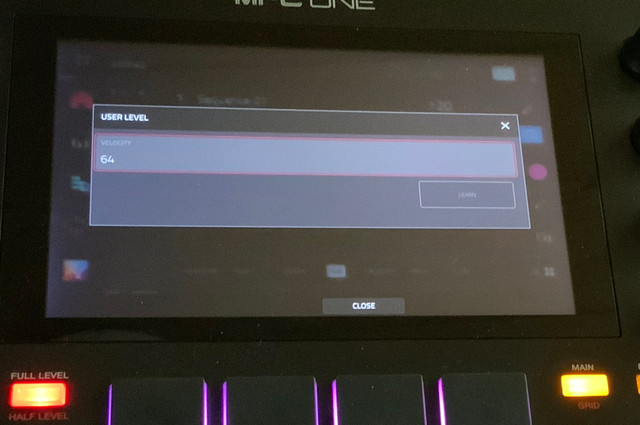
In MPC3, the velocity for Half Level can now be changed from 64 to any desired value. Pressing and holding the Full Level button opens the User Level dialog.
Image
By Masi Sat Jan 04, 2025 10:20 am
Elijah wrote:In MPC3, the velocity for Half Level can now be changed from 64 to any desired value. Pressing and holding the Full Level button opens the User Level dialog.
Image

Nice.

Beware: closing the dialog with the X icon does not dismiss any changes.
By Masi Sat Jan 04, 2025 10:23 am
MPC-Tutor wrote:MPC2 supports linear arrangement, via 'main', there was nothing stopping you working in a linear style in 2.15.

The "linear" in MPC3 marketing is misleading. What's new is the overview of events across tracks.

But who listens to marketing? ;)
By Masi Sat Jan 04, 2025 10:58 am
OPx-4 global FX are loosing settings. After a reload you cannot be sure that the FX is not different. Some FX loose "only" on setting, others are basically reset to their defaults.

So far I could live with the beta, but this is even for me a deal breaker.
By Masi Sat Jan 04, 2025 2:51 pm
Masi wrote:OPx-4 global FX are loosing settings. After a reload you cannot be sure that the FX is not different. Some FX loose "only" on setting, others are basically reset to their defaults.

It seems that the saving of presets is broken.

I cannot even store a preset in track 1 and load it directly afterwards (same track or not) without settings going amiss.
By Travis Sat Jan 11, 2025 1:41 am
Send FX on 3.4 beta don't work for mix channels.

Also on sample editor all of the processing options such as copy sample function don't show up unless you go back one sample then come back.

Also sometimes when you hit the pads on the pads while in pad mixer it doesn't change to the channels of the pads your striking unless you do it manually.

Also sometimes when using the 16 levels button it changes the bank of the drum programs.
User avatar
By Juxx Sat Jan 11, 2025 5:17 am
Every time I boot up my X-OG I have to ReActivate all my Plugins. Then I have to load Previous MPC 3 Projects while it is still on for them to load correctly.
By Travis Sat Jan 11, 2025 8:28 pm
Send three turns up volume with no insert fx and gives strange sounds with compressors and fx in tge chain.
Probably does it in all the sends but not sure have to try it
By webslinger29 Mon Jan 13, 2025 7:49 pm
Forgive me if this has been covered already but is anyone having weirdness when converting to WAV/MP3 in Song mode?

It used to be that you could easily get a WAV or an MP3 and store it in your projects on your SSD drive but when I convert I now get myriad additional files, then have to export again to get a WAV/MP3. Also, it seems to inject muting of certain tracks for some reason meaning I've had to go through the process of saving my project multiple times with different names on a trial and error basis.

Just spent about 2 hours doing this until I got the track I wanted, in the end I converted the song to a sequence, deleted the other sequences (thereby leaving me with one sequence covering the whole song), then had to save as a different name to get the WAV and MP3 files...a bit of trial and error yes, but that's the first time it has ever happened to me

I will caveat it was a rather complex piece with all plugins exhausted and several keygroups and audio tracks too (14 in total).

Much love, peace.

Webslinger
By Ocze Fri Feb 14, 2025 6:17 pm
Hi all,

I have MPC live 2 for sometime, however still I consider myself as a newbie. I have couple remarks/questions/feature requests regarding using MPC 3. Maybe you could help me with some of them. I upgraded to MPC 3 and it is great, however, they are some things which I struggle with when I am trying to use MPC as a device for live shows - launching backing tracks, sending parameter changes or midi sequences via midi to external devices, etc.

1. Do you have idea or workaround, how export sequences to another projects? I use MPC sequence as a song or as a part of a song and this would be great feature to build or organize live sets.

2. Is there any way or workaround in MPC 3, how to set different plugin patch (or send different program change message) in the same track but in different sequence? This would be great feature request.

3. It would be great to have different length of tracks in different sequences. I thing this is one feature which will be in a next update, right?

4. Is there any workaround how to have sequences chained outside a song mode? It would be great to have some option, for example, to loop sequence 4 times and then automatically jump to next sequence, and still be capable of playing live on pads. Or just jump on the next sequence in any time you wish. It would really enhance the live playing capabilities of this wonderful hardware.

5. Do you have an idea, if there are any routing options for headphones? E.g. when I use outputs 3 and 4 for backing tracks, and I want to hear them in a headphone output, is it possible? I couldn't find the option anywhere.

Thanks for help and sorry for silly questions :)

Cheers.
User avatar
By DJ_GodsOwn Tue Apr 22, 2025 10:52 am
So I'm having a bug where I have Mini D- Classic Brass plugin going, some drum samples, and a song i sampled from Tracklib.com . Looping is enabled and I've made sure to "Erase" all automation. The issues is that after a few playthroughs, the volume drops out completely and you can't hear the song anymore. Mini D stops registering in the volume meter, but my drum samples and Tracklib sample do. You see the VU meter but there's no sound. It's a really odd bug and it's annoying especially since it may prevent me from being able to record out this song into Audacity. :vomit: :Sigh:
By Narlow_London Sat Jul 12, 2025 11:55 am
Can anyone else confirm they have this issue??? When in standalone the sampler function works fine, i connect my iphone into the 2 inputs on the back of the MPC, click monitor in and have sound and can sample- happy days.

When using in CONTROLLER MODE i get no sound whatsoever. Checked the standard obvious things, monitor is on, audio settings are set to output (my sound card) input (MPC one) but i just get no signal at all.

Like i say, fine in standalone but seems to be an issue in controller mode.

Help would be greatly appreciated.

Thanks.