Support and discussion for all of Akai’s modern standalone MPCs including the MPC X / X SE, MPC Live 1, 2 & 3, MPC One / One+, MPC Key 37/61.
User avatar
By FromthePantoL.A. Sun Nov 15, 2020 4:10 am
What's up everyone.
A buddy picked up a used MPC X and the screen is black.
I have zero experience with this machine and I'm trying to lend a hand.
Is there some way to adjust the contrast / display brightness?
If not , does it need a new screen or could this be a different issue?
I've been doing some research but I see nothing in regards to this.
Any help is appreciated.
User avatar
By FromthePantoL.A. Sun Nov 15, 2020 12:04 pm
Thank you for the quick reply.
The screen is black , not dark.
It is as if it is not powered on . although it is because the buttons , etc light up when it is plugged in.
The links are lit up and the words are displayed properly.
Oddly though , the power button does not turn it off regardless of it being pressed.

It has to be unplugged to power off.
User avatar
By FromthePantoL.A. Sun Nov 15, 2020 12:06 pm
Also there is no external device connected.
No usb flash , nothing at all inserted into the mpc x.
By dsy73 Sun Nov 15, 2020 12:41 pm
Oddly though , the power button does not turn it off regardless of it being pressed. It has to be unplugged to power off.

I think the issue is more critical than just a screen to repair.

Also there is no external device connected. No usb flash , nothing at all inserted into the mpc x.

ok, maybe a disk (SSD or HDD ) was installed inside the MPC by the previous owner? You can try to disconnect it:
https://www.youtube.com/watch?v=4NfoLgiwSTU?t=62
There is no risk to remove the internal disk, there are only data here.

Also MPC X has 2 internal storages:
- Internal SD for factory content
- eMMC for system
Maybe one of them has a failure.
You can try to disconnect the internal SD card if you are used to work on hardware but it is risky of course.
By SakisX Sun Nov 15, 2020 12:54 pm
Seems like a hardware issue ,unfortunately . But you might have a faulty power supply . I would try first to find another one with the same specs (or measure the voltage of the with a multimeter) and as a last resort a firmware reinstall by using a computer (don't know if the X touchscreen is needed during the operation)
User avatar
By FromthePantoL.A. Mon Nov 16, 2020 4:17 am
Thanks for all of the replies.
I did decide to look into the MPC for a hard drive , etc and oh boy....
I did not see a hard drive but as soon as I got the little cover off , I saw a black wire hanging.
This encouraged me to remove the entire back cover and then I saw another wire that was not attached to anything on the opposite end.
It appears as though the previous owner has opened this device or someone did it for him.
Some of the screws they used are not the originals.
Anyway , I have no idea where these cables connect to.
Any help is appreciated.[img][img]https://live.staticflickr.com/65535/50607391893_5254fca454_z.jpg[/img]IMG_3713 by d williams, on Flickr[/img]

I haven't posted photos in years and this is all I could figure out.
By dsy73 Mon Nov 16, 2020 11:39 am
Sorry I cannot open my MPC for help.

Maybe these photos could help a few.

You should take more pictures:
- the label at the extremity of the think black cable
- the disconnected ports on the board for the large black cable
You can count the number of pins on the cable to find some candidate ports.
By SakisX Mon Nov 16, 2020 12:55 pm
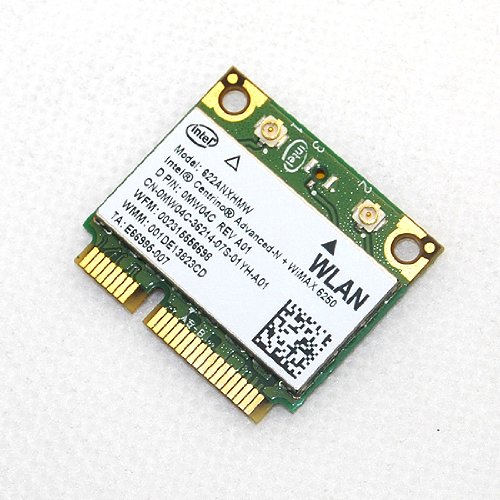
These wires connect to a WiFi card like
Image

I mean the thin one with the golden end , NOT the fat one
User avatar
By FromthePantoL.A. Mon Nov 16, 2020 1:45 pm
Thank you for the pics.
Sadly , the cables were disconnected in the pics and I couldn't tell where those 2 black wires should be going.
I just took a few more pics.
I wish I knew a better way of displaying them here.
I can't figure out where these wires should placed.
[img][img]https://live.staticflickr.com/65535/50608830063_fb2b8d9c06_z.jpg[/img]IMG_3734 by d williams, on Flickr[/img]
Last edited by FromthePantoL.A. on Mon Nov 16, 2020 2:27 pm, edited 1 time in total.
User avatar
By FromthePantoL.A. Mon Nov 16, 2020 1:48 pm
How can I insert the pics like you did?
I'm using Flickr.
It's been years since I posted photos here.
User avatar
By FromthePantoL.A. Mon Nov 16, 2020 1:49 pm
ok. Going to a Wifi card I can see.
If I could just see the connection.
Thank you very much for that.
User avatar
By FromthePantoL.A. Mon Nov 16, 2020 1:51 pm
Image
Last edited by FromthePantoL.A. on Mon Nov 16, 2020 2:51 pm, edited 2 times in total.
By 40Beatz Mon Nov 16, 2020 2:41 pm
Sounds like your LCD Screen is Toast