Support and discussion for all of Akai’s modern standalone MPCs including the MPC X / X SE, MPC Live 1, 2 & 3, MPC One / One+, MPC Key 37/61.
By Observer Mon Apr 13, 2026 6:20 am
Delphinus wrote:I use a Tascam Model 12, works perfectly. Killer combo indeed. I just got my MPC XL today and got it setup in my old QL400 stand that I've had since the 4000. I had to extend the arms down in the front 3-4 inches and open her up a little wider, but it fits perfectly. Thanks Certified Beatz for the heads up on that before purchase. Front headphone knob is close, but I gave it an extra few centimeters on the right side and we're golden. It was about the same with the X.

The XL is wild. I haven't even made a beat on it yet, but I love it. It looks much better in person and feels top quality. All these menu buttons will have me quick as a ninja once the muscle memory sets in. This feels like this might be my last MPC I need because honestly, where do we go from here? This thing can take me to the moon.

It was between this and the Live 3. I feel I made the right choice. There was a weird glitch with my preferences folder being in the wrong spot when I first turned it on, but a reset parameters and OS update fixed it.

Also, got a killer deal if anyone is in the market for an XL over at RetroGearShop out of Nashville,Tennessee. He said open box, but it's legit brand new sealed. Tax free if you don't live in the state.


Glad you are enjoying your XL! I can't wait to get my hands on it in the coming weeks. Many are saying that it looks better in person and that it's of high quality which is great.

Regarding the mixer, I think I might have to go for Model 16 or 24 which is massive. Some extra inputs won't hurt.
By Certified Beatz Mon Apr 13, 2026 5:00 pm
Delphinus wrote:I use a Tascam Model 12, works perfectly. Killer combo indeed. I just got my MPC XL today and got it setup in my old QL400 stand that I've had since the 4000. I had to extend the arms down in the front 3-4 inches and open her up a little wider, but it fits perfectly. Thanks Certified Beatz for the heads up on that before purchase. Front headphone knob is close, but I gave it an extra few centimeters on the right side and we're golden. It was about the same with the X.

The XL is wild. I haven't even made a beat on it yet, but I love it. It looks much better in person and feels top quality. All these menu buttons will have me quick as a ninja once the muscle memory sets in. This feels like this might be my last MPC I need because honestly, where do we go from here? This thing can take me to the moon.

It was between this and the Live 3. I feel I made the right choice. There was a weird glitch with my preferences folder being in the wrong spot when I first turned it on, but a reset parameters and OS update fixed it.

Also, got a killer deal if anyone is in the market for an XL over at RetroGearShop out of Nashville,Tennessee. He said open box, but it's legit brand new sealed. Tax free if you don't live in the state.


Your welcome i was tempted to move to my old stand but my 8 out cables are not long enough for where I want to put it.. enjoy i love this beast.. looking for a nice 30 degree desk stand .. not a 45 degree one :-D :-D
By Basics Tue Apr 14, 2026 10:44 pm
I've got a similar question. Been through pretty much the whole lineup at this point: 500, 1000 (JJOS maxed), 2000XL, 2500SE (JJOS maxed), and even the 5000. Been using the Live MK1 for about 9 years now.

Recently spotted the XL and it’s really pulling me in… but I’m torn between grabbing that or going for the Live MK3 instead.

My Live doesn’t really leave the home studio, it’s hooked up to the monitors, though the kids sometimes take it to their rooms and mess around on it with headphones (they still prefer using it through the monitors though).

Anyone else gone through this decision? Can’t decide which way to go - Live MK3 or XL?
By BeatWilson Wed Apr 15, 2026 9:50 am
Alright, so I did touch the XL yesterday at my local music store when I went to pick up a synth I ordered.

I tried the rubbery buttons, and I gotta say... It didn't feel good around the Number Pad..
Just the rubbery pad/buttons, sorta move/shift around before pushing down.

I really wish they went with all plastic buttons.

My reason for wishing they went with this is because... If any of ya have owned a synth where over time the rubber degrades(I've literally had synth knobs peel on me), that is my worry none the less it takes more of an effort to push down on a number pad button. Seem counter intuitive since before typing on the plastic clicky buttons on the X was a breeze and super quick. I feel like it was easier before in regards to muscle memory.

Anyways that's my two cent's.

Over it..
By Observer Wed Apr 15, 2026 2:12 pm
Basics wrote:I've got a similar question. Been through pretty much the whole lineup at this point: 500, 1000 (JJOS maxed), 2000XL, 2500SE (JJOS maxed), and even the 5000. Been using the Live MK1 for about 9 years now.

Recently spotted the XL and it’s really pulling me in… but I’m torn between grabbing that or going for the Live MK3 instead.

My Live doesn’t really leave the home studio, it’s hooked up to the monitors, though the kids sometimes take it to their rooms and mess around on it with headphones (they still prefer using it through the monitors though).

Anyone else gone through this decision? Can’t decide which way to go - Live MK3 or XL?


For me, it was MPC XL or nothing, I just don't like the Live form factor. I don't enjoy using it. If you do like your Live then getting a MK3 makes sense.

After all, the XL is an expensive bit of kit.

My only wish is that the XL came with a few more paid plugins and effects, I mean the modern ones and not stuff like Hype, Bassline etc. Oh well.
By fooddude Thu Apr 16, 2026 7:53 pm
BeatWilson wrote:I really wish they went with all plastic buttons.

My reason for wishing they went with this is because... the rubber degrades...

...plastic clicky buttons on the X was a breeze and super quick. I feel like it was easier before in regards to muscle memory.


I'm on team "hard plastic buttons" as well... esp. coming from an mpc60 I've used for +10 years.

Also, all my vintage synth/fx racks are all hard buttons (JD, JVs, TX, M3R, Alesis & Boss FX racks, FF filter, even archaic Mackie mixer, etc.).

Don't got an XL (perhaps in a few years when refurb prices are low enuf)... but, absolutely in love w/ my new X SE.

After months of cleaning/organizing studio/setup & finally done patching +50 cables to Mackie, I can finally get more serious & start a new track (haven't done so since 2016... I've only made random quick [only one machine] sketches since).
By Certified Beatz Thu Apr 16, 2026 8:01 pm
fooddude wrote:
BeatWilson wrote:I really wish they went with all plastic buttons.

My reason for wishing they went with this is because... the rubber degrades...

...plastic clicky buttons on the X was a breeze and super quick. I feel like it was easier before in regards to muscle memory.


I'm on team "hard plastic buttons" as well... esp. coming from an mpc60 I've used for +10 years.

Also, all my vintage synth/fx racks are all hard buttons (JD, JVs, TX, M3R, Alesis & Boss FX racks, FF filter, even archaic Mackie mixer, etc.).

Don't got an XL (perhaps in a few years when refurb prices are low enuf)... but, absolutely in love w/ my new X SE.

After months of cleaning/organizing studio/setup & finally done patching +50 cables to Mackie, I can finally get more serious & start a new track (haven't done so since 2016... I've only made random quick [only one machine] sketches since).


Congratulations you dont need to upgrade with 4gb of ram at the moment enjoy..
User avatar
By Lampdog Thu Apr 16, 2026 10:27 pm
Delphinus wrote:... because honestly, where do we go from here? ...

I said that SAME thing when I purchased OG X, aaaaannnnddd now look where I'm at.
OG X sold and XL is "where we went" from there.


:lol:
By Delphinus Thu Apr 16, 2026 11:08 pm
Lampdog wrote:
Delphinus wrote:... because honestly, where do we go from here? ...

I said that SAME thing when I purchased OG X, aaaaannnnddd now look where I'm at.
OG X sold and XL is "where we went" from there.


:lol:


You got me there. I said the same thing about the X myself. I could have probably stuck with it, but with OS3 and all the new features I felt an upgrade was necessary. Plus the insane work speed boost. Who knows what the next MPC could bring and I could be eating those words in the future.

Also, thanks for the earlier hot tips Lamp. Already utilizing the volume from touch slider option. Made a fresh template. Loving the step sequencer. I still feel like there is a lot under the hood that I might be missing and even more shortcuts and tricks, but this thing is a beast. I feel like I'm commanding a starship every time I'm in front of it. My X is up for sale currently.
User avatar
By Lampdog Fri Apr 17, 2026 4:10 am
Delphinus wrote:Also, thanks for the earlier hot tips Lamp. Already utilizing the volume from touch slider option.

I’ve used the touch strip as a/b fader as well.

Make a beat on trk “a”, highlight “a” at bottom of channel strip
Make a beat on trk “b”, highlight “b” at bottom of channel strip
Config touch strip to “crossfader”.
You can now hit play and fade between “a” and “b” tracks.
You could set multiple tracks to “a”.
You could set multiple tracks to “b”.
This could result in you fading between 2 songs, on the fly, if prepped properly.
—————
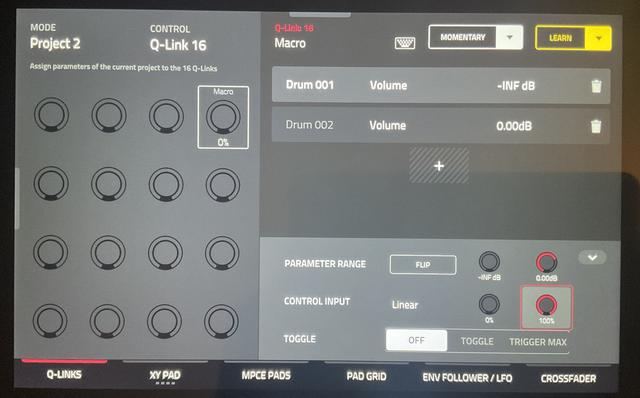
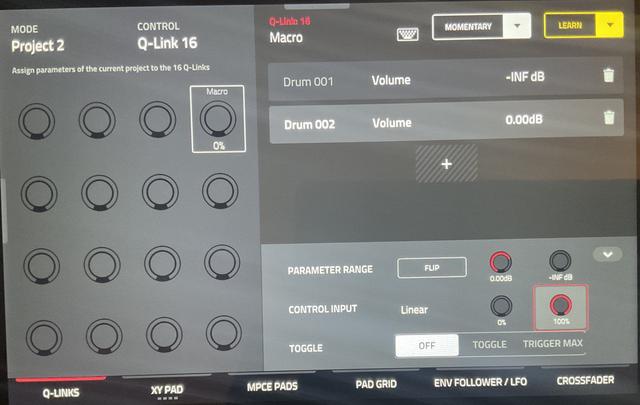
You can do this same thing on machines without the touch strip, utilize a q-link!
Make a beat on DRUM 001 (it’s just a drum track)
Make a beat on DRUM 002 (it’s just a drum track)
Q-link Edit
Project 2
Q-link 16 (any empty q-link will work)
Follow my pics.
Add macro, track, DRUM 001, mixer, volume, at bottom, “parameter range” is set to 0.00db

Add macro, track, DRUM 002, mixer, volume, at bottom, “parameter range” is set to 0.00db
DRUM 002 at bottom, “parameter range” is “flipped”

You can know fade between DRUM 001 AND DRUM 002 volume levels on the fly.

Image
Image