Support and discussion for all of Akai’s modern standalone MPCs including the MPC X / X SE, MPC Live 1, 2 & 3, MPC One / One+, MPC Key 37/61.
User avatar
By MPD MPK RAY Thu Jun 09, 2022 8:41 pm
Lampdog wrote:Using locate since 2kxl, very useful.

Spit dat 2Keezy talk Lamp! :smoker:

Locate on a MPC is like IF Manual Transmission was offered on THIS:

Image
Image

GO ANYWHERE ON THE TRACK with a flick of a button!
Last edited by MPD MPK RAY on Thu Jun 09, 2022 8:52 pm, edited 2 times in total.
User avatar
By BostonGreen Thu Jun 09, 2022 8:46 pm
Lampdog wrote:Using locate since 2kxl, very useful.


What is this locate i hear you speak of :hmmm:[/quote]


You've got like 8 locate points you can set up per sequence. I think you need to click the beat counter at the top to open the window. Not near the Live right now to double check..[/quote]

Oh cool, like a jump to button
User avatar
By BostonGreen Thu Jun 09, 2022 8:49 pm
Lampdog wrote:Using locate since 2kxl, very useful.


Well bugger me, I didn't know this existed, just checked on One and a whole new popup I've never seen before appears :worthy:
User avatar
By MPD MPK RAY Thu Jun 09, 2022 8:50 pm
BostonGreen wrote:
Lampdog wrote:Using locate since 2kxl, very useful.


What is this locate i hear you speak of :hmmm:


You've got like 8 locate points you can set up per sequence. I think you need to click the beat counter at the top to open the window. Not near the Live right now to double check..[/quote]

Oh cool, like a jump to button[/quote]
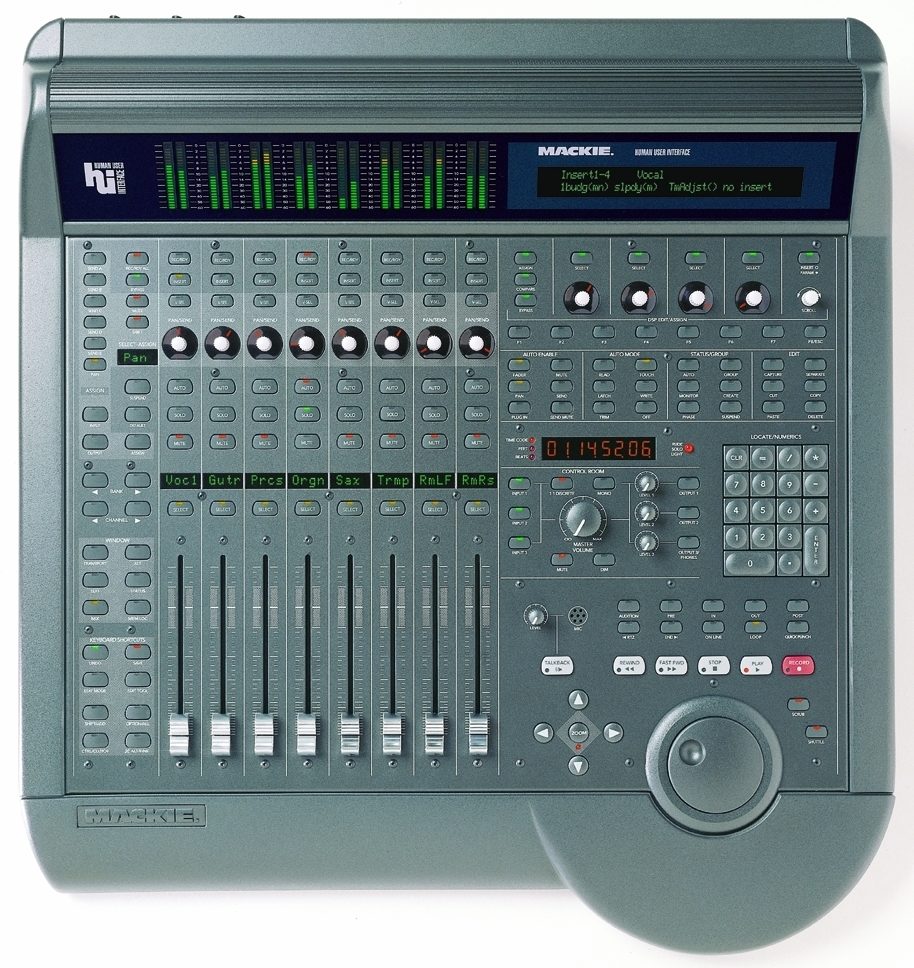
Image

This is the Makie Hui.

Transport sections like this allow supreme control over "where" you can jump TO..... AND START THE BEAT FROM said location.

:nod:
User avatar
By HanHuman Thu Jun 09, 2022 9:29 pm
Monotremata wrote:You've got like 8 locate points you can set up per sequence. I think you need to click the beat counter at the top to open the window. Not near the Live right now to double check..

Thought it was gone from the Live because there's not transport buttons! :o
But what are the shortcuts to use it on the Live II then. :hmmm:
Man I've been looking for this since I bought the Live II, never seen anyone talk about it. It's crazy how one single manual for every MPC sucks, you just guess the feature is gone if you don't see the button...
User avatar
By MPD MPK RAY Thu Jun 09, 2022 9:52 pm
HanHuman wrote:
Monotremata wrote:You've got like 8 locate points you can set up per sequence. I think you need to click the beat counter at the top to open the window. Not near the Live right now to double check..

Thought it was gone from the Live because there's not transport buttons! :o
But what are the shortcuts to use it on the Live II then. :hmmm:
Man I've been looking for this since I bought the Live II, never seen anyone talk about it. It's crazy how one single manual for every MPC sucks, you just guess the feature is gone if you don't see the button...

Ya'll new MPCers don't need it. Touch the screen.

:nod:
User avatar
By Lampdog Thu Jun 09, 2022 11:27 pm
BostonGreen wrote:Well bugger me, I didn't know this existed, just checked on One and a whole new popup I've never seen before appears :worthy:


:lol: :lol:
I have an MPC X.
LOCATE is on my 2kxlse2 and on my 4k, dedicated buttons.
I saw it on the X prior to purchase.

Also
3000
2500
1000
By Certified Beatz Fri Jun 10, 2022 12:19 am
Lampdog wrote:
BostonGreen wrote:Well bugger me, I didn't know this existed, just checked on One and a whole new popup I've never seen before appears :worthy:


:lol: :lol:
I have an MPC X.
LOCATE is on my 2kxlse2 and on my 4k, dedicated buttons.
I saw it on the X prior to purchase.

Also
3000
2500
1000


You forgot the 2000 classic mines have locate also
By KaoticShock Fri Jun 10, 2022 12:22 am
So the MPC Live & Live II don't have locate because they don't have the physical button? Or is it in a menu/shortcut function?
User avatar
By HanHuman Fri Jun 10, 2022 1:53 am
Curious as well, only locate shortcut I found on the Live II so far is SHIFT + STOP to go back to the beginning of the sequence. And also select the beat counter field and use "+/-" or SHIFT + "+/-" to move by TC value increments, even though it's not really a shortcut as selecting the beat counter is required.
User avatar
By Monotremata Fri Jun 10, 2022 2:10 am
There are no buttons for it. Double click the beat counter at the top. I was wrong though, we only got 6 locate points not 8.

And on that note, my Live started doing some weird shit just now when I turned it on to look at that.. This thing better not start **** up now after almost three years!
By ANTIKLVN Fri Jun 10, 2022 6:08 am
By ANTIKLVN Fri Jun 10, 2022 6:10 am
By ANTIKLVN Fri Jun 10, 2022 6:12 am