
Support and discussion for all of Akai’s modern standalone MPCs including the MPC X / X SE, MPC Live 1, 2 & 3, MPC One / One+, MPC Key 37/61.
By sir wiggles Sat Mar 14, 2020 12:26 pm
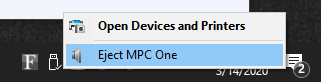
I connected my MPC one via usb and was able to upgrade the firmware successfully however the unit isn't showing up as a driver when I enter controller mode. Instead when I enter controller mode MPC one is recognized as an audio device. How do I get the mpc to show up as a drive so I can transfer files to it?

Image
By Elektrobolt Sat Mar 14, 2020 3:59 pm
The user installable drive and the SD card shows up as drives, but the internal (the one that comes with all the factory material) does not.

If you do have one of the two, or both, drives installed/plugged-in then maybe try a different cables, or even a different USB port? (The X has USB3, and I only use USB3 with USB3 cables, so I cannot speak for backwards compatibility.)
By CharlesRandolph Sat Mar 14, 2020 4:23 pm
sir wiggles wrote:I connected my MPC one via usb and was able to upgrade the firmware successfully however the unit isn't showing up as a driver when I enter controller mode. Instead when I enter controller mode MPC one is recognized as an audio device. How do I get the mpc to show up as a drive so I can transfer files to it?

Image


This is something they need to fix and somehow Q/A missed this on the MPC ONE.
User avatar
By Monotremata Sat Mar 14, 2020 5:56 pm
Yeah the One for whatever reason cant mount the SD cards to the desktop. The Live and X can but not the One. I wonder if they did screw it up or if thats really one of the features they left out on the 'little one' like the Bluetooth and Wifi stuff. The damn SOC has it all, they just didn't want to enable it I guess.