Support and discussion for all of Akai’s modern standalone MPCs including the MPC X / X SE, MPC Live 1, 2 & 3, MPC One / One+, MPC Key 37/61.
By darwingrosse Fri Jun 19, 2020 2:45 am
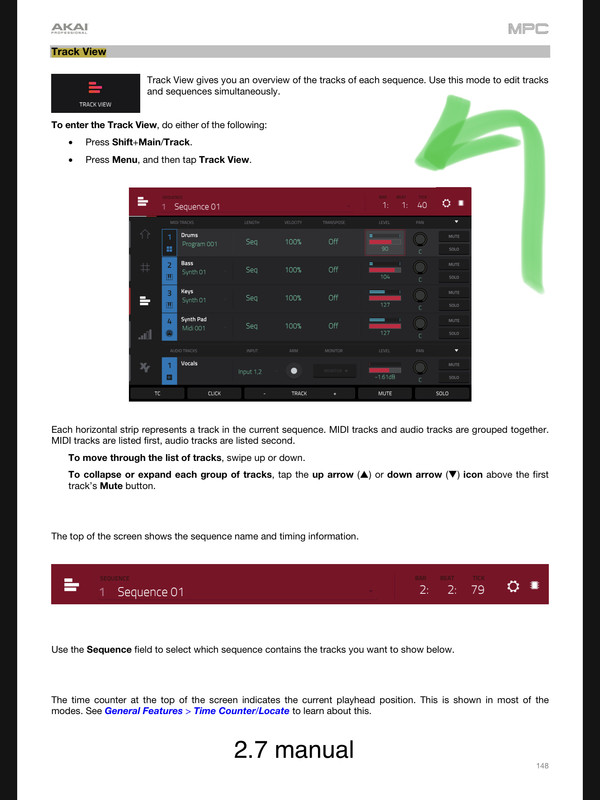
Does anyone know if there is a way to restore (or even view differently) the Pan function on MIDI tracks in Track View? I used that all the time for on-the-fly panning without having to mess with the program . You could also do some nice stuff with panning across tracks.

Where'd it go???

[ddg]
By CharlesRandolph Fri Jun 19, 2020 3:36 am
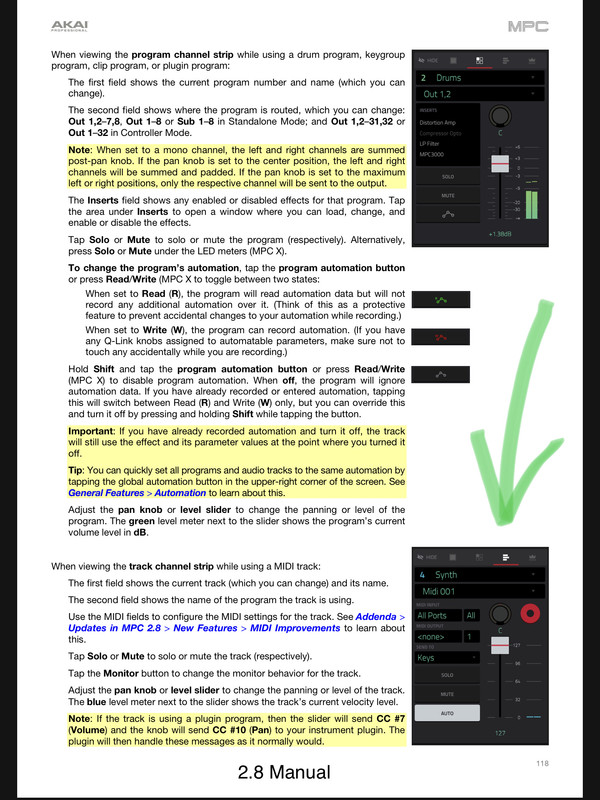
Yeah, it's not there. You have have to go track mix or pad mix and press the pan tab. Or do it on the main screen by pressing the eye ball.
User avatar
By Lampdog Fri Jun 19, 2020 6:15 am
CharlesRandolph wrote:main screen by pressing the eye ball.

Easiest access for now.
By CharlesRandolph Fri Jun 19, 2020 8:43 pm
kevbr0wn wrote:That's not the same pan that used to be in the track view.


That's why I use, Track Mix and/or Pad Mix for the pans. There are just too many, ways that does the same things. The track view and main should be the same, because if you use adjust the audio track in track view and go back to the main, it's the same level.

It's another funny bug that hasn't been corrected. :lol:
User avatar
By Lampdog Fri Jun 19, 2020 9:39 pm
I’m on 2.8 standalone, I don’t use the software. Different locations but they both do the same thing, pan the whole track.

Image

Image
User avatar
By Lampdog Fri Jun 19, 2020 9:46 pm
Never used the track view but I did notice it’s gone. It didn’t bother me as I use main menu instead, but, Ok, I understand now. Thanks for that clarification.
By darwingrosse Sat Jun 20, 2020 12:37 am
Yeah, a little disconcerting. I loved using Pan on MIDI Tracks because it was 'non-destructive' to the rest of the setup, and you could really play some games with sample locations on a track-by-track basis. I'm really missing that...
User avatar
By Lampdog Sat Jun 20, 2020 2:06 am
2 many ways to do the same things, but, I would think it’s all more fluid on the same page/view (Track view).
By kevbr0wn Sat Jun 20, 2020 2:51 pm
It's two different things. On the main screen you can effect the individual pad or program pan. In track view you can pan TRACKS. That's a big difference. It's gone in 2.8... Along with instant track mute (my sequences played back crazy in 2.8) ... I don't understand what the red record button is about on the main screen either. I never bothered to get to deep into it. I like the new features in 2.8 and I wish my joint wasn't buggy on it...all good I'm back on 2.7.2. And it works... Even got the ethernet midi to work...
By CharlesRandolph Sat Jun 20, 2020 3:25 pm
kevbr0wn wrote:It's two different things. On the main screen you can effect the individual pad or program pan. In track view you can pan TRACKS. That's a big difference. It's gone in 2.8... Along with instant track mute (my sequences played back crazy in 2.8) ... I don't understand what the red record button is about on the main screen either. I never bothered to get to deep into it. I like the new features in 2.8 and I wish my joint wasn't buggy on it...all good I'm back on 2.7.2. And it works... Even got the ethernet midi to work...


On main you can pan the track as well, just click the track icon.

I also retract my bug comment, after looking into more, I was in the wrong window. As far as the red button, it's arming the track for recording.