Support and discussion for all of Akai’s modern standalone MPCs including the MPC X / X SE, MPC Live 1, 2 & 3, MPC One / One+, MPC Key 37/61.
User avatar
By Monotremata Tue Jul 07, 2020 7:41 am
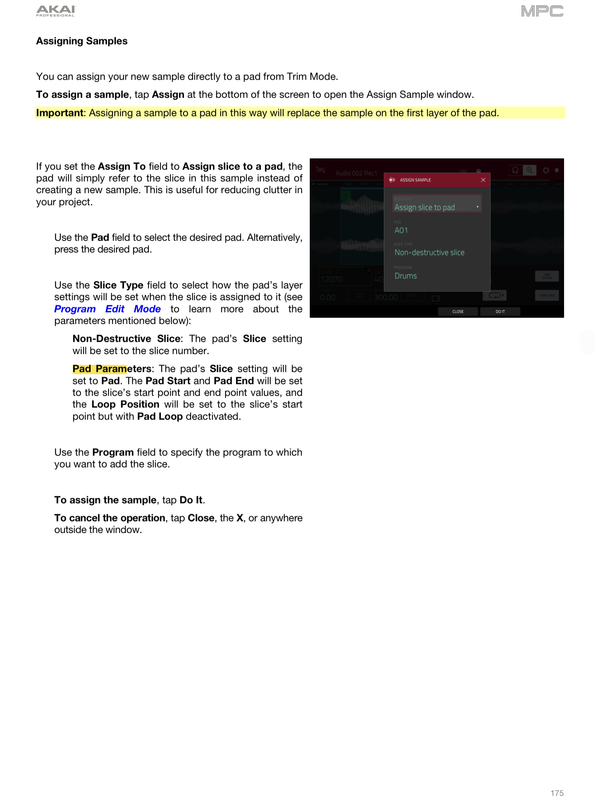
Cant remember exactly how 'non-destructive slice' works but as for pad parameters.. What that does is assigns the whole sample to each pad, but it adjusts the start/end times of the sample on each pad so it lines up with your slices. I haven't used non-destructive slice in awhile but last time I did (this was either 2.5 or 2.6) it liked to wipe its slice settings out when you tried to edit it and you had to redo the whole thing.
By biomaskin Tue Jul 07, 2020 8:34 am
Monotremata wrote:Cant remember exactly how 'non-destructive slice' works but as for pad parameters.. What that does is assigns the whole sample to each pad, but it adjusts the start/end times of the sample on each pad so it lines up with your slices. I haven't used non-destructive slice in awhile but last time I did (this was either 2.5 or 2.6) it liked to wipe its slice settings out when you tried to edit it and you had to redo the whole thing.


Oh, I see thanks!
By Elektrobolt Wed Jul 08, 2020 5:39 pm
I haven't really used this much but it appears to me that the difference is:

"Non-destructive slice" creates a 'list of slice regions' that resides (is stored) with the sample.
A sample with a slice list that be shared by many programs.

"Pad parameters" creates a 'list of slice regions' that resides (is stored) with a program.
Each program gets their own slice list.

Anyways, so why are there options if one is better? I don't think one is arbitrarily better. For any given situation, one may feel better suited. So, use the right tool for the job. :)

If you want to have different sets of slices from one sample, use "Pad parameters". On the other hand, if you want to manage a single set of slices across several programs, use the "Non-destructive slice", which enables you to change the slice points anywhere and it's audible everywhere. Remember that OTHER parameters are still kept separate between the programs using the same non-destructive slice, e.g. pitch, etc..

By TheEastSideStory Wed Jul 08, 2020 6:50 pm
The way I use this...

If you create non-destructive slices, then edit the slice, the other slices are affected. For example if pad 3 has a sample and I want to make the ending cut off sooner by shortening the sample, then pad 4 will start in the new end location of pad 3's sample.

With pad parameters, I can adjust pad 3's sample ending or start point and it will not affect the other pad's samples.

I don't know if anyone uses it for anything else, but this is what I do. Hope it helps.
User avatar
By NearTao Wed Jul 08, 2020 7:06 pm
TheEastSideStory wrote:The way I use this...

If you create non-destructive slices, then edit the slice, the other slices are affected. For example if pad 3 has a sample and I want to make the ending cut off sooner by shortening the sample, then pad 4 will start in the new end location of pad 3's sample.

With pad parameters, I can adjust pad 3's sample ending or start point and it will not affect the other pad's samples.

I don't know if anyone uses it for anything else, but this is what I do. Hope it helps.

That is true if you have linked slices turned on, but you can disable linked slices and then have each slice be completely independent regions from each other.
By TheEastSideStory Wed Jul 08, 2020 11:12 pm
NearTao wrote:
TheEastSideStory wrote:The way I use this...

If you create non-destructive slices, then edit the slice, the other slices are affected. For example if pad 3 has a sample and I want to make the ending cut off sooner by shortening the sample, then pad 4 will start in the new end location of pad 3's sample.

With pad parameters, I can adjust pad 3's sample ending or start point and it will not affect the other pad's samples.

I don't know if anyone uses it for anything else, but this is what I do. Hope it helps.

That is true if you have linked slices turned on, but you can disable linked slices and then have each slice be completely independent regions from each other.


YO THANK YOU! My dumbass had no idea. This is good to know.
By 40Beatz Thu Jul 09, 2020 1:32 pm
Elektrobolt wrote:I haven't really used this much but it appears to me that the difference is:

"Non-destructive slice" creates a 'list of slice regions' that resides (is stored) with the sample.
A sample with a slice list that be shared by many programs.

"Pad parameters" creates a 'list of slice regions' that resides (is stored) with a program.
Each program gets their own slice list.

Anyways, so why are there options if one is better? I don't think one is arbitrarily better. For any given situation, one may feel better suited. So, use the right tool for the job. :)

If you want to have different sets of slices from one sample, use "Pad parameters". On the other hand, if you want to manage a single set of slices across several programs, use the "Non-destructive slice", which enables you to change the slice points anywhere and it's audible everywhere. Remember that OTHER parameters are still kept separate between the programs using the same non-destructive slice, e.g. pitch, etc..


Very Interesting! I gotta try that out when i get home. Never really messed with Pad Parameters. Could be very useful. Bcz I was Duplicating Samples and re-chopping lol. Good Lookin!
By biomaskin Thu Jul 09, 2020 1:35 pm
40Beatz wrote:
Elektrobolt wrote:I haven't really used this much but it appears to me that the difference is:

"Non-destructive slice" creates a 'list of slice regions' that resides (is stored) with the sample.
A sample with a slice list that be shared by many programs.

"Pad parameters" creates a 'list of slice regions' that resides (is stored) with a program.
Each program gets their own slice list.

Anyways, so why are there options if one is better? I don't think one is arbitrarily better. For any given situation, one may feel better suited. So, use the right tool for the job. :)

If you want to have different sets of slices from one sample, use "Pad parameters". On the other hand, if you want to manage a single set of slices across several programs, use the "Non-destructive slice", which enables you to change the slice points anywhere and it's audible everywhere. Remember that OTHER parameters are still kept separate between the programs using the same non-destructive slice, e.g. pitch, etc..


Very Interesting! I gotta try that out when i get home. Never really messed with Pad Parameters. Could be very useful. Bcz I was Duplicating Samples and re-chopping lol. Good Lookin!


That explains it so much better than the manual :worthy: (but still thanks Lampdog for pointing out the user guide page. I hate browsing PDFs, can't seem to get the hang of it..
User avatar
By Lampdog Thu Jul 09, 2020 3:23 pm
I grew up on ASR-10, HAD to go into every function to get what you wanted. I still do the same thing while making practice beats, after my initial ohh/ahh is done I dig into the manual, still making practice beats while I read. Some functions you’ll stick with, some you won’t. Combine functions to end up with something that’s not a real function. You’ll end up answering many questions, even ones you haven’t asked yet.
By biomaskin Fri Jul 10, 2020 6:46 am
Lampdog wrote:I grew up on ASR-10, HAD to go into every function to get what you wanted. I still do the same thing while making practice beats, after my initial ohh/ahh is done I dig into the manual, still making practice beats while I read. Some functions you’ll stick with, some you won’t. Combine functions to end up with something that’s not a real function. You’ll end up answering many questions, even ones you haven’t asked yet.


Yo, my first ASR-10 was the RACK version - and there was no manual (or internet), somehow we still figured it out; amazing what youthful curiosity can accomplish huh :lol: But, I think that's the right thing to do; just try stuff and eventually learn it all. If I didn't had this forum and guys like you answering my every silly question - it would take longer though! So, I appreciate it!
User avatar
By Monotremata Fri Jul 10, 2020 6:51 am
AHA thanks for posting the manual page Lampdog! Now I remember.. Be careful if you do use the non-destructive setting. I don't know if its fixed but there was a bug in 2.5/2.6 where if you went back into TRIM mode, and then back to CHOP, it wiped out your slice mapping and took the whole program down with it. It WAS up somewhere at Get Satisfaction but I posted about it to make sure I wasn't being an idiot and Eliza reproduced it on her end too.