By Scott Righteous
Mon Aug 17, 2020 1:45 am
I find the mixer section to be a bit confusing, as it seems to control very different things using the same looking layout.
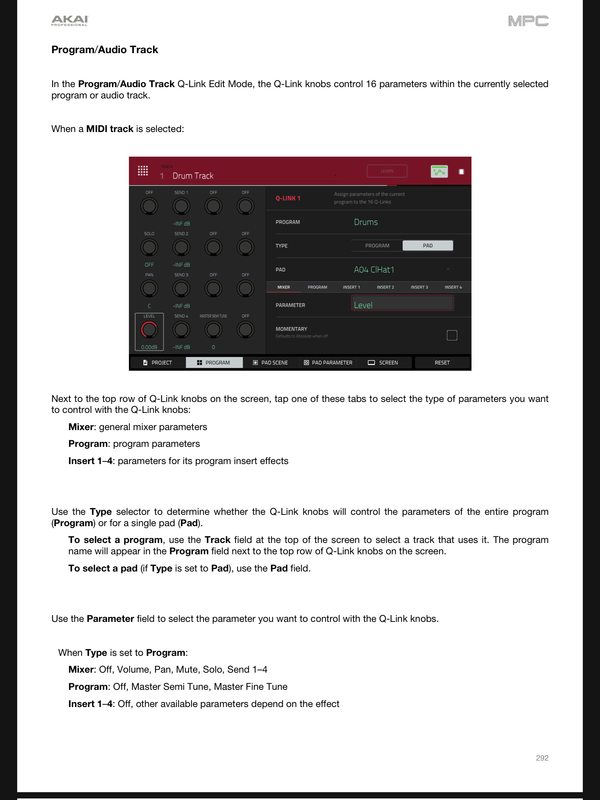
I have a program and I want to use the 4 Q-link knobs to adjust each send amount to the 4 sends for the entire program.
I have the Q-Links just set to use the default "Screen" options, where the knobs are set by the screen I am in. The other modes are still a bit confusing to me at this point.
To set up effects on those returns, I go to the Mixer, then select "Inserts", then click on the insert I want to edit, and add an effect. There are no Q-Link settings here to adjust the sends. I can't find the type of screen I want in the Channel Mixer at all.
So - I go to Program Edit, then the last tab Effects, where I can see the inserts of a particular pad. The Q-Links on this screen let me adjust the send amount for each of the four Sends, but if I want to do this for the entire program, I have to select "All" in the Pad Edit mode.
This seems like a really weird way to access this, so I assume I'm missing some important "Program level sends" screen or mode in the Channel Mixer??
In the Channel Mixer, where I would expect to see this, I can select a "Program", then there are 4 sub-tabs for the Sends, but the 4 Q-Link knobs do not control 4 sends for one program, they control 1 send for a row of 4 programs. If you want to adjust send 2 for a program, you have to use those sub-tab buttons under the Send tab. This seems weird.
Is there a default screen where all sends for a program can be controlled by the 4 knobs at once?
If not, I assume I would have to set up a custom Q-Link setup.
I have a program and I want to use the 4 Q-link knobs to adjust each send amount to the 4 sends for the entire program.
I have the Q-Links just set to use the default "Screen" options, where the knobs are set by the screen I am in. The other modes are still a bit confusing to me at this point.
To set up effects on those returns, I go to the Mixer, then select "Inserts", then click on the insert I want to edit, and add an effect. There are no Q-Link settings here to adjust the sends. I can't find the type of screen I want in the Channel Mixer at all.
So - I go to Program Edit, then the last tab Effects, where I can see the inserts of a particular pad. The Q-Links on this screen let me adjust the send amount for each of the four Sends, but if I want to do this for the entire program, I have to select "All" in the Pad Edit mode.
This seems like a really weird way to access this, so I assume I'm missing some important "Program level sends" screen or mode in the Channel Mixer??
In the Channel Mixer, where I would expect to see this, I can select a "Program", then there are 4 sub-tabs for the Sends, but the 4 Q-Link knobs do not control 4 sends for one program, they control 1 send for a row of 4 programs. If you want to adjust send 2 for a program, you have to use those sub-tab buttons under the Send tab. This seems weird.
Is there a default screen where all sends for a program can be controlled by the 4 knobs at once?
If not, I assume I would have to set up a custom Q-Link setup.