Support and discussion for all of Akai’s modern standalone MPCs including the MPC X / X SE, MPC Live 1, 2 & 3, MPC One / One+, MPC Key 37/61.
By UKUDO Wed Apr 26, 2023 9:45 pm
Hi!
In sample edit :
I would like to know, if there is a way to play the last seconds of the sample up to the set end point and have the sample edit continue from start or the loop point.

Especially for longer loops (e. g. 4 bars) it gets really frustrating to find the proper start and end point. I usually split it into several 1 bar loops and write down the positions. But this does not work really good on every loop.

I recently got my hands on a 404 and there is this neat function, where the sample playback starts near the end and returns to the start / loop point.

Am I missing something? Is there a better way?

Any advise is appreciated
User avatar
By 83dude Thu Apr 27, 2023 6:27 am
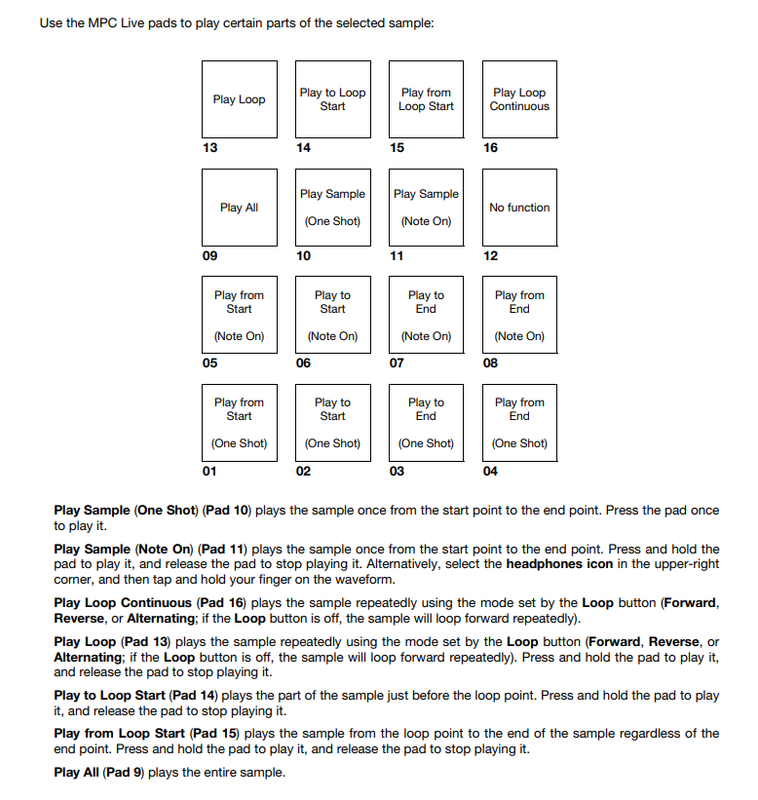
The manual (I checked from version 2.11.2, could have changed) shows the pad play options on page 184, „play to end“ and „play from end“. That‘s not available in CHOP mode, but you have a sort of a playhead with your CUE point.

Hope that helps.
By UKUDO Thu Apr 27, 2023 7:31 am
Yes, I'm actually talking about trim mode, where I'd like to truncate or trim my sample to give a proper loop.

The play to end and play from end will just do what it says. The sample plays the last bit and stops then. The play from end plays the sample part behind the end point.

If I could get the play to end function loop back to the start... That would be great.

Anyway, thank you for checking the manual. Appreciate the effort.
kind regards
UKUDO
By UKUDO Thu Apr 27, 2023 9:57 am
jpeg wrote:how bout use ur ears not to be dick :P


OK the emoji hints at this being a joke...

But, yeah, that's actually what I do. But to listen to a 4 bar loop over and over and over... Over the full length and adjust the end point...
By HouseWithoutMouse Thu Apr 27, 2023 10:19 am
You're talking about the ROLL button, it's great, Roland got it right. Akai didn't, but there's still one unused pad to add this function.

What I also like about the SP-404 mk II (no idea if it's there in older models) is how it automatically re-plays things almost immediately when the loop positions are moved. In Akai land, I have to manually re-play the whole thing to hear what it sounds like with the adjusted loop points. AFAIK. If someone knows better, let us hear.
By 40Beatz Thu Apr 27, 2023 1:18 pm
I wanna say Pad 3 auditions the last second of a pad in Trim Mode
By UKUDO Thu Apr 27, 2023 1:19 pm
HouseWithoutMouse wrote:You're talking about the ROLL button, it's great, Roland got it right. Akai didn't, but there's still one unused pad to add this function.

What I also like about the SP-404 mk II (no idea if it's there in older models) is how it automatically re-plays things almost immediately when the loop positions are moved. In Akai land, I have to manually re-play the whole thing to hear what it sounds like with the adjusted loop points. AFAIK. If someone knows better, let us hear.


The SP is on my wishlist... Unfortunately the MC 101 is also in the list... And there is only so much money
By UKUDO Fri Apr 28, 2023 9:26 pm
OK so there is no function like the roll function on the SP 404. Would be a nice feature to have. There is still pad 12 free for use.

The play to end definitely helps on finding clicks and so on, but as mentioned, for some melodic samples it takes quite some unnecessary time to get the loop perfectly trimmed.
By 40Beatz Fri Apr 28, 2023 9:31 pm
Enable the Zero Snap to get rid of clicks at the beginning and end when tweaking the Start/End/Loop Points
By HouseWithoutMouse Fri Apr 28, 2023 9:35 pm
Finding loop points is unnecessarily complicated. It's not only the lack of listening tools like Roland's "roll" style loop end-to-start mode, or immediately re-playing when moving points, but the machine could actually try and automatically find proper loop points based on fundamental frequency detection and autocorrelation. It doesn't have to be that difficult.

Zero snap doesn't magically get rid of all clicks, it's just one basic tool that helps a little in some cases.