Support and discussion for all of Akai’s modern standalone MPCs including the MPC X / X SE, MPC Live 1, 2 & 3, MPC One / One+, MPC Key 37/61.
By Maoxiung Tue Oct 17, 2023 8:09 am
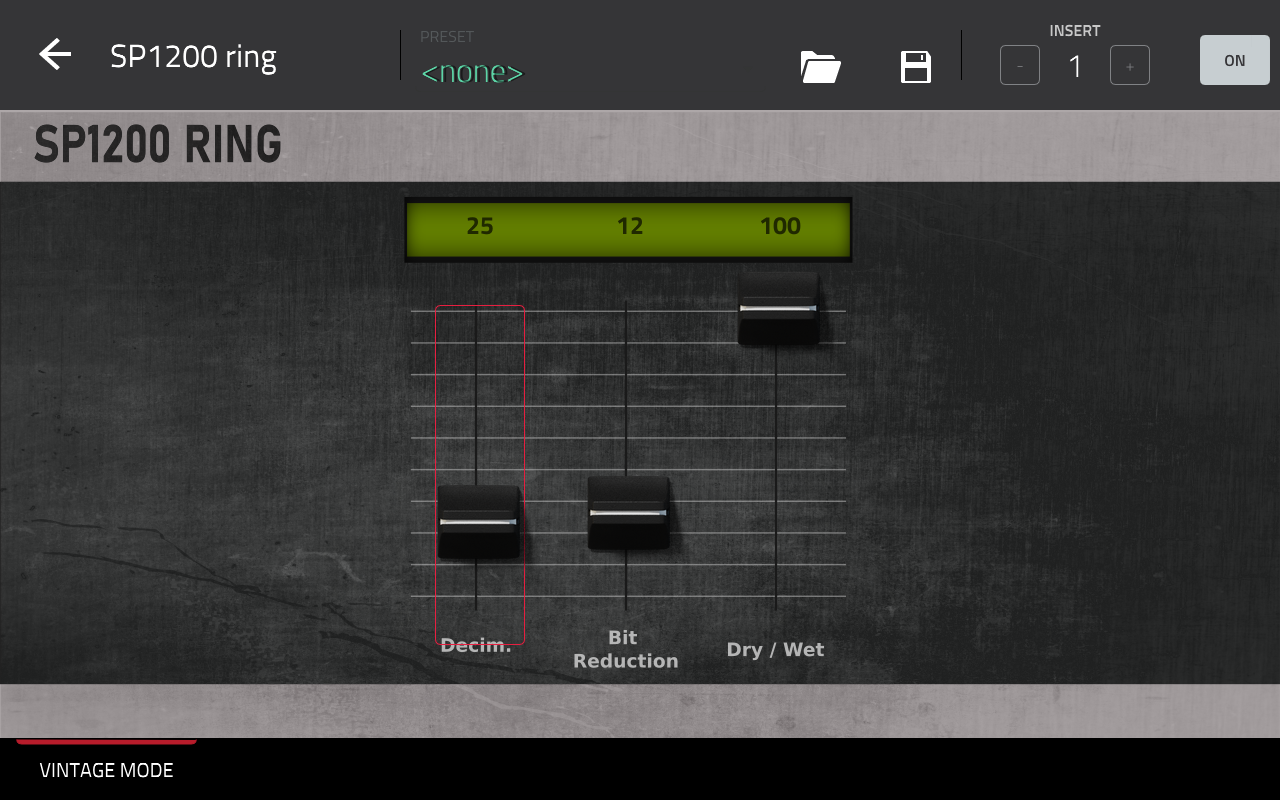
Dunno if it is already known but if ever it isn't... here's 3 secret parameters:

(˵╹.╹)━☆ The highlighted row shows default value for the 3 Hidden parameters...
Image

I've discovered this completely by chance:

"Let's give q-links to the parameters of this insert 1 on my return 2 and... what? where are my delay's parameters ?... Oh I see, I'm stayed on return 1 but wait... this plugin isn't supposed to have any settings? Ooohh lucky me! another Zelda's hidden door!"

Obviously, I tried on other vintage inserts than the sp1200ring, but it is the only one that gives us parameters to tweak...But that's a great trick anyway!
User avatar
By MPC-Tutor Tue Oct 17, 2023 8:19 am
Yes SP1200 ring mode is actually just the standard decimator plugin, they just hid the normal UI and put a different graphical UI and tried to make out it was something more special. It's mentioned in my article from 2014 - at the time an Akai rep at NAMM initially claimed that the vintage mode plugins were somehow tied into MPC Renaissance hardware circuitry, but it was discovered that they were nothing more than software plugins so could be used with any MPC model. This was when we spotted that the SP1200 ring was nothing more than a patch for the decimator plugin

https://www.mpc-tutor.com/mpc-studio-mp ... unleashed/
By dustyslices Tue Oct 17, 2023 9:54 am
Yup, it they always been there, very first revisions of those „vintage FX had their parameters exposed iirc.
Don’t remember if you can actually expose them via skin customization, haven’t played with it for a looooong time.
Akai / Air are very sloppy with their GUIs, if you look at OPx4 FX section, you’ll see that contrary to master FX - insert FX are mising several types of effects that are available via master FX. However those effects are exposed via q-links and you can freely control them. Unfortunately they cannot be exposed via skin modification as the whole FX section panel won’t allow you to do that.
fun fact: you can make your own skins for external VST plugins as well but as always, Akai implementation is half assed at best.
By high198 Wed Oct 18, 2023 11:48 pm
dustyslices wrote:spur of the moment thing but, yeah, these parameters are available via skin mod ;)

Image

How do you do the skin mods?
By dustyslices Thu Oct 19, 2023 6:01 am
once you get a grip of it, it’s quite easy.
you need to edit (or make a new one) TUI.json file inside „skins” folder of your choice,
create applicable graphics in inkscape and then inside that .json file add parameters of your choice. If you remove original skin beforehand and run the MPC software, your plugin will show you all of the parameters instead of graphics, so it’s easy to pick the ones you interested in.
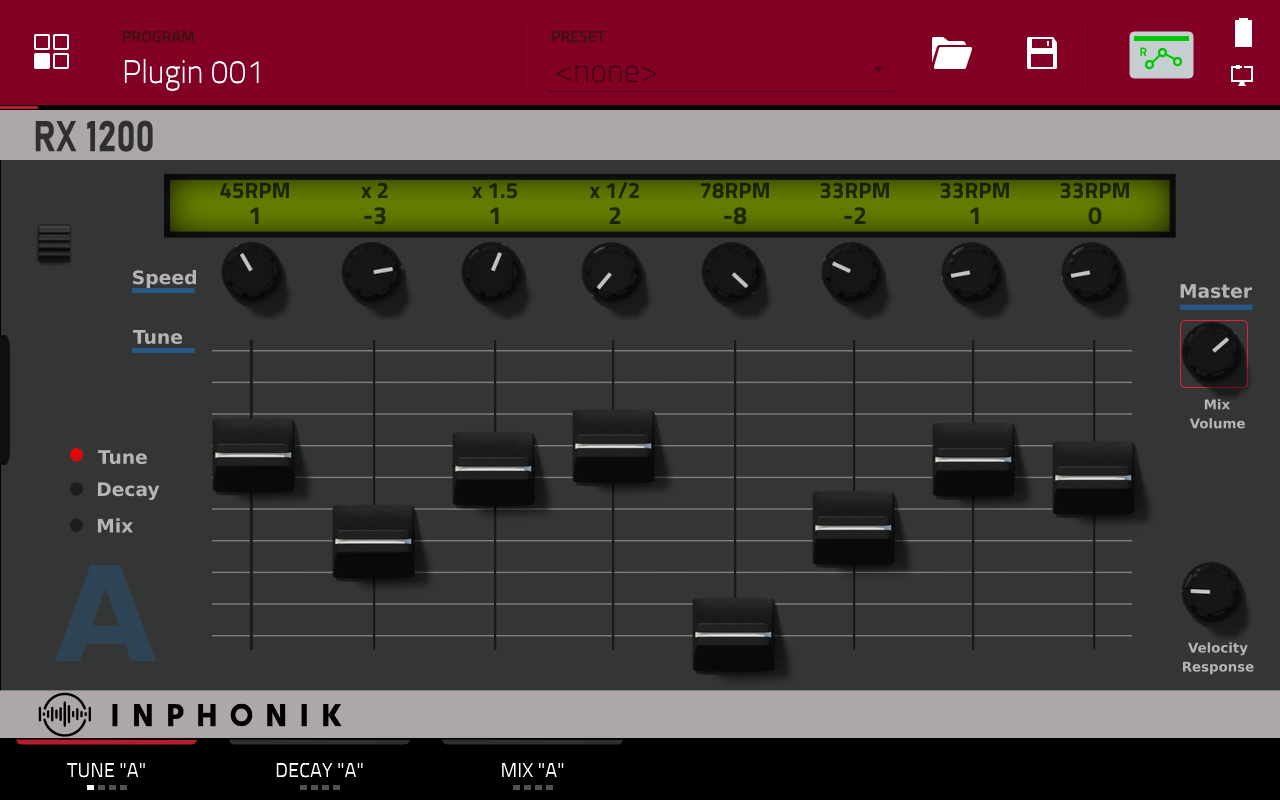
That „1200 Ring” skin I’ve made from scratch within less than half an hour as I had some gfx assets from different projects already.

These ones took me a bit longer and never got to finish them properly due to lack of time :/
Image
Image
User avatar
By Ultros Thu Oct 19, 2023 2:53 pm
Nice one! love this post.

Also Dustyslices, the skin looks amazing. I meant to look into the controls for sp ring, mpc60 and 3000 but havent had much time. Did you code your tui.json by hand? I need to look into some kinda rapid development crap for that stuff...
By dustyslices Thu Oct 19, 2023 4:13 pm
Ultros wrote:Nice one! love this post.

Also Dustyslices, the skin looks amazing. I meant to look into the controls for sp ring, mpc60 and 3000 but havent had much time. Did you code your tui.json by hand? I need to look into some kinda rapid development crap for that stuff...

Yeah, I have an empty template created (I will post it as soon as I get back home).
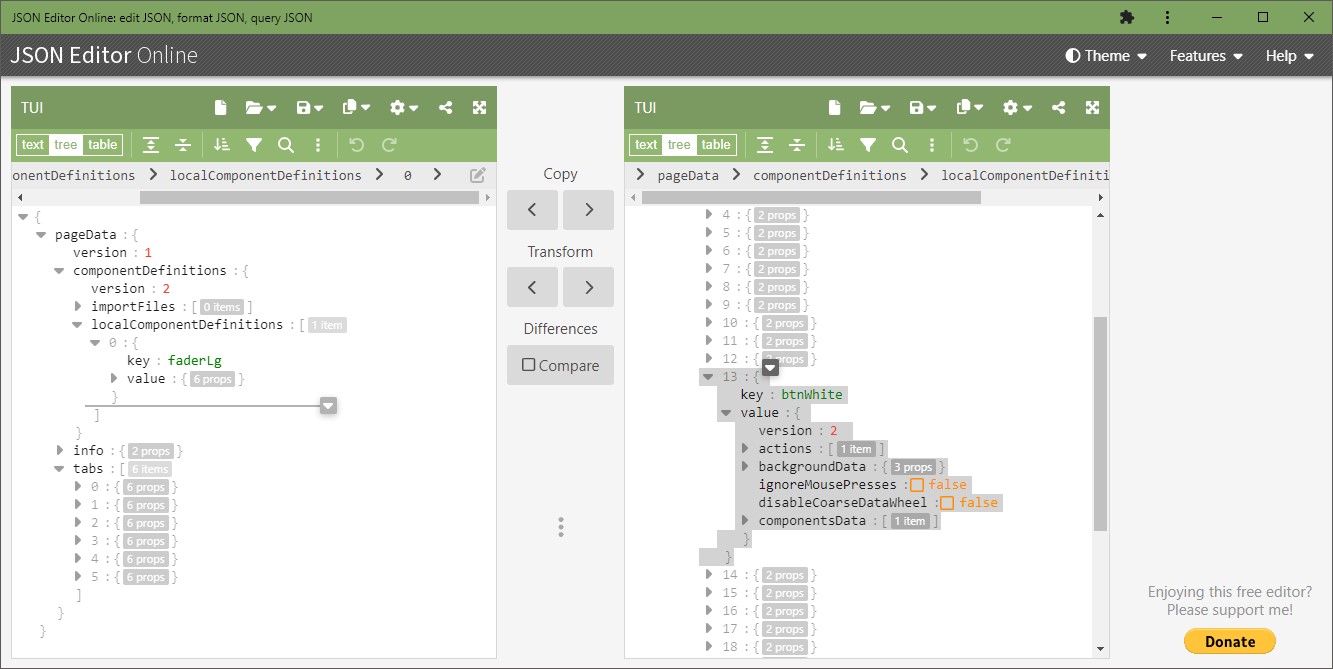
I mainly use "JSON Editor online" in tree view, in one window I usually put my template and the other one any of AIR TUIs, rest of work is just copy/pasta between the windows :lol:

Image

Buckle up if you want to skin VSTs though as there is a LOT of places where akai completely dropped the ball.
* preset management doesn't work
* there is no such object as "momentary button"
* you can't assign arbitrary values to objects apart of what is being sent from "parameter" so you can't create two separate buttons that will for example store two separate values for filter cutoff - that was my idea to bypass lack of preset handling - just make a bunch of dummy objects and give them some kind of value that could be recalled afterwards.

Name containing skin folder should be: [manufacturer name] - VST - [plugin name] but...
* looks like they internally store plugin manifest in some kind of array with items separated by a comma. So if "manufacturer name" or "plugin name" contains a comma in its name, you won't be able to skin it as the name is being treated as two separate items which in turn "throws off" whole array and mpc won't recognize it. Good example is "Valhalla DSP, LLC" - it only worked after I threw the plugin in HxD and physically removed all commas from the plugin dll :lol:
There is a lot more but can't recall it from the top of my head atm :WTF:

BTW. I wouldn't invest too much time in skins atm. I have the feeling that 3.x is closer than we might think and given that it must be a major rewrite, things might change.

EDIT:
if you want to create your own filmstrips, there's a nice program that looks like it's been made around "dot com bubble" era, but does its job very well:
https://www.g200kg.com/jp/software/knobman.html


EDIT 2:
actually I was thinking and came to a conclusion that if you ask nicely - chatGPT wil be happy to generate parts of TUI for you :lol: :lol: :lol:


EDIT 3:
since I shamelessly derailed this thread, here's one more:
Image
By popshize Thu Sep 26, 2024 2:32 am
This looks **** awesome!

What do you mean by "its possible with external plugins too"? Do you mean external air plugins like Hybrid or also third party plugins? I ask because I dont understand if the inphonik one you made is a skin for the real rx950 or a skin for an air plugin.

MPC is such a great machine but I think there are so much unused possibilities from akai. It could be perfect, Long Time I used it in standalone, and i am satisfied, but using it in controller mode is a pain in the ass regarding controlling third party plugins. All those sliders in the program edit menu arent even sorted. My first thought was about buying a touchscreen but then I thought "what if it would be possible to show the surface of my third party plugins on the touchscreen?"

And today I saw this. So, it is possible?
By dustyslices Thu Sep 26, 2024 6:43 am
these are „real” plugin overalys however the implementation of skinning 3rd parties is kind of lacking atm. For example Akai won’t let you grab presets directly from the plugin, there is no way to assign an arbitrary value to a button (that would be a preset workaround) etc…
I mean, overlays are still highly configurable but there are some areas which are begging for a „touch up”. Also I think that there is no point of wasting time for making the skins now because you don’t know what 3.x will bring. They might change some things here and there (as they changed save files into monolithic files) which will force you to redo everything except of graphics themselves.
BTW. if you think these look cool then you should look up „BonsaiPanda” - he’s a skinning genius imho. While, I’m doing everything in 2D (inkscape and stuff), he implemented Blender with a lot of custom scripts in his chain.
https://www.reddit.com/r/akaiMPC/s/Cwz8j2gQLr


By popshize Fri Sep 27, 2024 2:45 am
Thanks for your answer :)
to be honest, if I would be able to see my third party plugins with beautiful skins on the mpc touchscreen, i wouldnt update anymore. I bought a mini pc, have a tablet as a small touchscreen and a small midi keyboard and I am planning to build this in a small wooden box, so i have best of both worlds - a portable DAW with 32gb Ram Power and access to third party plugins. I try to make dnb in the style of early 2000s in the style of dillinja and ed rush & Optical. So I think I dont need anymore than the OSTIrus VST, some Airwindows E-mu Emulations, RX950, Roland Cloud jv1080. But however, I think I am not educated enough in this editing stuff like you are. I dont even managed to find the tui.json from OsTIrus on my system, so I think its too complicated for me. But that shouldnt be an issue for me, because I dont really need those skins. If I could create my own skins it would be perfect, but I would be happy if i could control my vsts in a uglier but still practical way. I am thinking of sorting the sliders on the program edit page in the mpc touchscreen, like on page 1 i have all controls for osc1, on page 2 for osc2 and so on. I already sorted them one time, but sadly I had to see that everything disappeared by restarting a new project or opening a new instance of OstiRus. Seems like it isnt possible to save the order of the siders. I could save them in a template but i dont want to, because maybe i need two instances of my VST and I want to be flexible.

So now that you told me, that it is possible to edit skins for third party plugins, it should be possible to change the initial order or the sliders, am I right? Maybe there is a file which i can edit? I would really appreciate if you could help me somehow, because I see no other way to control OsTIrus (has no midi learn and you need way more than 200 parameters to control everything) and huge romplers like the JV1080 VST or JD800 VST (Has also way more controls and for some reason, i cannot save midi settings in roland vsts), except using a mouse or my access virus TI2 hardware, which is too big and heavy for what I am planning.
By popshize Mon Jun 30, 2025 2:10 pm
Hello again, I want to try building such a JSON structure using ChatGPT. Unfortunately, I seem to have overlooked the template, and without it, I'm completely helpless with my very limited skills in this area. Could you upload it again?
By dustyslices Mon Jun 30, 2025 8:05 pm
you don't need an empty "template" just check what parameter numbers are needed for a given plugin, load any skin into a json editor such as "JSON Editor Online", check and learn how does the content is laid out, and start modyfing pages. There is a million ways to 'skin" this cat (see what I did here ?), you can create a whole panels and piece them togheter later on or create each control individually on each page but if you have a lot of visually same controls, such as knobs or faders, the best idea is to define such knob globally in local component definitions and then just reference in component data on the page (tab). Json Editor Online gives you flexibility to drag and drop shit between two windows / skins, so you can easily copy things you need.

btw. It's way faster to 'waste' two or three days in order to familiarise yourself with the way those TUIs look like internally than hoping for GPT to be correct or having no idea what it's output is doing. ;)