Support and discussion for all of Akai’s modern standalone MPCs including the MPC X / X SE, MPC Live 1, 2 & 3, MPC One / One+, MPC Key 37/61.
User avatar
By MPC-Tutor Sat Jan 25, 2025 4:28 pm
Post up any bugs and feedback for the latest 'release' version of MPC 3, currently v3.4.1. Please report bugs in as much step-by-step detail as possible so they can be easily verified.

(worth noting that many of the bugs from the previous public beta have NOT been addressed in this 'release' version, so also refer to the previous 3.4 bug topic)
User avatar
By MPC-Tutor Sat Jan 25, 2025 4:35 pm
'Return' tracks created during audio mixdown can include 'bleed' from previous audio track

1. New project
2. Track1: Audio track (vocal). Add some reverb via SEND 1
3. Track 2: Drum track: Record beat, add some reverb via SEND 1
4. SAVE > Audio Mixdown > Separate tracks > Export Returns

Expectation: The 'Drum' track return file contains only wet, effected drums
Actual: Drum track return also contains the wet vocal.
User avatar
By MPC-Tutor Sun Jan 26, 2025 9:36 am
Setting custom sequence loop disables audio track playback upon loop

1. Project with at least 1 audio track
2. Set a custom seq START point (via MAIN or ARRANGE)
3. Press [PLAY START] and let sequence play and then loop back to START point

Expectation: Audio track continues playing
Actual: audio track is silenced upon looping
Workaround: Press STOP then PLAY to reactivate audio track.
User avatar
By DJ_GodsOwn Sun Jan 26, 2025 4:30 pm
Splice integration still doesn't seem to be working. I know a lot of people hate on Splice, but I used their sample/sound packs and I like the integration with MPC 2.0. We need it back in 3.0 please!
By Lex Luthor71 Sun Jan 26, 2025 4:57 pm
Not sure if this is a bug (as I don’t recall if this behavior was the same on MPC 2.15.1) but when I process mono samples to STEMS, the resulting files are in stereo instead of mono. As I mentioned, I can’t recall if this was the same in MPC 2.15.1, but if so, disregard.
Last edited by Lex Luthor71 on Sun Jan 26, 2025 5:32 pm, edited 1 time in total.
User avatar
By MPC-Tutor Sun Jan 26, 2025 5:27 pm
DJ_GodsOwn wrote:Splice integration still doesn't seem to be working. I know a lot of people hate on Splice, but I used their sample/sound packs and I like the integration with MPC 2.0. We need it back in 3.0 please!


Please be more specific, 'not working' doesn't help recreate and check this issue; for example, error messages, step by step method to recreate it etc.
By lordradish Sun Jan 26, 2025 7:55 pm
Not sure if this is a bug or something else, but there's no way to get any program changes on a track other than the initial PC you choose, as it keeps it through the whole sequence and reloads the program change every time you go to a new sequence.

Putting program changes in list view or grid automation doesn't seem to work, nor do they let you actually pick a number - it just goes in percentages.
By herbie Sun Jan 26, 2025 8:34 pm
Arrange view with grid showing (after swiping the arrow up)
Adjusting volume automation (after clicking automation at the bottom right of the screen) no longer shows the volume level of the note being edited.
By Elijah Mon Jan 27, 2025 4:48 am
MPC-Tutor wrote:Setting custom sequence loop disables audio track playback upon loop

1. Project with at least 1 audio track
2. Set a custom seq START point (via MAIN or ARRANGE)
3. Press [PLAY START] and let sequence play and then loop back to START point

Expectation: Audio track continues playing
Actual: audio track is silenced upon looping
Workaround: Press STOP then PLAY to reactivate audio track.


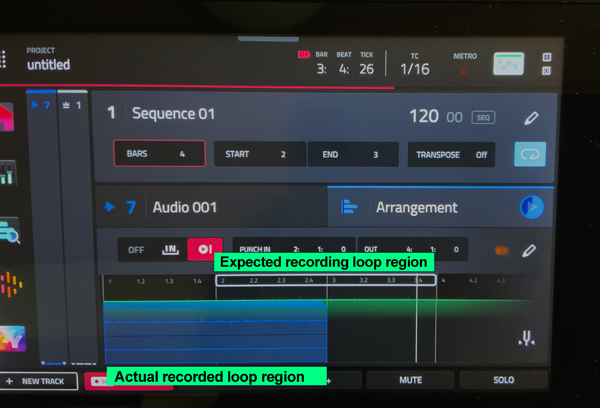
When setting a custom loop region and using the auto-recording function, the recording always starts from the beginning instead of the expected region. This issue also occurs with punch-in recording.

Image
By droctii Mon Jan 27, 2025 5:52 am
Can anyone confirm whether the Q-Links work in insert plugins in Sampler mode? Mine don't work.

I reinstalled 3.4.1 via USB to verify that corrupted firmware from the OTA update was not the reason. But the problem persists.

I have confirmed my Q-Links work otherwise.

Thanks.
User avatar
By MPC-Tutor Mon Jan 27, 2025 8:10 am
Not working for me either. Recreation:

1. MENU > SAMPLER
2. Insert any FX plugin into insert 1
3. Tap on plugin and hit the pencil icon to open FX settings
4. touch a Qlink to open the Qlink bar, or hold down Qlink button

Expect: Qlinks to be assigned to parameters
Actual: Qlinks blank


droctii wrote:Can anyone confirm whether the Q-Links work in insert plugins in Sampler mode? Mine don't work.

I reinstalled 3.4.1 via USB to verify that corrupted firmware from the OTA update was not the reason. But the problem persists.

I have confirmed my Q-Links work otherwise.

Thanks.