Support and discussion for all of Akai’s modern standalone MPCs including the MPC X / X SE, MPC Live 1, 2 & 3, MPC One / One+, MPC Key 37/61.
User avatar
By Crumb$ Sun Mar 29, 2026 3:13 pm
Hi,

I just got an X SE second hand. It’s come with the new version of the firmware, which I’d never used and don’t like (I’m just not familiar with it. Can someone tell me what the last decent firmware was for the previous style?

Was it just anything before 3?

Thanks
User avatar
By Crumb$ Sun Mar 29, 2026 10:19 pm
Is 2.15 actually the better firmware for the X? I’ve just given myself the evening to try the 3.7 but it’s just got me scratching around looking for things. I couldn’t;t even work out how to save a sample from a pad to the sd card. Hitting the pencil doesn’t;t give an option to save sample.
By B-Wise Sun Mar 29, 2026 11:43 pm
Crumb$ wrote:Is 2.15 actually the better firmware for the X? I’ve just given myself the evening to try the 3.7 but it’s just got me scratching around looking for things. I couldn’t;t even work out how to save a sample from a pad to the sd card. Hitting the pencil doesn’t;t give an option to save sample.

2.15 maybe be better for you, but to be fair, you're not gonna get comfortable with any new OS in 1 session. I'd do more research via the manual & videos for like 2 weeks to a month. Many ended up like it 3.0 better.
User avatar

By Lampdog Mon Mar 30, 2026 1:09 am
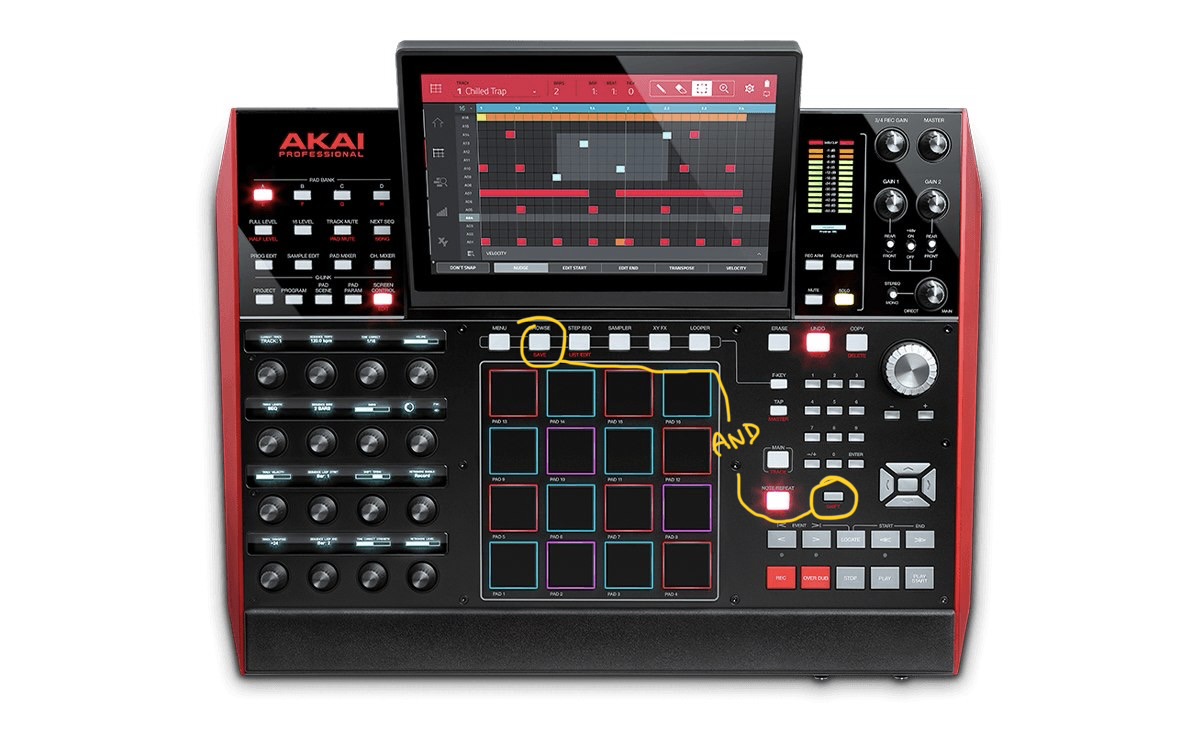
Isn’t there a SAVE button on X? Hit that and save options will come up.
Same as MENU and SAVE icon.

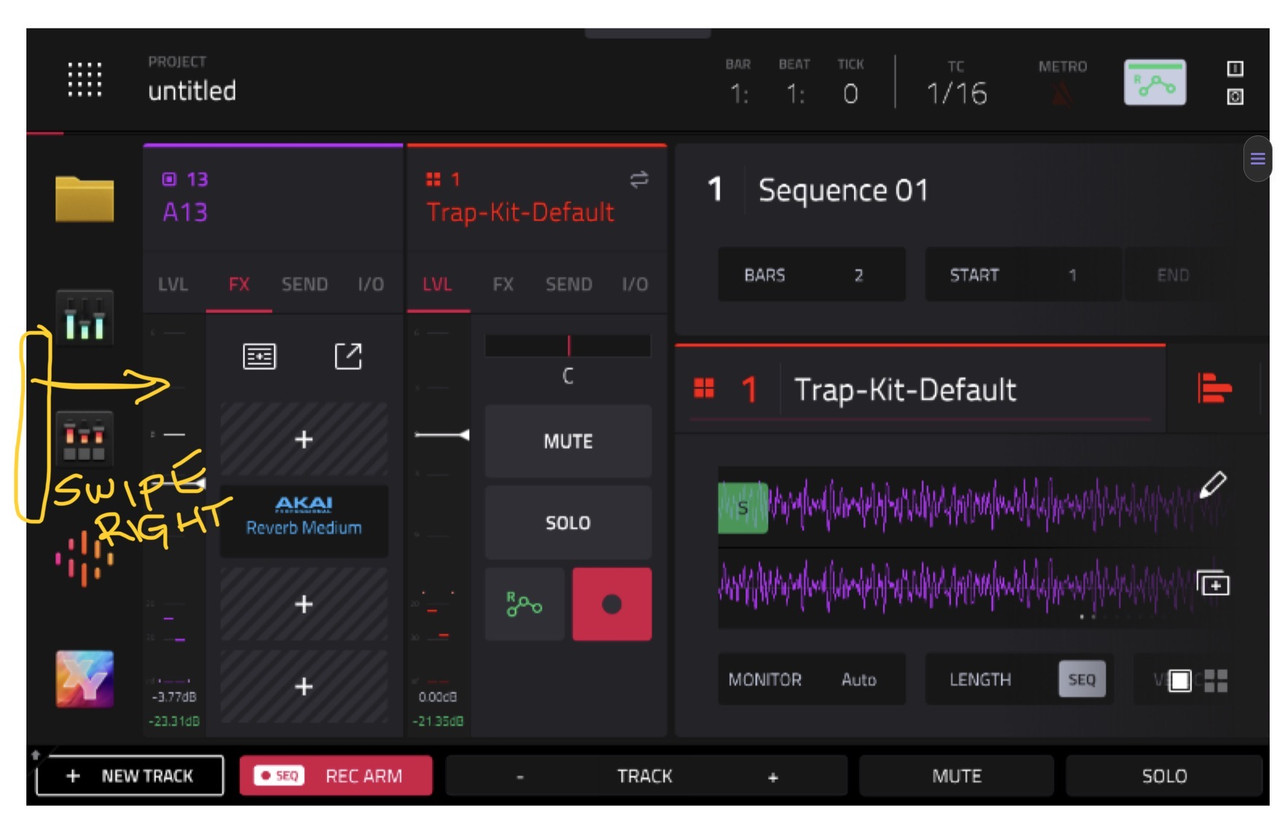
ME, I edited the left side slide panel and placed the save icon at the bottom.
Enable the slide panel in preferences.
General, (scroll down almost to bottom), Show Mode Shortcut Panel.

Image

*Show Mode Shortcut Panel: When enabled, you can access the mode shortcut panel by swiping to the right on the grey bar on the left-edge of the screen. You can use the Mode Menu layout editing to put your five most-used modes in this shortcut panel for easy access. This is disabled by default.* (the left side of the menu is now your shortcut panel)

* To rearrange the menu layout, tap and drag a mode icon to the desired location. All other mode icons will shift to accommodate the new positioning. The five modes on the left side are also available to access in most screens by swiping the black touch handle to the right from the left edge of the touchscreen. Tap the three-dots icon next to the Sync setting and then tap Reset Mode Menu to revert all layout changes*


Image
User avatar
By MPC-Tutor Mon Mar 30, 2026 6:49 am
Crumb$ wrote:Is 2.15 actually the better firmware for the X? I’ve just given myself the evening to try the 3.7 but it’s just got me scratching around looking for things. I couldn’t;t even work out how to save a sample from a pad to the sd card. Hitting the pencil doesn’t;t give an option to save sample.


With the sample currently selected (in sample edit, or as layer 1 of the currently selected pad), go to MENU > SAVE > Sample.

And if you need it, set up a save icon in the shortcut panel, as per Lamp's post.

Check out MPC Bible 3 for a fully structured course on MPC3.