By mario-g
Mon Oct 16, 2023 7:20 am
When putting together a song with several DrumSynth plugin tracks, I bumped into the limit of 8. Because of this I had to group them into a single DrumSynth:Multi to avoid running out of slots.
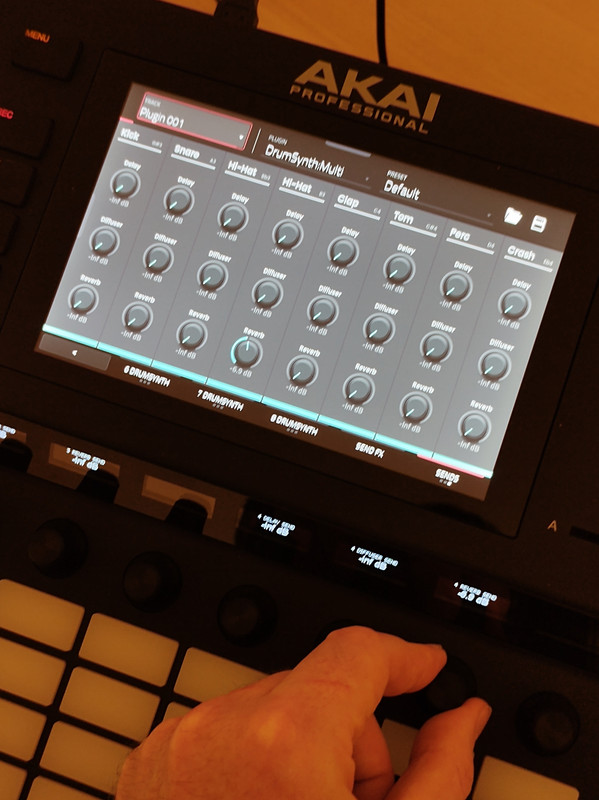
While using DrumSynth:Multi, I realised that when I'm in the Mixer tab of the plugin, there are more than 16 controls. Since the Knobs Screen Mode has 2 pages of 8 knobs, it's not possible to assign a physical knob to every control.
As it is, Knob 7 on page 2 controls the Reverb of track 4 of DrumSynth:Multi, leaving tracks 5 to 8 editable only with the touchscreen or with the main dial. I prefer editing parameters with the knobs as they don't have detention clicks like the main dial.
I opened a ticket with Akai suggestin them to add extra pages to the Knobs Screen mode. This is similar to what is done in the Step Sequencer.
While using DrumSynth:Multi, I realised that when I'm in the Mixer tab of the plugin, there are more than 16 controls. Since the Knobs Screen Mode has 2 pages of 8 knobs, it's not possible to assign a physical knob to every control.
As it is, Knob 7 on page 2 controls the Reverb of track 4 of DrumSynth:Multi, leaving tracks 5 to 8 editable only with the touchscreen or with the main dial. I prefer editing parameters with the knobs as they don't have detention clicks like the main dial.
I opened a ticket with Akai suggestin them to add extra pages to the Knobs Screen mode. This is similar to what is done in the Step Sequencer.