Support and discussion for all of Akai’s modern standalone MPCs including the MPC X / X SE, MPC Live 1, 2 & 3, MPC One / One+, MPC Key 37/61.
User avatar
By pspsounds Wed Nov 28, 2018 6:32 pm
I am also having the same issue. I thought it was something I was not doing correctly. The x/y effect I was using is the tape stop. Also we still can’t automate the main output using x/y effects.
Bymember04959388 Wed Nov 28, 2018 7:03 pm
It looks like XY needs a fix.
Maybe next update will be focused on effects? A XY fix and an improvement of the existing effects, especially modulations?
I really hope so.
Maybe Akai could ask a hand to Air musictech?
User avatar
By Danoc Wed Nov 28, 2018 8:46 pm
I think that repeat has a glitch. If l need LPF l will use my great third party LPF. I think Akai has to fix those gkitches.
By J.O.BEATS Wed Nov 28, 2018 9:47 pm
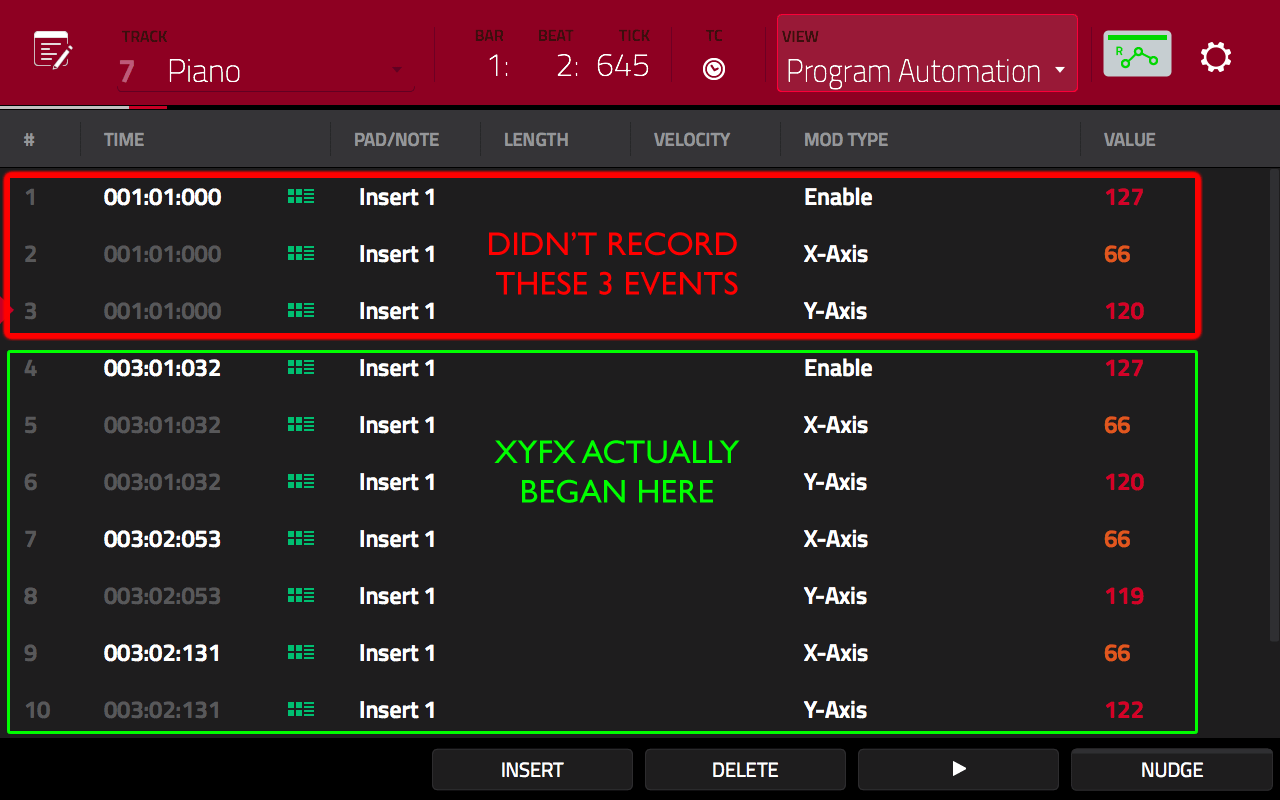
MPC-Tutor wrote:XYFX seem to be broken. Basically every time I write XYFX to any point in my sequence, the MPC is sticking a bunch of XYFX events at the very beginning of the sequence. For example, even if I very carefully ensure that no automation can be written to the start of my sequence, the MPC writes it there regardless. e.g.

- 8 bar sequence
- enable XYFX on a program
- set automation to R
- press PLAY START
- at around bar 3, set automation to W and begin recording a few bars of xyfx automation
- at bar 7 set automation to R and stop

In the above, the MPC should only possibly write automation data between bars 3 and 7. However, the result everytime without fail is that the MPC writes a bunch of XYFX events at 01.01.000, therefore causing the XYFX to begin immediately. Here's the result of a tape stop I recorded at the start of bar 3:

Image

In this particular sequence (which had a piano chord triggered at bar 1 and 3) this has the effect of triggering a tape stop twice, first at bar 1 and then at bar 3. The intent was only to have the tape stop at bar 3.

The fix is to either completely ERASE that uninvited data, or set the 'enable' value at 01.01.000 to '0' at the start of any series of xyfx that you don't want. As you can see, there is also an enable event at 03:01:032 which will correctly enable the originally intended XYFX.

How did this ever get missed during beta testing? It happens every time without fail for me, there's no way to avoid it as far as I can see. Does this all tally with what everyone else is experiencing?

I'm also finding that XYFX data recorded in previous versions isn't playing nicely. It seems that the 'setup' config is being re-initialised. For example in the MPC Bible I originally recorded a filter sweep using the 'LPF Manual' preset (this was probably originally recorded using 2.05). When that project is now loaded into 2.3, the XYFX 'setup' for that program is showing as 'beat repeat LPF', which messes up the sweep.

Setting back to LPF Manual and re-saving fixes it though.


This is exactly what is happening for me. I tried to even delete the events that are put at front of sequence but it won’t let you....completely broken
By omygod Wed Nov 28, 2018 11:41 pm
Tutor your spot on!!! Been saying this from the beginning... Where are the users that are claiming they have no issues with this it all ? Isn't there a no issue thread?? Please post results...
User avatar
By MPC-Tutor Thu Nov 29, 2018 4:23 pm
Digging a bit deeper, it does seem that XYFX definitely has some issues. So basically, we have that 'Enable' event being added at 01.01.000 - I think this is intentional, but I believe it's supposed to be set to a value of 0, not 127, this would then always reset the XYFX params at 01.01.000. This is happening both in standalone and controller mode, so this is clearly a global issue. I can only conclude that no one during the beta testing phase ever tried recording any XYFX automation data, despite there being new options (e.g. tape stop), otherwise surely this problem would have been discovered instantly.

Another issue - loading older projects, the existing XYFX recordings are all messed up. This is because the original preset used in the XYFX 'setup' is being overridden when you load that same project in 2.3. e.g. I used LPF MAnual in the project originally, but when loading in 2.3 it gets changed to Beat Repeat. Easy to put it back though, then re-save.

Also the MPC can't seem to handle 're-recording' XYFX data over existing data. If I try to re-record over an existing XYFX session, existing automation data is not overwritten, it's just mangled, I actually can't work out what's going on, but it's certainly not recording the new stuff and it's simultaneously changing the existing stuff.

For example, if I record a sweep from left to right along the bottom of the screen (i.e. constantly low value Y-axis, increasing X-axis), and then record a sweep from right to left at the top of the screen to the same time range (high value Y axis, decreasing x-axis), this results in a bunch of 'high Y-axis' and only 'low x-axis', so basically the Y-axis from the second session mixed with only the low value x-axis from both sessions. DEfinitely not what I recorded last, and not even a merged version of both sessions.

I don't have this problem when recording any other automation, e.g. a pan sweep with a Qlink (for example) - I can re-record all I want, only the last session's data is ever recorded to the sequence.

The solution is to delete all existing XYFX data and start again, but sometimes that's tricky. ERASE allows you to only erase 'automation', but that erases all types of automation together, including track mutes, mixer, track automation etc. You can manually delete individual events, but this can get tiresome if you have hundreds of events to remove (SHIFT and tap cannot select ranges by tapping the top and bottom values, although it can in the GUI).

What a waste of time having to bug test all this shit. :evil:
User avatar
By SupremeSoulstice Thu Nov 29, 2018 5:14 pm
MPC-Tutor wrote:Digging a bit deeper, it does seem that XYFX definitely has some issues. So basically, we have that 'Enable' event being added at 01.01.000 - I think this is intentional, but I believe it's supposed to be set to a value of 0, not 127, this would then always reset the XYFX params at 01.01.000. This is happening both in standalone and controller mode, so this is clearly a global issue. I can only conclude that no one during the beta testing phase ever tried recording any XYFX automation data, despite there being new options (e.g. tape stop), otherwise surely this problem would have been discovered instantly.

Another issue - loading older projects, the existing XYFX recordings are all messed up. This is because the original preset used in the XYFX 'setup' is being overridden when you load that same project in 2.3. e.g. I used LPF MAnual in the project originally, but when loading in 2.3 it gets changed to Beat Repeat. Easy to put it back though, then re-save.

Also the MPC can't seem to handle 're-recording' XYFX data over existing data. If I try to re-record over an existing XYFX session, existing automation data is not overwritten, it's just mangled, I actually can't work out what's going on, but it's certainly not recording the new stuff and it's simultaneously changing the existing stuff.

For example, if I record a sweep from left to right along the bottom of the screen (i.e. constantly low value Y-axis, increasing X-axis), and then record a sweep from right to left at the top of the screen (high value Y axis, decreasing x-axis), this results in a bunch of high Y-axis and low x-axis, so basically the Y-axis from the second session mixed with only the low value x-axis from both sessions.

I don't have this problem when recording any other automation, e.g. a pan sweep with a Qlink (for example) - I can re-record all I want, only the last session's data is recorded to the sequence.

The solution is to delete all existing XYFX data and start again, but sometimes that's tricky. ERASE allows you to only erase 'automation', but that erases all types of automation together, including track mutes, mixer, track automation etc. You can manually delete individual events, but this can get tiresome if you have hundreds of events to remove (SHIFT and tap cannot select ranges by tapping the top and bottom values, although it can in the GUI).


Probably a stupid question, but have you submitted this to Akai yet? Damn they should bring you in as a beta tester. I haven’t dove into XYFX yet so I didn’t even know this was a problem until a few days ago. Nice catch to all those who caught it. You definitely explained it better than most though that’s for sure. Kudos to you.
User avatar
By MPC-Tutor Thu Nov 29, 2018 5:44 pm
SupremeSoulstice wrote:Probably a stupid question, but have you submitted this to Akai yet? Damn they should bring you in as a beta tester.


Yes, submitted although I don't think any of the bugs I've submitted via the software have been fixed. The only one I got any response to was the 'all audio is converted to 16 bit bug', but only after I went on a social media frenzy and eventually Dan responded to it on Gearslutz. And that one still isn't fixed properly as it still affects Chop mode and 'bounce to audio'.

As for beta testing, I did that for 2 years as a volunteer, never again. Of course, clearly we're all still beta testing this stuff.
User avatar
By Bezo Thu Nov 29, 2018 6:02 pm
MPC-Tutor wrote:
SupremeSoulstice wrote:...Of course, clearly we're all still beta testing this stuff.
Music creating tools & video games are 2 industries that will not hesitate to sell unfinished products. Fortunately, the more I'm involved with music (getting serious again), the less time I have to play video games. But yeah, relying of updates to fix so many & such serious bugs is crazy. But we allow it, just like gamers.
By machinesworking Thu Nov 29, 2018 7:11 pm
MPC-Tutor wrote:
SupremeSoulstice wrote:Probably a stupid question, but have you submitted this to Akai yet? Damn they should bring you in as a beta tester.


Yes, submitted although I don't think any of the bugs I've submitted via the software have been fixed. The only one I got any response to was the 'all audio is converted to 16 bit bug', but only after I went on a social media frenzy and eventually Dan responded to it on Gearslutz. And that one still isn't fixed properly as it still affects Chop mode and 'bounce to audio'.

As for beta testing, I did that for 2 years as a volunteer, never again. Of course, clearly we're all still beta testing this stuff.

For the record one of the first bugs I experienced and sent to AKAI with the MPC was a REX import bug you replicated on these forums. That's fixed in 2.3.

Not a word about in in the release notes. It is a crazy consistent shortcoming of developers that documenting this sort of thing is where all of them are beyond lazy, from AKAI MPC release notes to Apple OSX release notes, things are undocumented.
User avatar
By Danoc Fri Nov 30, 2018 1:05 am
LOL WOW! He said BEYOND LAZY :lol:
By smellypants Fri Nov 30, 2018 3:46 am
Hey Tutor can we get an official MPC Live/X bug thread.

Bugs that are confirmed by multiple users and can be repeated.

The thread can be updated when bugs are fixed in updates or if new bugs are discovered.

I think you doing it would be more official than if I did it for example.

It would also make mpc-forums the official place for confirmed and repeatable bugs, I'm sure it would drive more traffic etc.

Users can report things and other users can confirm if it is repeatable on their end. Then you could be the official bug confirmer once enough people have confirmed a bugs legitimacy you can do the final test and update the OP when a bug is confirmed.

Then multiple users can just spam the OP through the Akai official bug report in the software :)

May be more work than you are willing to take on, but I believe it could be incredible useful for us all!

Cheers Tutor
User avatar
By SupremeSoulstice Fri Nov 30, 2018 5:01 am
smellypants wrote:Hey Tutor can we get an official MPC Live/X bug thread.

Bugs that are confirmed by multiple users and can be repeated.

The thread can be updated when bugs are fixed in updates or if new bugs are discovered.

I think you doing it would be more official than if I did it for example.

It would also make mpc-forums the official place for confirmed and repeatable bugs, I'm sure it would drive more traffic etc.

Users can report things and other users can confirm if it is repeatable on their end. Then you could be the official bug confirmer once enough people have confirmed a bugs legitimacy you can do the final test and update the OP when a bug is confirmed.

Then multiple users can just spam the OP through the Akai official bug report in the software :)

May be more work than you are willing to take on, but I believe it could be incredible useful for us all!

Cheers Tutor


I messaged him about this a couple months ago when I came back to this forum, but I’m sure he gets a lot of messages daily. This would help others try to reproduce these bugs. Case in point, I haven’t used the xyfx while I’m still learning the Live, so so didn’t even know it was an issue to even voice to Akai. Great idea. Something like that could help us all stay on the same page with being more vocal with valid issues.
By JeriKo Jackson Fri Nov 30, 2018 5:32 am
J.O.BEATS wrote:
MPC-Tutor wrote:XYFX seem to be broken. Basically every time I write XYFX to any point in my sequence, the MPC is sticking a bunch of XYFX events at the very beginning of the sequence. For example, even if I very carefully ensure that no automation can be written to the start of my sequence, the MPC writes it there regardless. e.g.

- 8 bar sequence
- enable XYFX on a program
- set automation to R
- press PLAY START
- at around bar 3, set automation to W and begin recording a few bars of xyfx automation
- at bar 7 set automation to R and stop

In the above, the MPC should only possibly write automation data between bars 3 and 7. However, the result everytime without fail is that the MPC writes a bunch of XYFX events at 01.01.000, therefore causing the XYFX to begin immediately. Here's the result of a tape stop I recorded at the start of bar 3:

Image

In this particular sequence (which had a piano chord triggered at bar 1 and 3) this has the effect of triggering a tape stop twice, first at bar 1 and then at bar 3. The intent was only to have the tape stop at bar 3.

The fix is to either completely ERASE that uninvited data, or set the 'enable' value at 01.01.000 to '0' at the start of any series of xyfx that you don't want. As you can see, there is also an enable event at 03:01:032 which will correctly enable the originally intended XYFX.

How did this ever get missed during beta testing? It happens every time without fail for me, there's no way to avoid it as far as I can see. Does this all tally with what everyone else is experiencing?

I'm also finding that XYFX data recorded in previous versions isn't playing nicely. It seems that the 'setup' config is being re-initialised. For example in the MPC Bible I originally recorded a filter sweep using the 'LPF Manual' preset (this was probably originally recorded using 2.05). When that project is now loaded into 2.3, the XYFX 'setup' for that program is showing as 'beat repeat LPF', which messes up the sweep.

Setting back to LPF Manual and re-saving fixes it though.


This is exactly what is happening for me. I tried to even delete the events that are put at front of sequence but it won’t let you....completely broken


You can’t delete the event but you can set the value to zero. Has to be a bug though
By machinesworking Fri Nov 30, 2018 7:14 am
Danoc wrote:LOL WOW! He said BEYOND LAZY :lol:

What would you call it? It's bizarre to me that the world of software includes this as a common thing.
You fix a bunch of bugs, great, you don't document any of it, or only a few, and this is how it works whether it's one guy or Apple, Microsoft etc. End users basically report to each other which are fixed or not...

It isn't lazy at that point, it's beyond that, it's an accepted level of laziness. :x