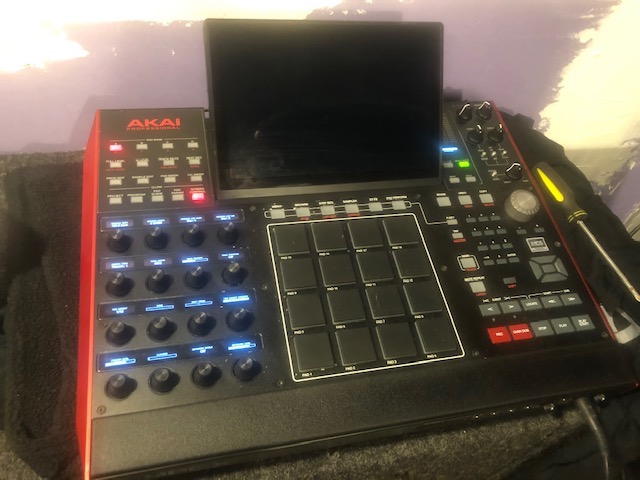
Support and discussion for all of Akai’s modern standalone MPCs including the MPC X / X SE, MPC Live 1, 2 & 3, MPC One / One+, MPC Key 37/61.
By SakisX Mon Nov 16, 2020 3:21 pm
FromthePantoL.A. wrote:How can I insert the pics like you did?
I'm using Flickr.
It's been years since I posted photos here.


https://postimg.cc
I upload and choose the second generated link "direct link"

Usually on laptops when the screen dies it's just the inverter . If you get it to a repair shop they could check it . It's around 50E repair. The actual cost of the inverter varies from 5 to 25E...
Don't measure it with a multimeter since it's thousand volts (although the current is small), but you'll fry it
User avatar
By FromthePantoL.A. Mon Nov 16, 2020 5:00 pm
Thanks again to all.
Checking out the video now while I have lunch.
Then I'll follow those other instructions in the hopes I can do better with the pics.
It's great getting help from everyone.
User avatar
By FromthePantoL.A. Mon Nov 16, 2020 6:29 pm
"By comparing the photos, it seems the big black cable is connected to the top right of you last photo. "
Thanks for this.
This , plus the video helped me find where the black cable should have been plugged in.
I have been unable to get the wifi cable connected.
Well , the big wire did not turn on the screen.
Is there any procedure that I can perform without the screen working that would make the mpc make a sound?
Is there any step by step instruction that I could do to make the pads make a noise?
Assuming that I do need to get a screen ( not sure from where or who could fix it ) I'd like to know beforehand that the MPC actually works other than just the buttons lighting up.
Image
User avatar
By FromthePantoL.A. Mon Nov 16, 2020 6:30 pm
https://postimg.cc
"I upload and choose the second generated link "direct link" "
Word.
By 40Beatz Mon Nov 16, 2020 6:50 pm
LCD Screen Is Shot
By SakisX Mon Nov 16, 2020 7:48 pm
"Is there any step by step instruction that I could do to make the pads make a noise?"
Unfortunately I don't have an X, so maybe someone can help you in blind flying

"Assuming that I do need to get a screen ( not sure from where or who could fix it )..."
In a repair shop for TVs or even better for Laptops. If there is a skilled technician he could check the inverter or the panel easily ...

"I have been unable to get the wifi cable connected."
It needs to be completely parallel on top and squeeze hard till you hear a click .

If you got it from ebay as a working unit I'd issue for refund. It's obvious the previous owner had issues and opened it
By 40Beatz Mon Nov 16, 2020 8:42 pm
MPCSTUFF.COM
By dsy73 Tue Nov 17, 2020 2:43 am
I have no idea how to test the sound without screen because settings and sounds are not reset a priori.

You may try this procedure to hear the metronome:
- start the MPC holding SHIFT button to skip any autoloaded file
- use RECORD and PLAY buttons
You may hear the metronome tick sound.

Also you can try to check or reconnect the screen cable, I think it is a gray ribbon cable.
User avatar
By FromthePantoL.A. Tue Nov 17, 2020 10:58 am
"You may try this procedure to hear the metronome:
- start the MPC holding SHIFT button to skip any autoloaded file
- use RECORD and PLAY buttons
You may hear the metronome tick sound."

This worked!
Thank you. at least I know that the X does function.
I wouldn't want to invest any more without knowing that.
I tried the cable , it seems firm.
I doubt we will get any further info from the previous owners.
I'm willing to spend some money on a screen install ( does mpc stuff do that? ) or to purchase a screen and install myself if there is an instructional video.
If anyone knows about this stuff, please inform me.
Again , you guys have been great.
I really appreciate all of the help.
User avatar
By FromthePantoL.A. Sat Nov 28, 2020 11:28 am
I have sent the X in for repair. I will update you all once it is complete.
User avatar
By FromthePantoL.A. Wed Feb 17, 2021 4:03 pm
I have the MPCX back
It appears to be working properly.
I needed a new screen and a few other items.
I can't wait to start learning about this machine.
Thanks to everyone for you help, etc.
User avatar
By Lampdog Wed Feb 17, 2021 5:47 pm
Small black wire is wifi. Look around in there for the spot that looks like it fits that end of the wire, there is only 1 spot it can go.

The black wire with white connector has only one place it can go as well.

I haven't opened up my X in a while but I've seen those SAME 2 wires and it will take about 1 minute to find both connections. They can only fit in 1 place each, no worries there.

X screen going bad is something someone in the know is very aware of and says it's more common than we may think.

Where did you send it for repair?
By arp70blue Thu Jan 11, 2024 9:38 pm
Hi,

I know this is well after the OP's original post but this may help others.
For those of you with black or intermittent screen problems.....

I just bought a broken MPC X off that online shop we all use....it had an intermittent screen issue.
I got it cheap in the hope I could fix it and I have.

Do the following at your own risk, I accept no liability for any damage you do.
There are videos on YouTube which show you how to open the machine up, I strongly suggest you follow those videos.

The following will confirm if it is your main board or the issue is after the main board i.e. the screen itself.

The mainboard is the in the upper right if machine is faced down and the mainboard is screwed the base cover, not the half with the buttons on it.

When you get to it you will see the small copper coloured ribbon cable connected to the main board - that cable goes to your LCD. What you can do is check the voltage with a multimeter as there needs to be circa 24.5vs going to the LCD to drive the LED lamps.

If you look where the ribbon cable connects to the mainboard you will see a diode (small rectangular component) directly in front of where the ribbon is connecting.

Put your black meter prong on ground (you will need to find a grounding point - the frame of the unit is ground from memory) and put your red on the diode - check the voltage (you will need to power up the machine) - it doesn't matter if the rest of the machine is disconnected - we just need the mainboard powered up and a check on the voltage coming from that diode. If you have circa 24 - 26vs then the problem lies after this diode.

If getting the correct voltage then you need to check for the ribbon being seated properly, that there are no tears in it (these tear easily so be careful) and that there is no obvious signs of damage from the ribbon cable onwards (just follow it).

If you are not getting 24-26vs then the LCD screen will never light up as it hasn't sufficient power to do so.

If you are getting 5vs then there is a small 6 pin component labelled U16 with "GEC" on the top of it. This component is by the diode but close to that metal frame that the large aluminium heat sink is screwed onto .
That component takes in 5vs and uses that circular 4.7 component (inductor) to turn that 5vs into the 24-26v output for the LCD lamps. I suspect if you are getting 5vs on the diode that that U16 will be faulty.

On mine, and I note a chap on YouTube, I found liquid damage - somebody must have spilled coffee, coke, beer on the unit and it had dripped into that area by the end of the ribbon cable and caused corrosion to U16, one of its pins was corroded off. I replaced that component and the screen fired straight up. I checked for the output voltage before reassembly and that's how I know you need at least 24-26vs or the screen won't work.

I hope that helps.

The large fat black cable is from the headphones circuit board and plugs into the mainboard about 1 cm down from that copper ribbon cable. The smaller wire is indeed the wifi connector and if you have the machine face down, with the unit opened up in half the if you look at the mainboard there is a small "nipple" located centrally along the upper outer edge, it pushes onto that. It says "BT / WIFI" on the actual mainboard by this nipple, you will see it.

Again, hope the above helps.

Happy beat making!
By jila Mon Oct 14, 2024 7:12 pm
arp70blue wrote:Hi,

I know this is well after the OP's original post but this may help others.
For those of you with black or intermittent screen problems.....

I just bought a broken MPC X off that online shop we all use....it had an intermittent screen issue.
I got it cheap in the hope I could fix it and I have.

Do the following at your own risk, I accept no liability for any damage you do.
There are videos on YouTube which show you how to open the machine up, I strongly suggest you follow those videos.

The following will confirm if it is your main board or the issue is after the main board i.e. the screen itself.

The mainboard is the in the upper right if machine is faced down and the mainboard is screwed the base cover, not the half with the buttons on it.

When you get to it you will see the small copper coloured ribbon cable connected to the main board - that cable goes to your LCD. What you can do is check the voltage with a multimeter as there needs to be circa 24.5vs going to the LCD to drive the LED lamps.

If you look where the ribbon cable connects to the mainboard you will see a diode (small rectangular component) directly in front of where the ribbon is connecting.

Put your black meter prong on ground (you will need to find a grounding point - the frame of the unit is ground from memory) and put your red on the diode - check the voltage (you will need to power up the machine) - it doesn't matter if the rest of the machine is disconnected - we just need the mainboard powered up and a check on the voltage coming from that diode. If you have circa 24 - 26vs then the problem lies after this diode.

If getting the correct voltage then you need to check for the ribbon being seated properly, that there are no tears in it (these tear easily so be careful) and that there is no obvious signs of damage from the ribbon cable onwards (just follow it).

If you are not getting 24-26vs then the LCD screen will never light up as it hasn't sufficient power to do so.

If you are getting 5vs then there is a small 6 pin component labelled U16 with "GEC" on the top of it. This component is by the diode but close to that metal frame that the large aluminium heat sink is screwed onto .
That component takes in 5vs and uses that circular 4.7 component (inductor) to turn that 5vs into the 24-26v output for the LCD lamps. I suspect if you are getting 5vs on the diode that that U16 will be faulty.

On mine, and I note a chap on YouTube, I found liquid damage - somebody must have spilled coffee, coke, beer on the unit and it had dripped into that area by the end of the ribbon cable and caused corrosion to U16, one of its pins was corroded off. I replaced that component and the screen fired straight up. I checked for the output voltage before reassembly and that's how I know you need at least 24-26vs or the screen won't work.

I hope that helps.

The large fat black cable is from the headphones circuit board and plugs into the mainboard about 1 cm down from that copper ribbon cable. The smaller wire is indeed the wifi connector and if you have the machine face down, with the unit opened up in half the if you look at the mainboard there is a small "nipple" located centrally along the upper outer edge, it pushes onto that. It says "BT / WIFI" on the actual mainboard by this nipple, you will see it.

Again, hope the above helps.

Happy beat making!


Hi thanks for your post. Please can you advise of the specs of u16, or of a suitable replacement for it? Thanks.