Forum dedicated to the new portable standalone MPC, the MPC Sample.
By Baltimega Mon May 11, 2026 8:38 pm
I'm getting crackling in the audio when playing via midi clock. it can be the usb midi through a daw or 1/4 inch midi from a groovebox, there is terrible crackle that makes this unusable to sync with my whole set up
By West Grim Mon May 18, 2026 5:16 am
MPC-Tutor wrote:Tried copying seq 3 to seq 1, released the shift and copy buttons and the unit stuck in the sequence screen playing the same sequence. Unable to go to sample screen (or any other screen), unable to change sequence. Had to force power down.


This exact thing started happening to me last week , I can't believe I'm almost possibly going to have to send my sample back to Akai for repair smh, so if I reboot it loads properly ,I got to edit sample like chop tune etc ,works perfect , the minute I go to sequence the sample button /input config no longer works ,I mean you can't even hold shift and go to the input config menu ,now another thing I hadn't even noticed was my projects also won't show up on my card , thank god I backed them up just in case I figured I lost them cause they disappeared but I'm able to load them up in my one and desktop software

I'm in Los Angeles ,tech support Is gonna call me around 1am tonight to try some work arounds ,I even reverted back to the software it came with when I got mine day 1 ,and no luck , I'll update if there's a fix , man I love this sample I don't want to send it back but without a workaround and no way to get to the input config menu, I'll have to ship it back, I started with the 60 in 92, got the 1000 the week it released in like 03, then decided to upgrade to the one during the pandemic and tbh it was overwhelming Iwould tell my wife I can't believe how much you could now do with a one.

so now I just buy every instrument when it drops ,my wife knew I stayed loyal to the brand from my first studio session at 3am at paramount recording studio, to buying a 0ne with my wife by my side, to ordering the sample on amazon on release day knowing zero bout it but I see it as a gift from my wife who passed away last year from cancer it sure has helped pass time. this is my first post btw ,my apologies if I rambled. salute to you all :-D
By Hieker Tue May 19, 2026 8:13 am
I'm on the latest firmware, also experience clicking, glitchy sounds in certain kits supplied in the unit, for example the drill kit. Notice that turning the master compress of removes the issue.
By Pablo M. Mon Jun 15, 2026 3:31 pm
hi
i post here something i thing is a HUGE problem, if you use the MPCS with more gear

the Mpc Sample receive Midi Program changes in all channels
i send PChange to any of my synths and MPC Sample changes sequence
i have the midi in channel in 16, not in all channels, and it changes seq in all the channels
i think that is a big mistake, makes it incompatible to work with other machines in same setup
in midi config, it should show a Midi Program change channel option, or at leats, just use the midi in channel
it would be probably 1 line of coding, akai, come on.... just restrict the midi PC to the midi in channel
By hwj Thu Jun 18, 2026 8:33 am
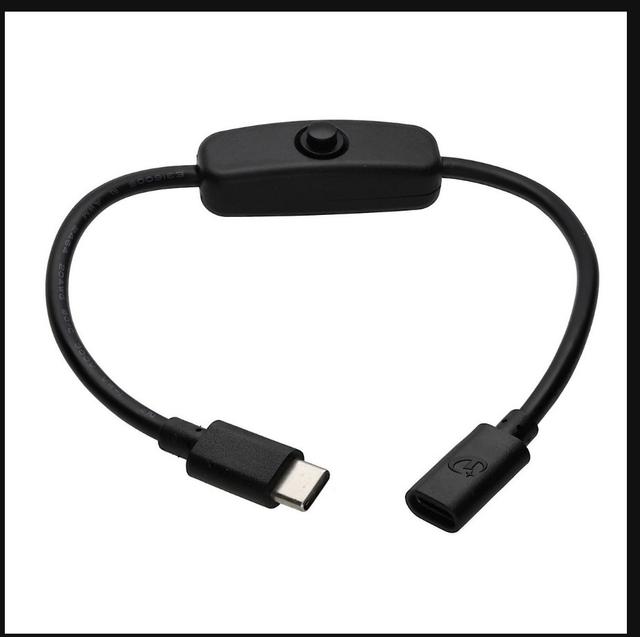
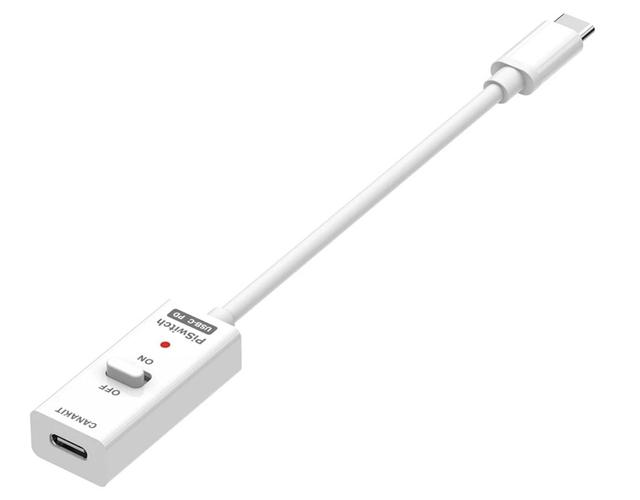
Drain out Problem on USB-C (iPad, iPhone)

Is there a workaround for the USB-C iPad and iPhone battery drain issue? Or has anyone already submitted a request to AKAI regarding this?
Otherwise, I would submit the following request to AKAI:

"
Feature Request: MPC Sample – Low Power / Battery-Only Mode when connected to iOS devices

Hello Akai Support Team,

I am writing to submit a feature request for the MPC Sample firmware.

When the MPC Sample is connected via USB-C to an iPad or iPhone as a USB audio interface, it draws power from the iOS device's battery, even when the MPC Sample's own internal battery is sufficiently charged. This significantly drains the iPad/iPhone battery during sessions.

I understand that this behavior is inherent to the USB specification — the host (iPad/iPhone) provides VBUS by default. However, I believe this could be addressed at the firmware level by implementing a "Battery-Only" or "Low Power" mode for USB audio operation, similar to the solution Akai previously implemented for the MPC Element, where holding the TAP TEMPO button during USB connection activated a low-power iOS mode.

Suggested implementation options:
1. A setting in the MPC Sample's preferences: "When connected to iOS device: use internal battery only (do not draw USB power from host)"
2. Or a key combination during power-on/USB connection to activate this mode

This would make the MPC Sample significantly more practical for mobile, battery-powered use alongside iPads and iPhones — which is clearly a core use case for this device.

The MPC Element precedent shows that Akai has already solved exactly this class of problem before. I hope the team can consider this for an upcoming firmware update.

Thank you very much for your time and consideration.

Best regards
By hwj Fri Jun 26, 2026 7:22 am
Again, is it neccesary to inform Akai, hat the MPC sample drain the battery of devices connected via USB (iPhone, iPad), even though its own battery is almost full? That’s very counterproductive and annoying. It should be relatively easy to add a menu option and implement this feature:
Menu option: “Power from USB Host: On / Off / Auto
Thanks
By fsa.eko Sat Jun 27, 2026 1:47 pm
Think i've got a bug!!:)

So i'm triggering the mpc sample with an external midi sequencer ( Squarp Instruments Pyramid ), i sequence it via program changes..

It works well most of the time, but sometimes not!:) When i change my pattern on my Pyramid, MPC follows, no problem, sequence is well triggered, but the sample in it is not..

On the MPC, I have to manually change the sequence to another one, then come back on the one i want to trigger the sample..

I was a little surprise when i played live with it, it is going well, and suddenly, problem!:))

Could someone have a look at this problem?
By hwj Sun Jun 28, 2026 5:30 am
Lampdog wrote:And while you’re waiting for a feature that may or may not happen….


Yes, i know this. But another item in the bag, which would be unnecessary with a little firmware update.
But thanks, lampdog.
By hwj Sun Jun 28, 2026 6:02 am
fsa.eko wrote:Think i've got a bug!!:)

So i'm triggering the mpc sample with an external midi sequencer ( Squarp Instruments Pyramid ), i sequence it via program changes..

It works well most of the time, but sometimes not!:) When i change my pattern on my Pyramid, MPC follows, no problem, sequence is well triggered, but the sample in it is not..

On the MPC, I have to manually change the sequence to another one, then come back on the one i want to trigger the sample..

I was a little surprise when i played live with it, it is going well, and suddenly, problem!:))

Could someone have a look at this problem?

I didn't know your Pyramid, but, if your sample is sometimes glitchy, I can think of one possible cause: an incompatible sample rate. As far as I know, the Akay Sample works exclusively at 44 kHz.
By hwj Sun Jun 28, 2026 6:21 am
maybe that points towards a firmware timing/state issue. If the Pyramid sends the first Note On immediately after the Program Change, the MPC may not have finished loading the new sequence yet, so the first trigger gets lost.
A simple test would be to add a short delay (e.g. 20–100 ms) between the Program Change and the first note. If the problem disappears, it’s very likely a timing-related firmware bug rather than an issue with the samples themselves.
User avatar
By Lampdog Sun Jun 28, 2026 2:24 pm
hwj wrote:…A simple test would be to add a short delay (e.g. 20–100 ms) between the Program Change and the first note.

This is the exact reason some people place program changes a few ticks/nudges after 001.01.01 in order to give midi a chance to sync/lock in.
By samfrantz Mon Jul 20, 2026 8:15 am
First day of use, I notice after recording a sample or two from REAR inputs, and editing start end and loop points, two significant problems pop up and I need to reboot the unit (via the MPC Sample's power switch).

First of all the loop point and the start point rotary encoders are both the same and it becomes impossible to set a loop point that is different from the starting point.

Secondly and more critically - the MPC pads become extremely insensitive, missing even moderate taps and only powerful high velocity hits will trigger a pad's sample at all.

Rebooting fixes both problems, pads become sensitive again, loop points work again - for a while.

Seems like a memory leak. I am considering returning this long awaited device as it is clearly beta or even alpha level code, not properly QA'ed, released before development was finished.
By samfrantz Mon Jul 20, 2026 2:55 pm
Thank you - any suggestions about the sudden and extreme loss of pad sensitivity that is resolved by cycling power? The unit becomes completely unusable (v1.3 firmware), and I am very close to returning it and I'd really rather not.