For discussion about setting up your studio and advice on the gear and equipment within it.
By Clint Tue Apr 19, 2011 9:14 pm
nogginj wrote: I'm curious how much you paid for two working drives clint?


I paid forum member mygermanium 55 euro (£49.00) including postage from France.

One was pulled from his 60 when he upgraded, the other is a Sony he kept as a spare.

Arrive later this week hopefully. :wink:

I am aware the HxC SD floppy emulator is on Ebay for £75.00.
By jimmie Wed Apr 20, 2011 12:35 am
mr_debauch wrote:It would be cool if the screen was on the front of some sort of 3.5" sized unit with a card slot and buttons rather then just raw pcb.


That would be very cool indeed :)
User avatar
By mr_debauch Wed Apr 20, 2011 5:39 am
high hat wrote:send the dude an email,
say you want the screen on a ribbon cable so you can mount it.
it might happen !


maybe, but dude would have done that if fitting in ergonomics was his priority...
User avatar
By nogginj Wed Apr 20, 2011 3:35 pm
Ergonomics is definitely NOT this guys priority. I think getting this amazing technology to people that need it, in the most customisable form possible, is his priority. I have to say I have a lot of respect for that, it means the end user can mount this thing anyway he wants.

As far as mounting goes...I've already provided a few links to some bad ass custom-mounting jobs, and again, they just started offering external cases as well though I'm not sure how much they cost or if they would be worth it. I'm fine with mine hanging out my floppy slot until I mount it in an old drive.

Check the links out! The EPS modification is pretty incredible, mounted in an old floppy drive and then utilising the space available for disk-stacking above the drive.
The SP1200 install is ok but it doesn't look as clean.

nogginj wrote:Here is the best one I have seen, in an Ensoniq EPS:
http://www.youtube.com/watch?v=Bm7avjMSviU

Here is his details of how he did the modification / installation:
http://www.youtube.com/watch?v=-MoR3G4LKDc

I think the manufacturer just started offering external cases.

And finally, about the SP1200, here are two videos of the HxC running in an E-Mu SP1200:
http://www.youtube.com/watch?v=JDky0ZJTu-c
http://www.youtube.com/watch?v=TMf3xJdr ... re=related

In the second video, you can see it is mounted internally into the SP.


It should be noted this is not an idiot-proof solution...you have to put in the work and know what you are doing to make it work properly. At the very least, you would still have to place blank disk images on your sd card that you could then format from within the machine.
I skipped that step and instead put a bunch of already-formatted images on it...easy to do with a computer.
User avatar
By mr_debauch Wed Apr 20, 2011 4:05 pm
nogginj wrote:I skipped that step and instead put a bunch of already-formatted images on it...easy to do with a computer.


and very likely to be easier then doing the same with actual floppies.. haha! Damn you omni flop!
User avatar
By nogginj Tue May 03, 2011 6:21 pm
Found out some more info about those cheaper knockoffs...and let me say early on, the HxC project does not have these limitations. Stay informed and don't waste a dollar thinking you are saving 50 cents.

check out this limitation:
This version only emulate 1 Floppy in 1 USB Pen drive.


OUCH. That means your gigabyte-sized usb stick is getting shrunk down to 720kb in this case. One floppy disk per usb stick? I don't think so. You'd have to buy a usb stick for each disk you want to use.

They are probably not all like that, but definitely check into it before you buy a cheap knock off. That does not sound appealing to me.

The HxC does not have these limitations, you can fit as many disk images onto an SD card as it will hold. It's also compatible with almost any piece of equipment.

Other cheap emulators have restrictions like:
- It can only replace floppy drivers compatible with PC
- USB Memory Pendrive must be formatted up to 100 virtual floppy diskettes using our small software.


Just be warned, yall, those cheap ones seem real fishy, if someone has some experience with them, let us know. I imagine/hope there are some legit, cheap alternatives, but be sure to check the capabilities of them.

User avatar
By nogginj Wed May 04, 2011 7:57 pm
It will work in a 950 and a 3000.

I have not done it personally, but it should work. The 950 is listed on the main webpage so somebody has already done it. The 3000 is nothing special so I imagine it's the exact same process.

Somebody has to step up and be the first one though. It should not be too different than my experience with the EPS, which was very easy.

I'd encourage anyone who is ready to replace their floppy to get on it, and report back in this thread. There is an HxC forum at their website which is very helpful, but I will try to help if I can around here.

It's not idiot proof, so be prepared to do some actual work, but it's very straightforward if you get the concept.
By jimmie Thu May 05, 2011 12:53 am
illa90 wrote:Has anyone successfully install this inside their S950? If yes please share your experience..


I'm interested in the S950 too. We all know that it should work in theory, but it would be nice to see in practise. I'm interested in hearing about someone doing an efficient floppy drive replacement (regarding placement, etc) in the S950.

Obv this means doing some DIY to get it to fit.

It's the DIY I'm interested in, as I'm guessing you and others are.
User avatar
By peterpiper Thu May 05, 2011 10:27 pm
jimmie wrote:
illa90 wrote:Has anyone successfully install this inside their S950? If yes please share your experience..


I'm interested in the S950 too. We all know that it should work in theory, but it would be nice to see in practise. I'm interested in hearing about someone doing an efficient floppy drive replacement (regarding placement, etc) in the S950.

Obv this means doing some DIY to get it to fit.

It's the DIY I'm interested in, as I'm guessing you and others are.


You should read the forum on the HxC website. It's tested already by someone.

peace
User avatar
By nogginj Sat Aug 13, 2011 9:59 pm
mr_debauch wrote:It would be cool if the screen was on the front of some sort of 3.5" sized unit with a card slot and buttons rather then just raw pcb.

that's exactly what i thought.
i will continue to update the first post with details on the install.
Image
By Plexicube Fri Aug 26, 2011 7:05 am
Hey nogginj, that's a great looking install.

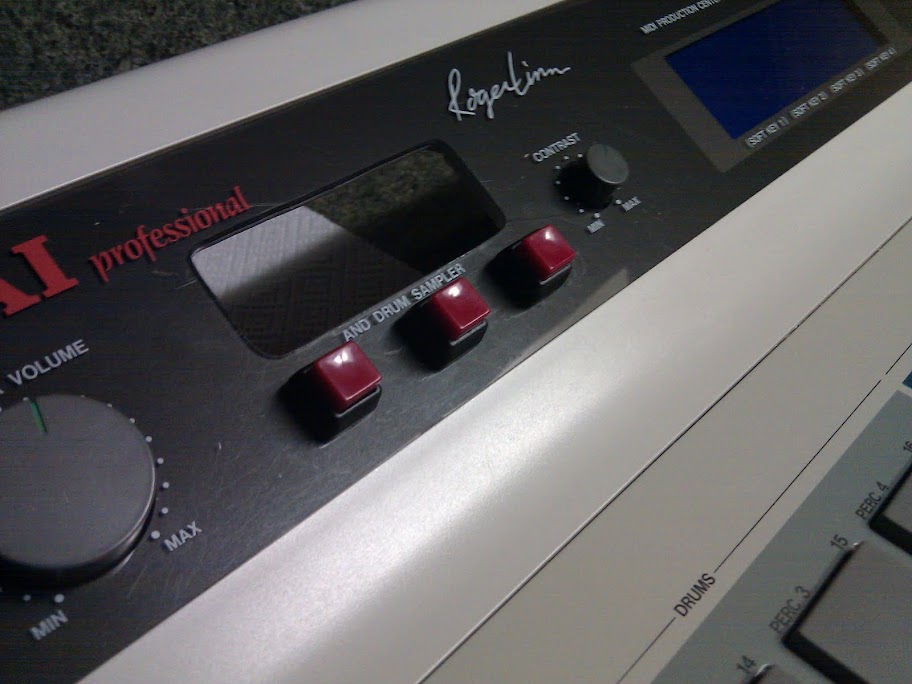
I'm *almost* finished with my install into an MPC60II. I have been keeping a record of my endeavors at https://picasaweb.google.com/1027204551 ... pyEmulator for anyone who is interested. There are pictures of the install (somewhat step-by-step) links to all necessary files to get the MPC60 up and running, and a short video showing the emulator functioning. The MKII MPC60 offered a unique opportunity, with all of its unused dashboard space, to have the emulator screen front and center rather than in the drive bay Image
This leaves me room to keep the floppy, so now I'm looking into a drive selector switch.

The HxC card is really sweet, the only downside I've found thus far is I had to install windows on my macbook in order to use the disk creation software (I had *lots* of compilation issues trying to use the linux source (perhaps due to using GCC rather than XCode?). However, I plan on creating a ton of disk images (I have a shell script which will fill the SD card) and using the emulator more like an internal HD, so I only had to use the HxC software once. :)