Reviews and questions about the entry-level MPC500
User avatar
By penumbra.beats Mon Jul 02, 2012 8:31 pm
I haven't seen a thread here for showing off your custom 500's, though every other MPC sub-category has one.

I'll start off with mine.

I got the pads this morning and trimmed them to size (thanks inflict3, no logo!) and installed them. So far they feel great (thanks MPCstuff!)

Last week I painted the other parts, I did a few coats throughout the week and I'm hoping the paint doesn't rub off.

I also gave some of the logos and all of the screws the electrical tape treatment.

Sorry for the iPhone pics, my camera battery was dead.

Top cover and pads off:
Image

Taping white indicators (ended up not working for arrow keys, only volume knobs and the slider.)

Image

After paint layer 1 (I took the tape off to see if it had kept the paint off the white/red parts.)

Image

Jog wheel and buttons

Image

Other buttons

Image

Knobs and slider with fat pads

Image

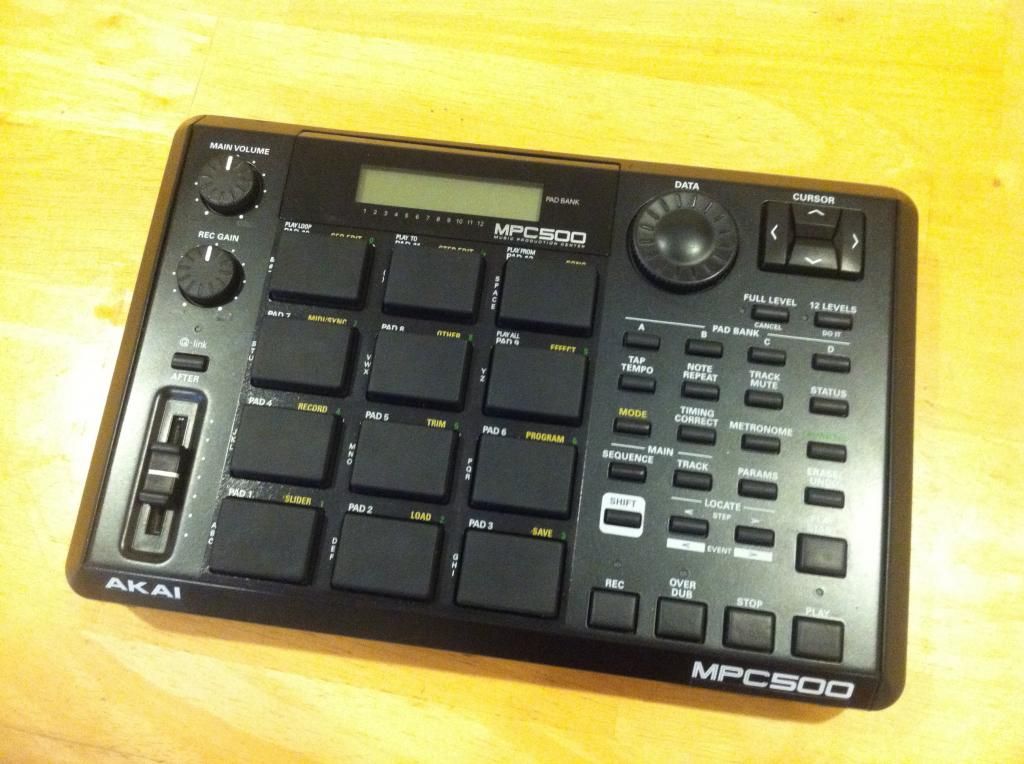
All together

Image

Alt angle

Image
By mastasteez Mon Jul 02, 2012 9:48 pm
Looks sick my man. I'll swap my standard 500 for yours so you can do it all over again :nod:

On the real, I need to get up on the fat pads. Looks so good!!!!!
User avatar
By Roger Nodge Mon Jul 02, 2012 10:36 pm
That's exactly what I've been tryin to do with my 1000!! Got the black screen and black fat pads. I want to paint the buttons but I've been apprehensive cause I wasn't sure about what paint to use on the buttons and if they should sanded.
User avatar
By penumbra.beats Mon Jul 02, 2012 11:01 pm
mastasteez wrote:On the real, I need to get up on the fat pads. Looks so good!!!!!


Thanks! Do the pad upgrade, I can already tell its going to be a good investment.

RdoubleL wrote:That's exactly what I've been tryin to do with my 1000!! Got the black screen and black fat pads. I want to paint the buttons but I've been apprehensive cause I wasn't sure about what paint to use on the buttons and if they should sanded.


The buttons werent hard to paint. I used a spray paint called Rustoleum painters touch, which says it bonds to plastic. I bought this because the hardware store I went to didnt have the Krylon Fusion (made for plastic) in matte black, which was what I wanted.

The volume knobs and the slider were more difficult though. I would recommend laying down a layer on each of them and then roughing the layer of paint up with a high grit sand paper (I used 400) and then repainting with 2 more layers. I didnt do this in the first place and I wanted to test whether I would need a second/third coat so I put them in the MPC. I ended up wearing the paint off after like an hour of use, so I had to re-tape the level indicators and repaint. The method stated above seems to work much better. Focus on the edges of the volume knobs if you do it, they seem to take them most beating.

Also, big buttons (record, overdub, play...etc) will build up a lip of paint if you paint them and let them lay down, so what i did was poke holes in the cardboard that I sprayed them on so the button surface would sit flat and the paint would dry evenly. (sorry if I didnt explain that very well)
User avatar
By Roger Nodge Mon Jul 02, 2012 11:23 pm
penumbra.beats wrote:
mastasteez wrote:On the real, I need to get up on the fat pads. Looks so good!!!!!


Thanks! Do the pad upgrade, I can already tell its going to be a good investment.

RdoubleL wrote:That's exactly what I've been tryin to do with my 1000!! Got the black screen and black fat pads. I want to paint the buttons but I've been apprehensive cause I wasn't sure about what paint to use on the buttons and if they should sanded.


The buttons werent hard to paint. I used a spray paint called Rustoleum painters touch, which says it bonds to plastic. I bought this because the hardware store I went to didnt have the Krylon Fusion (made for plastic) in matte black, which was what I wanted.

The volume knobs and the slider were more difficult though. I would recommend laying down a layer on each of them and then roughing the layer of paint up with a high grit sand paper (I used 400) and then repainting with 2 more layers. I didnt do this in the first place and I wanted to test whether I would need a second/third coat so I put them in the MPC. I ended up wearing the paint off after like an hour of use, so I had to re-tape the level indicators and repaint. The method stated above seems to work much better. Focus on the edges of the volume knobs if you do it, they seem to take them most beating.

Also, big buttons (record, overdub, play...etc) will build up a lip of paint if you paint them and let them lay down, so what i did was poke holes in the cardboard that I sprayed them on so the button surface would sit flat and the paint would dry evenly. (sorry if I didnt explain that very well)

Hell yeah, thanks mang!! :smoker: I'll post a pic of mine once its done!!! :mrgreen:
User avatar
By penumbra.beats Mon Jul 02, 2012 11:45 pm
RdoubleL wrote:Hell yeah, thanks mang!! :smoker: I'll post a pic of mine once its done!!! :mrgreen:


Of course!

Cool, another thing to think about is the buttons on the 1000. Arnt some of them lighted? If so you could do a stripe of tape in the middle of the button so you can still see the light after paining like I did for the q-link slider.

Also, I dont know what the buttons are like on the 1000, but the 500's are a little rough to begin with, which is why I didnt bother sanding them.
User avatar
By Roger Nodge Mon Jul 02, 2012 11:47 pm
penumbra.beats wrote:
RdoubleL wrote:Hell yeah, thanks mang!! :smoker: I'll post a pic of mine once its done!!! :mrgreen:


Of course!

Cool, another thing to think about is the buttons on the 1000. Arnt some of them lighted? If so you could do a stripe of tape in the middle of the button so you can still see the light after paining like I did for the q-link slider.

Also, I dont know what the buttons are like on the 1000, but the 500's are a little rough to begin with, which is why I didnt bother sanding them.

They seem pretty smooth. The clear buttons I figured I'd just leave them clear but that's not a bad idea there, think I'll try it out.
User avatar
By Ill-Green Tue Jul 03, 2012 4:28 am
That looks real dope my man!!!

I would paint the red buttons with a dark grey. The red is kinda glaring more than the blackness.


...but thats just me.
User avatar
By penumbra.beats Tue Jul 03, 2012 6:11 pm
Ill-Green wrote:That looks real dope my man!!!

I would paint the red buttons with a dark grey. The red is kinda glaring more than the blackness.


...but thats just me.


That's a good call! :smoker:

I may do that, the red has been less appealing each time I look at it, its just too bright for the all black theme.
User avatar
By Roger Nodge Tue Jul 03, 2012 6:15 pm
penumbra.beats wrote:
Ill-Green wrote:That looks real dope my man!!!

I would paint the red buttons with a dark grey. The red is kinda glaring more than the blackness.


...but thats just me.


That's a good call! :smoker:

I may do that, the red has been less appealing each time I look at it, its just too bright for the all black theme.

Maybe, if MPCstuff ever gets these back in stock. I ordered 2 but wish I ordered 4.
http://www.mpcstuff.com/black-play--rec ... i-mpc.html
User avatar
By inflict3 Wed Jul 11, 2012 5:33 am
there is a custom mpc500 thread, just gotta dig through a bit... ill post a link soon..


http://instagram.com/p/M60wFAFe9c/