Support and discussion for all of Akai’s modern standalone MPCs including the MPC X / X SE, MPC Live 1, 2 & 3, MPC One / One+, MPC Key 37/61.
User avatar
By Danoc Sat Nov 24, 2018 2:26 am
YES SIRRRRRRRR! It works in 2.3

I use 90% of standalone also. But you do know you can export directly from standalone right? I do it all the time that's why l love the Live.

I mean try the tape stop on the MPC , you might like it.
Yeah Izotope is dope. And l got that Izotope tape stop for free :-)

J.O.BEATS wrote:
Yes, I know it can only automate on a program. So you’re saying xy automation still works in 2.3 in stand-alone for you?

I use the xy with great affect. You can get some cool transitions and change ups. I’m like a 95% stand-alone user. Really only use the software for exporting and file management etc. But thx for the izotope suggestion
By omygod Sat Nov 24, 2018 2:47 am
For many users RECORDING automation with the new tape stop effect is not working properly. Whether its in stand alone or connected to the software, when you use the effect it affects the entire track...Its a bug... If its working for you post a quick vid..
By J.O.BEATS Sun Nov 25, 2018 5:12 pm
omygod wrote:For many users RECORDING automation with the new tape stop effect is not working properly. Whether its in stand alone or connected to the software, when you use the effect it affects the entire track...Its a bug... If its working for you post a quick vid..


None of the XY effects can be automated now....at least for me
User avatar
By ralphyartis' Mon Nov 26, 2018 12:02 am
machinesworking wrote:
ralphyartis' wrote:Thanks homie and that would be a good work around I do imagine that working.

Just a heads up, I think there's scripting issues with some Kontakt instruments and Autosampler. I watched Spitfires GUI bounce between articulations in a library while "recording" nothing...
Two different orchestral libraries, Spitfire spits out blank samples, and Cinesamples works fine. It would be nice to know what's going on there, but in the mean time the workaround is probably using MPC-Tutors method for sampling certain Kontakt libraries. Gonna try that out next.

Had sad results trying various methods of getting audio from Reaper, I'm on OSX so an ancient version of Soundflower etc. AIC MIDI is receiving some SysEx dumps, and it seems it's messing with the MPC, you can see what looks like arpeggiator notes being played on the piano roll in MPC2 software. The reason to do this was to record some 32 bit VSTi's into the MPC. I'm thinking I would have better luck using the stand alone version of the MPC to do this, even sending audio from the computer into the MPC.

As a side note, I can get the software to read my system audio just fine though, since I have it routed to SPDIF on a Firface card, so at least sampling youtube bit's is dead easy. A whole lot of experimenting left to do, thinking sending MPC MIDI over IAC is a losing battle though.


Thank you for the input. I have had success using the auto-sampler standalone controlling Kontakt through midi and routing the audio to the LIVEs inputs. This is probably everyones best bet.
User avatar
By IMAKEMADBEATS Mon Nov 26, 2018 12:12 am
thanks for this.
By machinesworking Mon Nov 26, 2018 6:15 am
ralphyartis' wrote:Thank you for the input. I have had success using the auto-sampler standalone controlling Kontakt through midi and routing the audio to the LIVEs inputs. This is probably everyones best bet.

I made one error when doing this, and got a MIDI loop. Fixing that, AIC MIDI works fine on the 32 bit IK Sampletron standalone with internal routing to MPC Live software version!

I'm going to try this with Kontakt in stand alone next. It's possible the SysEx the MPC is sending is not sent through AIC and only shows up when Kontakt is instantiated as a plug in, in the MPC. So the issues Auto Sampler was/is having with a lot of scripted libraries won't happen etc.
User avatar
By Danoc Mon Nov 26, 2018 7:24 am
Tell me the steps you take to use for the automation on to work

J.O.BEATS wrote:None of the XY effects can be automated now....at least for me
By J.O.BEATS Mon Nov 26, 2018 3:45 pm
Danoc wrote:Tell me the steps you take to use for the automation on to work

J.O.BEATS wrote:None of the XY effects can be automated now....at least for me


--Put xy effect on program
--choose xy effect type (say tape stop)
--turn automation to "write" /"red"
--Play sequence
--touch xy screen anywhere in sequence
--stop sequence
--play back sequence
--automation starts at beginning of sequence "holding effect throughout sequence" regardless of where I automated effect into sequence
User avatar
By Bezo Mon Nov 26, 2018 5:10 pm
Anyone have any success adding user patterns to the Arpeggiator, specifically on a Mac?

On Gearslutz, someone has done this successfully and provided instructions, but on a PC; basically dropping a MIDI pattern into the pattern folder and numbering it. I can't imagine it not being possible on a Mac, but I've not gotten it to work yet.
User avatar
By Danoc Mon Nov 26, 2018 5:51 pm
You're doing it right. But when you finish "Write" you should turn it to "Read" so you can listen back. I use "Overdub" recording so it can count me in. Mines works perfect. I use the manual LPF instead of repeat LPF.
Immediately turn on the Read/Green cause if it stays on write/red it will overdub more XY effect. I don't know why.

J.O.BEATS wrote:--Put xy effect on program
--choose xy effect type (say tape stop)
--turn automation to "write" /"red"
--Play sequence
--touch xy screen anywhere in sequence
--stop sequence
--play back sequence
--automation starts at beginning of sequence "holding effect throughout sequence" regardless of where I automated effect into sequence
By Kozmos6 Mon Nov 26, 2018 7:30 pm
re
Anyone have any success adding user patterns to the Arpeggiator, specifically on a Mac?

On Gearslutz, someone has done this successfully and provided instructions, but on a PC; basically dropping a MIDI pattern into the pattern folder and numbering it. I can't imagine it not being possible on a Mac, but I've not gotten it to work yet.


just tried it ..
mpc sftwr. / mac osx 10.13.4

take a .mid file
go to folders:
system .. library .. application support
akai .. mpc .. arp patterns ..

drop the .mid file into the 'arp patterns' folder
( i did rename the file .. adding a number and a " - " prefix )

had to restart to get the file to show in the mpc arp window
under 'patterns' menu ..

that did work .. i.e. the pattern played as it should
~~~~~~~~~~~~~~~~~~

hope that helps

~~~~~~~~~~~~~~~~~~~~
User avatar
By Bezo Mon Nov 26, 2018 8:15 pm
Kozmos6 wrote:re
Anyone have any success adding user patterns to the Arpeggiator, specifically on a Mac?

On Gearslutz, someone has done this successfully and provided instructions, but on a PC; basically dropping a MIDI pattern into the pattern folder and numbering it. I can't imagine it not being possible on a Mac, but I've not gotten it to work yet.


just tried it ..
mpc sftwr. / mac osx 10.13.4

take a .mid file
go to folders:
system .. library .. application support
akai .. mpc .. arp patterns ..

drop the .mid file into the 'arp patterns' folder
( i did rename the file .. adding a number and a " - " prefix )

had to restart to get the file to show in the mpc arp window
under 'patterns' menu ..

that did work .. i.e. the pattern played as it should
~~~~~~~~~~~~~~~~~~

hope that helps

~~~~~~~~~~~~~~~~~~~~
I did everything except restart. I will try it again with that now obvious addition. Thanks!!!
By sbtst6 Wed Nov 28, 2018 3:56 am
Kozmos6 wrote:re
Anyone have any success adding user patterns to the Arpeggiator, specifically on a Mac?

On Gearslutz, someone has done this successfully and provided instructions, but on a PC; basically dropping a MIDI pattern into the pattern folder and numbering it. I can't imagine it not being possible on a Mac, but I've not gotten it to work yet.


just tried it ..
mpc sftwr. / mac osx 10.13.4

take a .mid file
go to folders:
system .. library .. application support
akai .. mpc .. arp patterns ..

drop the .mid file into the 'arp patterns' folder
( i did rename the file .. adding a number and a " - " prefix )

had to restart to get the file to show in the mpc arp window
under 'patterns' menu ..

that did work .. i.e. the pattern played as it should
~~~~~~~~~~~~~~~~~~

hope that helps

~~~~~~~~~~~~~~~~~~~~


Is there a place on the MPC Hardware (Live/X) where the arp patterns would be stored? Would be nice to use personal arp midi patterns in Standalone.
User avatar
By MPC-Tutor Wed Nov 28, 2018 5:11 pm
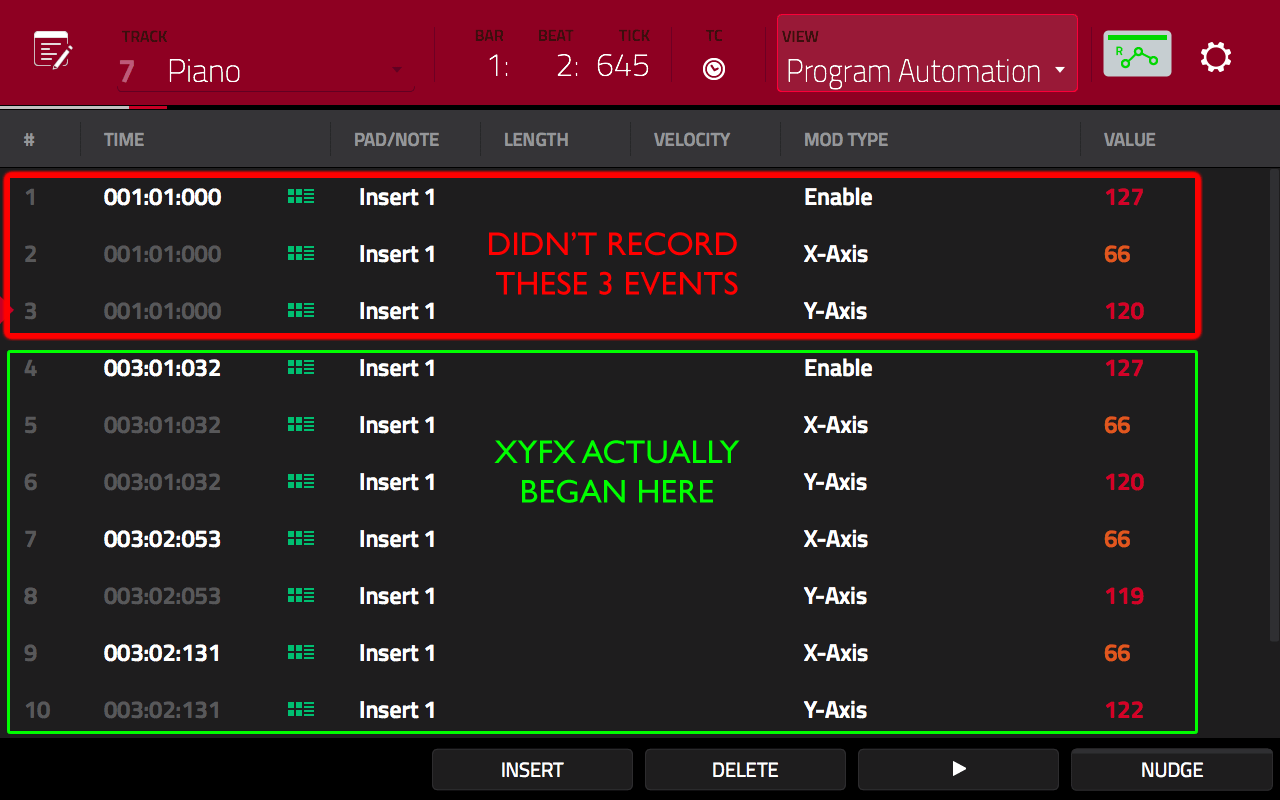
XYFX seem to be broken. Basically every time I write XYFX to any point in my sequence, the MPC is sticking a bunch of XYFX events at the very beginning of the sequence. For example, even if I very carefully ensure that no automation can be written to the start of my sequence, the MPC writes it there regardless. e.g.

- 8 bar sequence
- enable XYFX on a program
- set automation to R
- press PLAY START
- at around bar 3, set automation to W and begin recording a few bars of xyfx automation
- at bar 7 set automation to R and stop

In the above, the MPC should only possibly write automation data between bars 3 and 7. However, the result everytime without fail is that the MPC writes a bunch of XYFX events at 01.01.000, therefore causing the XYFX to begin immediately. Here's the result of a tape stop I recorded at the start of bar 3:

Image

In this particular sequence (which had a piano chord triggered at bar 1 and 3) this has the effect of triggering a tape stop twice, first at bar 1 and then at bar 3. The intent was only to have the tape stop at bar 3.

The fix is to either completely ERASE that uninvited data, or set the 'enable' value at 01.01.000 to '0' at the start of any series of xyfx that you don't want. As you can see, there is also an enable event at 03:01:032 which will correctly enable the originally intended XYFX.

How did this ever get missed during beta testing? It happens every time without fail for me, there's no way to avoid it as far as I can see. Does this all tally with what everyone else is experiencing?

I'm also finding that XYFX data recorded in previous versions isn't playing nicely. It seems that the 'setup' config is being re-initialised. For example in the MPC Bible I originally recorded a filter sweep using the 'LPF Manual' preset (this was probably originally recorded using 2.05). When that project is now loaded into 2.3, the XYFX 'setup' for that program is showing as 'beat repeat LPF', which messes up the sweep.

Setting back to LPF Manual and re-saving fixes it though.