Support and discussion for all of Akai’s modern standalone MPCs including the MPC X / X SE, MPC Live 1, 2 & 3, MPC One / One+, MPC Key 37/61.
By CharlesRandolph Wed May 08, 2019 6:45 pm
Videos and different genre audio samples, produced by clients, who he's mastered using the MPC Live would speak volumes. :nod: Perhaps, ask the Beat Battle section, to submit unmastered beats, then use those as live examples in your videos.
Bymember04959388 Wed May 08, 2019 6:57 pm
Just a question.
How do you deal on levels like Rms or Lufs which are a must for mastering?
No Lufs metering on Mpc.
And also no spectrum analyzer.
User avatar
By Danoc Wed May 08, 2019 7:13 pm
Frisbi wrote:Just a question.
How do you deal on levels like Rms or Lufs which are a must for mastering?
No Lufs metering on Mpc.
And also no spectrum analyzer.


Well that's why l use Studio One it has Peak, RMS, Lufs etc.
In The mpc you will have to deal with Normalizing, and 0.0db. But the key is correct gain staging. If you can get that right and your stereo signal balanced you can probably master better.
Bymember04959388 Wed May 08, 2019 7:20 pm
Danoc wrote:
Frisbi wrote:Just a question.
How do you deal on levels like Rms or Lufs which are a must for mastering?
No Lufs metering on Mpc.
And also no spectrum analyzer.


Well that's why l use Studio One it has Peak, RMS, Lufs etc.
In The mpc you will have to deal with Normalizing, and 0.0db. But the key is correct gain staging. If you can get that right and your stereo signal balanced you can probably master better.

Well but I cannot call it a mastering if I cannot control Lufs level (and also true peak which is missing on Mpc).
I would call it maybe a premastering.
By CharlesRandolph Wed May 08, 2019 7:33 pm
Frisbi wrote:Just a question.
How do you deal on levels like Rms or Lufs which are a must for mastering?
No Lufs metering on Mpc.
And also no spectrum analyzer.


Patch the outs to a TC Electronic CLARITY M STEREO.

Image
User avatar
By Danoc Wed May 08, 2019 7:50 pm
Can't argue with that. :smoker:
Frisbi wrote:
Well that's why l use Studio One it has Peak, RMS, Lufs etc.
In The mpc you will have to deal with Normalizing, and 0.0db. But the key is correct gain staging. If you can get that right and your stereo signal balanced you can probably master better.

Well but I cannot call it a mastering if I cannot control Lufs level (and also true peak which is missing on Mpc).
I would call it maybe a premastering.[/quote]
Bymember04959388 Wed May 08, 2019 7:56 pm
CharlesRandolph wrote:
Frisbi wrote:Just a question.
How do you deal on levels like Rms or Lufs which are a must for mastering?
No Lufs metering on Mpc.
And also no spectrum analyzer.


Patch the outs to a TC Electronic CLARITY M STEREO.

Image

Ah that's interesting, I didnt know about it.
So technically is somehow possible to make a mastering with Mpc and use this TC device to check Lufs, stereo image and frequency spectrum.
But if, as I read now, in this TC device you can load VST, why not just use good limiter on it instead of using Air one?
By CharlesRandolph Wed May 08, 2019 8:07 pm
Frisbi wrote:Ah that's interesting, I didnt know about it. So technically is somehow possible to make a mastering with Mpc and use this TC device to check Lufs, stereo image and frequency spectrum.

Yes, if that was something you wanted to do.

Frisbi wrote:But if, as I read now, in this TC device you can load VST, why not just use good limiter on it instead of using Air one?

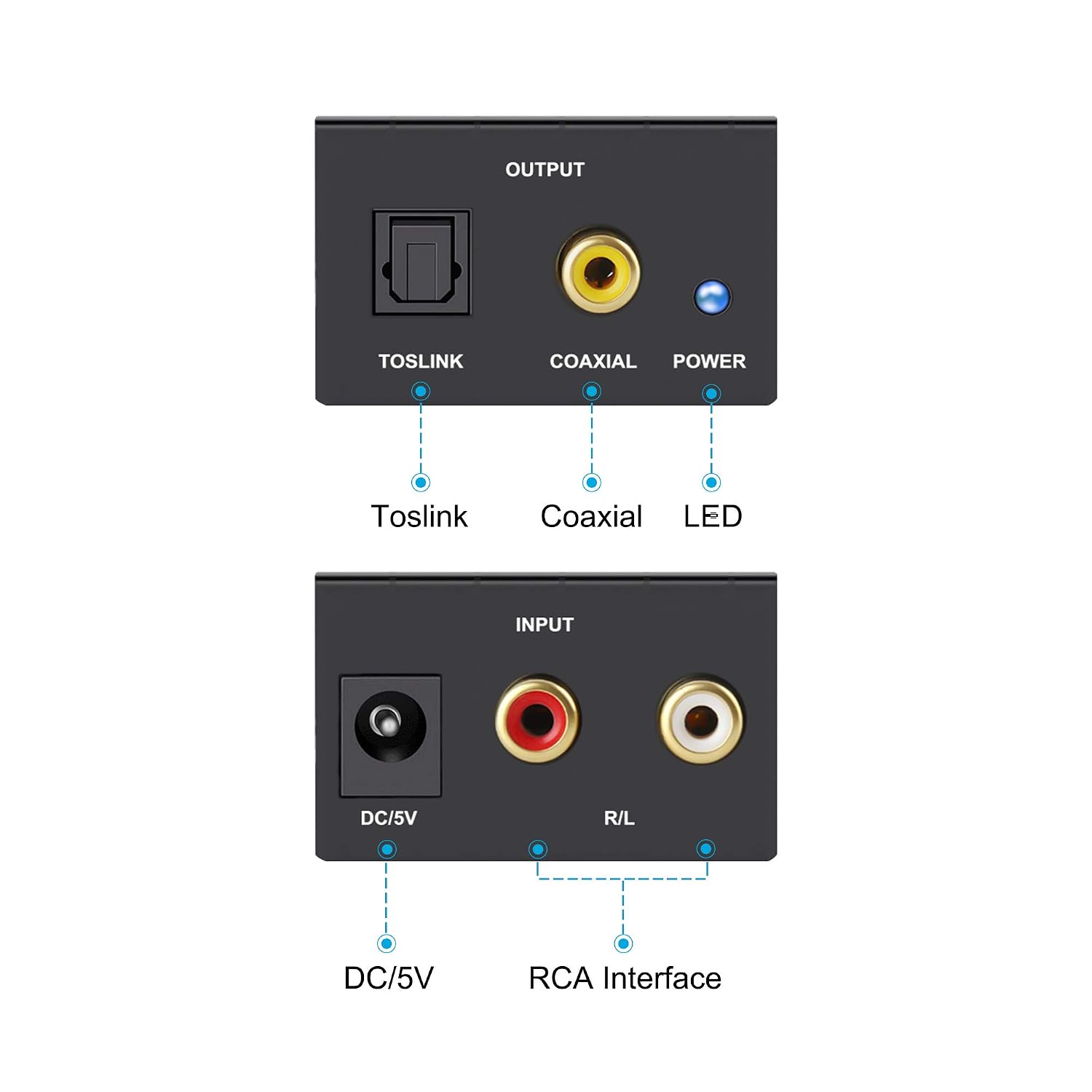
You can patch directly from the MPC LIVE or X into the Clarity M. However, you're going to need a converter box to toslink. Since the MPC LIve/X don't have digital outs. :lol: :lol:


Run 1/4 to RCA cable out to something like the box below. Then from the Box Toslink to TC Electronic Clarity M.
Image

This is an exmaple, you can search for the one you need.
https://www.amazon.com/Portta-Digital-Optical-Coaxial-Converter/dp/B00ATNWBZU
Bymember04959388 Wed May 08, 2019 8:49 pm
CharlesRandolph wrote:
Frisbi wrote:Ah that's interesting, I didnt know about it. So technically is somehow possible to make a mastering with Mpc and use this TC device to check Lufs, stereo image and frequency spectrum.

Yes, if that was something you wanted to do.

Frisbi wrote:But if, as I read now, in this TC device you can load VST, why not just use good limiter on it instead of using Air one?

You can patch directly from the MPC LIVE or X into the Clarity M. However, you're going to need a converter box to toslink. Since the MPC LIve/X don't have digital outs. :lol: :lol:


Run 1/4 to RCA cable out to something like the box below. Then from the Box Toslink to TC Electronic Clarity M.
Image

This is an exmaple, you can search for the one you need.
https://www.amazon.com/Portta-Digital-Optical-Coaxial-Converter/dp/B00ATNWBZU

Its becoming complicated :)
I stay with Studio One for mastering.
User avatar
By Danoc Wed May 08, 2019 10:36 pm
CharlesRandolph how much does that TC thingy cost?
By Yorgos Arabatzis Wed May 08, 2019 11:28 pm
Done that already!My ears are training since the days of my studies at SAE Institute and i’ve exchanging ideas with fellow sound designers and audio engineers all my life so i’m not trying to prove anything here..If your mix is crappie then nothing can save it..No magic button..As for levels you’’ll Definitely need an external analyzer like TC’s above ^ or a DAW that you can load your own analyzers until AKAI gives us some proper ones..In my videos i’ll be showing which ones i use inside Ableton Live..Basically i use Ableton Live only for that :wink:
CharlesRandolph wrote:Your idea is not the problem, it's your approach. Ear Training and Time are the only templates a person needs. You'll do more and gain more interest by exchanging ideas, instead of trying to sell an instant mastering button.
By Yorgos Arabatzis Wed May 08, 2019 11:31 pm
AJ (Tubedigga) took the template for a spin :-P!

“This is a serious piece of work right here. I've tested it out and it sounds great - but it needs refinement, and is not something that can be applied to existing projects because it's been built inside a project already which is limiting (no pun intended). But don't underestimate what it can do - I've run some pre-made tracks through this tonight and it breathes a lot of life, energy and power to whatever you throw at it. Yorgos knows his stuff for sure! Building a track from scratch inside the template is my next challenge - because the returns are being used by the multi-band compressor and I use the returns all the time for delays and reverbs. So for now it's great for importing existing mixdowns into an audio track and used purely as a mastering environment.”
By CharlesRandolph Wed May 08, 2019 11:33 pm
Frisbi wrote:Its becoming complicated :)
I stay with Studio One for mastering.


:lol: Not really complicated.

1. 1/4 to Stereo RCA cable (Which any gear head should have.)
2. Converter box (Cheap to buy)
3. TC Electronic CLARITY M STEREO.


Danoc wrote:CharlesRandolph how much does that TC thingy cost?

It's $279.99 for Stereo and 349.99 for Stereo and 5.1.