Support and discussion for all of Akai’s modern standalone MPCs including the MPC X / X SE, MPC Live 1, 2 & 3, MPC One / One+, MPC Key 37/61.
By kaydigi Tue May 05, 2020 11:36 pm
This update is incredible, very happy that the qlink overlay was added. I really wish they would add qlink auto switch to all modes, it would take away the reliance on the qlink button press.

Not being doom and gloomy , this is a big update I’m honestly floored at the amount for stuff added. Can someone recommend a good usb hub and good usb to cv converter.


What’s going on with the Force?
User avatar
By EnochLight Wed May 06, 2020 3:34 am
kaydigi wrote:Can someone recommend a good usb hub and good usb to cv converter.


The Sabrent 4-port is a solid USB hub and only $18 USD (I've got this one):

https://www.amazon.com/gp/product/B00TP ... UTF8&psc=1

If you have a metric shit ton of hardware that does USB MIDI, then the Sabrent 16-port is a solid choice as well, but a bit pricey:

https://www.amazon.com/gp/product/B07KH ... =UTF8&th=1
By CharlesRandolph Wed May 06, 2020 4:32 am
kaydigi wrote:This update is incredible, very happy that the qlink overlay was added. I really wish they would add qlink auto switch to all modes, it would take away the reliance on the qlink button press.

Not being doom and gloomy , this is a big update I’m honestly floored at the amount for stuff added. Can someone recommend a good usb hub and good usb to cv converter.

What’s going on with the Force?


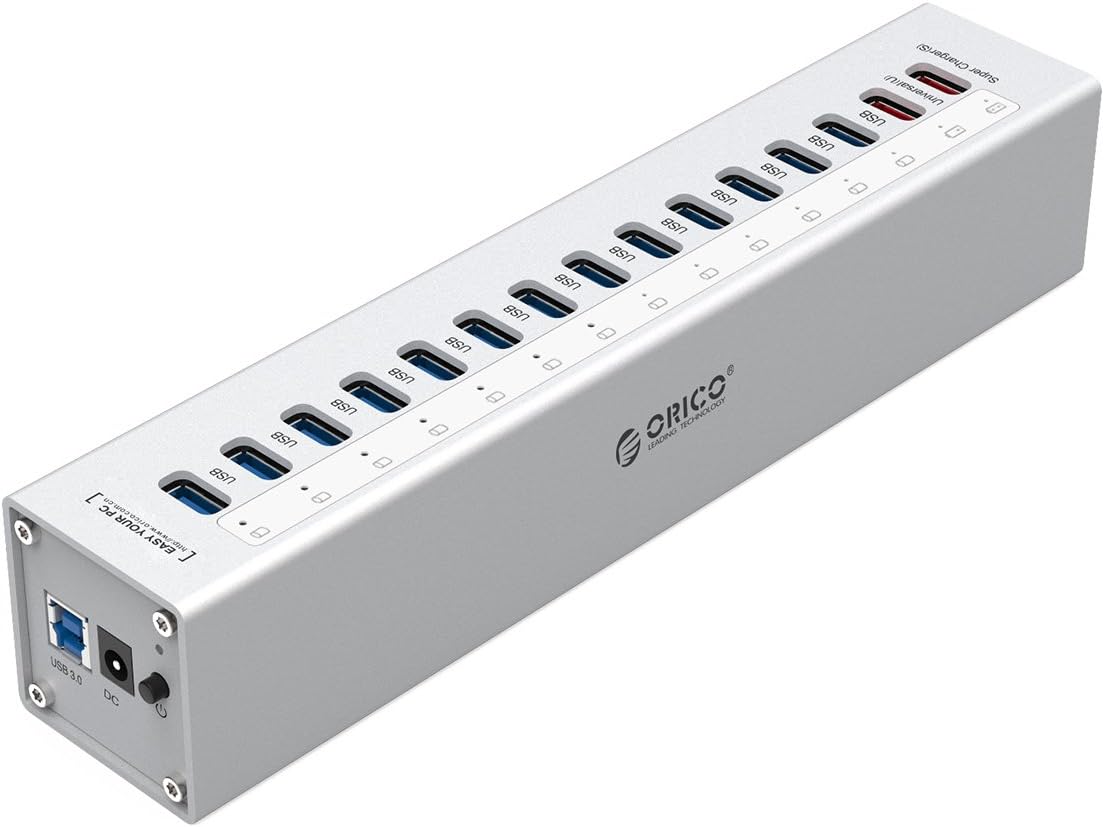
This is the USB HUB I use: ORICO 13 Port Aluminum USB 3.0
Image
By c-real Wed May 06, 2020 7:52 am
Overall, this is really good news. Akai moves to the right direction in my opinion. Here is my feeling about all these enhancements:

- Multi-MIDI : yes! we are finally rewarded for our patience. And sincerely, it goes beyond my expectations. I mean, 32 devices is a loooooot. I guess we will not force to use a USB hub to connect two USB MIDI keyboards but just use the two inputs ports instead. They still keep a way to set a master device, which is a good idea. And we can rename the ins/outs! Now, the MPC Live can truly be called MPC "Live". By the way, the track inspector of the main page as well as the track view mode will really be good for something :)

- Perform mode : yes! we now can use perform pads without being on the perform page. And the feature of creating our own progressions in standalone is a great addition (the way of doing seems clever)

- Workflow enhancements : for me, it's the best things and it shows that Akai listened to some of our suggestions. The main + pad to change track will be dope. The pad perform icon on the main page instead of a dedicated mode is welcome (the shift + 16 level shortcut too). Copying pads/pad range/banks between programs is also important. Drum mapping will be very useful too. I just hoped we could create presets but maybe it will be added later. The on/off button on the TC window is great too, as well as the "click" shortcut on the track view mode and both shortcuts "shift + TUI metronome/TC" to enable/disable click/TC

- Retrospective record : very unexpected addition! When Ableton Live added this feature 2 years ago, I thought... well, so what? But now I use it all the time. So I'm very happy to see this on the MPC

- Q-link overlay : someone suggested that feature last year, and sincerely I did not believe Akai will implement this, but it's very welcome. I wish we could disable the option if we want. Another great thing would be to auto-focus the q-link function when touching the screen in some modes (program mode, mixer mode, etc.)

- Send MIDI track to another track : quite surprising feature but I guess it could be useful, if only to create synth layering. And it is chainable, working like MIDI thru sockets


With all of that, it will be not surprising that Akai implement class compliant USB audio interfaces, disk streaming and some other workflow improvements. Look forward to the next week :)

Last edited by c-real on Wed May 06, 2020 9:45 am, edited 2 times in total.
By wavejockey Wed May 06, 2020 9:02 am
kaydigi wrote:This update is incredible, very happy that the qlink overlay was added. I really wish they would add qlink auto switch to all modes, it would take away the reliance on the qlink button press.

Not being doom and gloomy , this is a big update I’m honestly floored at the amount for stuff added. Can someone recommend a good usb hub and good usb to cv converter.


in the video, they are using this USB hub which is dirt cheap and looks ideal - though i cannot get it (from amazon) in belgium
http://www.rongshtech.com/product.html

try this USB-MIDI-CV expander :
(if you're not -yet- into eurorack)
https://www.retrokits.com/shop/rk006/
By c-real Wed May 06, 2020 9:39 am
bees80 wrote:About performance mode.. From the video it's not really clear to me how to turn off the performance mode once activated..

Just set it back to note i guess?


I think you will have to set pad perform to "off" in the dedicated page. As I understand, pad perform mode is not a mode anymore but just a way your pads will send MIDI information to the plugin/keygroup program, enabled for all tracks.
User avatar
By bees80 Wed May 06, 2020 10:58 am
c-real wrote:
bees80 wrote:About performance mode.. From the video it's not really clear to me how to turn off the performance mode once activated..

Just set it back to note i guess?


I think you will have to set pad perform to "off" in the dedicated page. As I understand, pad perform mode is not a mode anymore but just a way your pads will send MIDI information to the plugin/keygroup program, enabled for all tracks.


Thanks :nod:
By 40Beatz Wed May 06, 2020 12:49 pm
Crumb$ wrote:Yeah a good update. retrospective record is cool. I still need to call my q-links 2 days before I want to turn them though.


:lol: :lol: :nod: :nod: