MPC Software & MPC Beats Forum: Bug reports, feature suggestions and discussion for the MPC Software and the free 'MPC Beats' application for Mac/PC. If you have hardware-specific questions, please post in the relevant MPC sub-forum.
User avatar
By NearTao Mon Jul 27, 2020 12:47 am
CharlesRandolph wrote:When a person strives for mastery levels in music or any field. Most tend to come to the same conclusion.
Also once, that process is become natural, we tend to apply it to everything we do. It's not necessarily doing more with less, but understand why we do something and how it effects what we do in the long run.

This is what I'm trying to understand about the process.


Absolutely! I fully agree, and you need to put in those first ten, hundred, thousand, and ten thousand hours to hit those peaks or you end up flat lining. Self reflection is incredibly important in understanding both why we do things as well as how we can do them better. If I was to account for my hours involved with music... it's spread over about twenty years, and I'm definitely in the thousands of hours, but nowhere near ten thousand. I find it helps me appreciate a great many things in what others do and the skill and artistry, but not so much that I can sit down and show too many people who are well experienced how to do things better.

While I do understand not wanting to mess with a PO-33 due to the limits, I personally find myself far more creative with limits in place. I am not going to make myself into a serious musician on the PO-33, but it has certainly helped remind me about old school limitations that I actually appreciate. I also see some of it as a personal test... how much can I actually coax out of this silly little toy, to make it sound like a real instrument. I guess it's kind of in a similar mental space for me as "give an amateur guitarist a high quality guitar and you will get a mediocre performance, but give a professional guitarist a low quality guitar and you will get an amazing performance". Sure... the quality of the instrument and the performer goes hand in hand... but how much of it is skill and how much of it is the instrument?

Do you man, but don't be afraid of these toys to flex your mind and your skillsets.
By CharlesRandolph Mon Jul 27, 2020 1:40 am
NearTao wrote:
Do you man, but don't be afraid of these toys to flex your mind and your skillsets.


Not afraid, it's conscious choice to deliberately avoid those things. :lol: :lol:
User avatar
By troshalom Mon Jul 27, 2020 3:57 am
64hz wrote:Really, the only difference is the track count, everything else is given away. Why did I buy in to this ecosystem to only see it been given away 2 months later?


@64hz

Lots of companies do that. I have Cubase Pro, I started with Cubase AI that came bundled with the UR242. It was a great introduction for me and eventually led to my upgrading to Pro.

If the full version of the software is doing what you need, you shouldn't be angry that they are offering a free version that has many of the elements the full version has.

I purchased my MPK Mini MKII in 2017 and for years I could not use the Q links (K knobs) in the MPC Essentials software, and it was such a pain trying to program them to work in Cubase that I just purchased a Nektar Impact which is programmed to work with Cubase out the box. So for 3 years I had a piece of hardware I didn't use and software that came with 1 track and no formal video tutorials. I'm happy MPC Beats came along, now I can dust off my mini and look a closer look at the MPC ecosystem.
User avatar
By troshalom Mon Jul 27, 2020 4:01 am
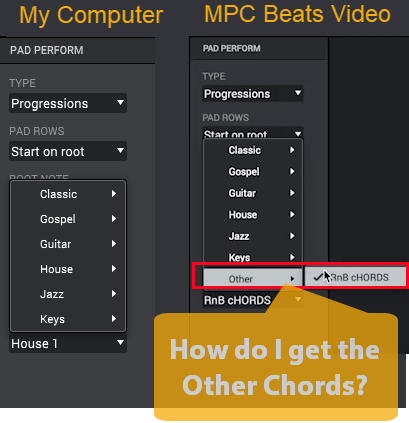
So, I'm taking the online training and noticed in the first video that under Pad Perform > Progressions that they have listed Other with RnB Chords
Image
Is that intimating that when you purchase other expansion packs you will get additional chord progressions? Or does it indicate that when you create a chord progression it displays under Other?
User avatar
By Menco Mon Jul 27, 2020 6:02 am
CharlesRandolph wrote:
Menco wrote:I often chop samples and make programs in the software and export the programs as an MPC1000/ MPC2500 program. Load that in the 500, build beat and import that back into the software. Best of both worlds.


What are the advantage that you receive by doing this? Wouldn't it be less work to just finish it in the software, since it's already there?


The amount of extra work isn’t that much. It’s just more fun laying down tracks with the 500 than with the software, and in my case the Studio. For years I’ve been trying to find a workable mobile setup, giving me a workflow close to the 2500 JJOS1 when I’m at my girlfriend/ nightshift/ or at my parents taking care of them. And MPC500 with laptop combo gives me that.
User avatar
By MPC-Tutor Mon Jul 27, 2020 6:25 am
64hz wrote:Really, the only difference is the track count, everything else is given away. Why did I buy in to this ecosystem to only see it been given away 2 months later?

You have an MPC one right? That's what you bought, a standalone hardware MPC, you got the full version of MPC software free with it.
By CharlesRandolph Mon Jul 27, 2020 6:26 am
Menco wrote:
The amount of extra work isn’t that much. It’s just more fun laying down tracks with the 500 than with the software, and in my case the Studio. For years I’ve been trying to find a workable mobile setup, giving me a workflow close to the 2500 JJOS1 when I’m at my girlfriend/ nightshift/ or at my parents taking care of them. And MPC500 with laptop combo gives me that.


How is the MPC 500 integrated with the laptop and software? Can the software/laptop see the MPC 500 while it's in standalone mode, allowing you to drag and drop projects over usb?
User avatar
By troshalom Mon Jul 27, 2020 6:52 am
troshalom wrote:
64hz wrote:Really, the only difference is the track count, everything else is given away. Why did I buy in to this ecosystem to only see it been given away 2 months later?


@64hz

Lots of companies do that. I have Cubase Pro, I started with Cubase AI that came bundled with the UR242. It was a great introduction for me and eventually led to my upgrading to Pro.

If the full version of the software is doing what you need, you shouldn't be angry that they are offering a free version that has many of the elements the full version has.

I purchased my MPK Mini MKII in 2017 and for years I could not use the Q links (K knobs) in the MPC Essentials software, and it was such a pain trying to program them to work in Cubase that I just purchased a Nektar Impact which is programmed to work with Cubase out the box. So for 3 years I had a piece of hardware I didn't use and software that came with 1 track and no formal video tutorials. I'm happy MPC Beats came along, now I can dust off my mini and look a closer look at the MPC ecosystem.


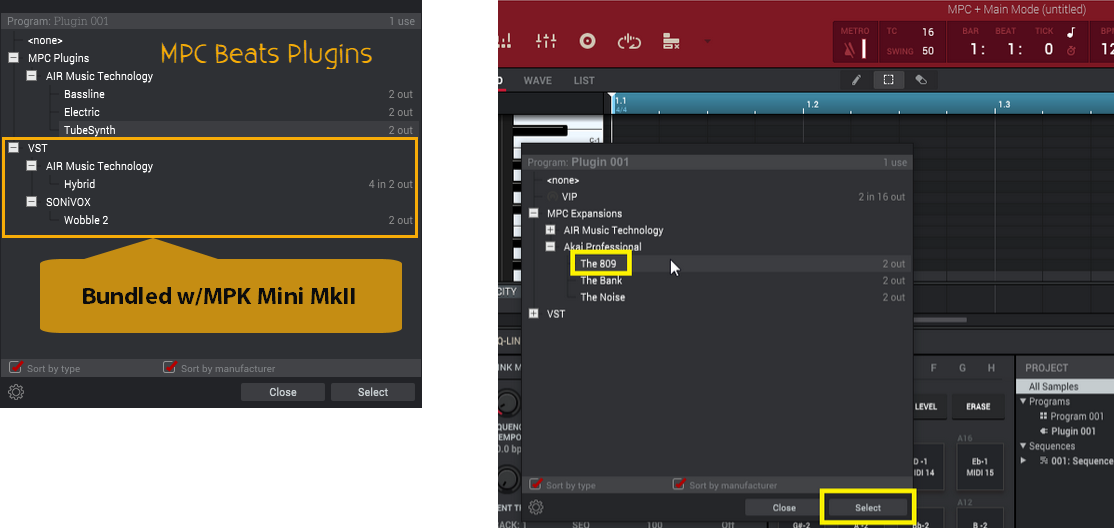
Also, Beats is a stripped down version of MPC 2.8, not just in the number of tracks. For instance it includes the plugins The 809, Bank and Noise, but not the full versions of the plugins.
Image

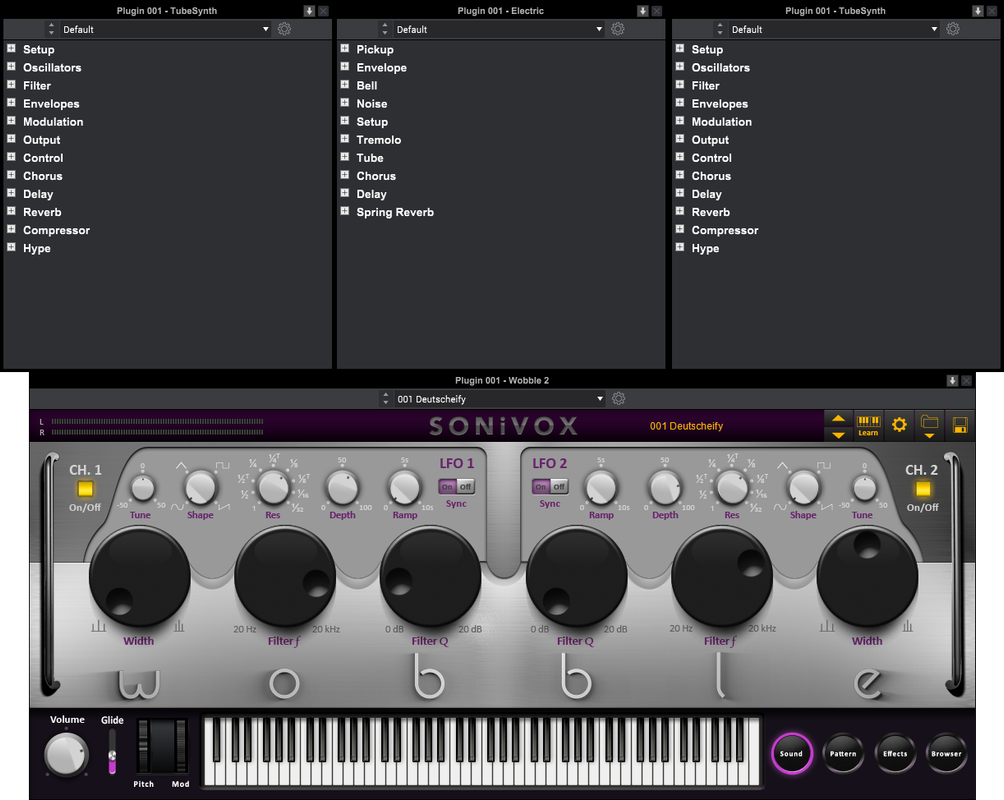
When I add a plugin from Air Music Technology I don't get the full interface to manipulate that you will get with MPC 2. However, because I do have a license for Wobble I do get that full interface.
Image
User avatar
By Menco Mon Jul 27, 2020 6:55 am
CharlesRandolph wrote:
Menco wrote:
The amount of extra work isn’t that much. It’s just more fun laying down tracks with the 500 than with the software, and in my case the Studio. For years I’ve been trying to find a workable mobile setup, giving me a workflow close to the 2500 JJOS1 when I’m at my girlfriend/ nightshift/ or at my parents taking care of them. And MPC500 with laptop combo gives me that.


How is the MPC 500 integrated with the laptop and software? Can the software/laptop see the MPC 500 while it's in standalone mode, allowing you to drag and drop projects over usb?


Yes. Just like the 1000 and 2500, the computer sees the CF card as an external disk which also shows up in the software browser.
By CharlesRandolph Mon Jul 27, 2020 7:49 am
Menco wrote:Yes. Just like the 1000 and 2500, the computer sees the CF card as an external disk which also shows up in the software browser.


Well that makes things much easier. What about the software keeps you from just staying in that environment?
User avatar
By Menco Mon Jul 27, 2020 8:12 am
CharlesRandolph wrote:
Menco wrote:Yes. Just like the 1000 and 2500, the computer sees the CF card as an external disk which also shows up in the software browser.


Well that makes things much easier. What about the software keeps you from just staying in that environment?


In terms of user experience I just prefer relatively simple hardware gear to build my beats or at least the foundation of the beat. It just stimulates me more on a creative level. Don't know what the exact reasons are. All I know is that I am most productive when I spend a day on the 2500.
By CharlesRandolph Mon Jul 27, 2020 8:40 am
Menco wrote:In terms of user experience I just prefer relatively simple hardware gear to build my beats or at least the foundation of the beat. It just stimulates me more on a creative level. Don't know what the exact reasons are. All I know is that I am most productive when I spend a day on the 2500.


It's your muscle memory and learned thought process. It's natural and you don't have to think, just do. Software can offer that same stimulation, as long as the computer is solid and the software is bug free. For your particular production style, it seems you've found your way.

To adjust my brain to the MPC SOFTWARE, using the MPC in controller mode really helped. I also found it easier to use dual screen setup, so the mixer is always open. While doing MPC type things the software is just fine. However the issues with the Software arises, when trying to do certain things that other Software DAW can do.

That's why I can only look at the BEATS or MPC SOFTWARE 2 as utility programs for the MPC.
User avatar
By Menco Mon Jul 27, 2020 8:47 am
CharlesRandolph wrote:
Menco wrote:In terms of user experience I just prefer relatively simple hardware gear to build my beats or at least the foundation of the beat. It just stimulates me more on a creative level. Don't know what the exact reasons are. All I know is that I am most productive when I spend a day on the 2500.


It's your muscle memory and learned thought process. It's natural and you don't have to think, just do. Software can offer that same stimulation, as long as the computer is solid and the software is bug free. For your particular production style, it seems you've found your way.

To adjust my brain to the MPC SOFTWARE, using the MPC in controller mode really helped. I also found it easier to use dual screen setup, so the mixer is always open. While doing MPC type things the software is just fine. However the issues with the Software arises, when trying to do certain things that other Software DAW can do.

That's why I can only look at the BEATS or MPC SOFTWARE 2 as utility programs for the MPC.


Sounds very plausible.

I agree, when using more advanced DAW type stuff the MPC Software/ Beats comes up short, making it a specific tasks type thing imo. Tasks that in my case can be done quicker and easier with something else.
By CharlesRandolph Mon Jul 27, 2020 9:06 am
Menco wrote:Sounds very plausible.

I agree, when using more advanced DAW type stuff the MPC Software/ Beats comes up short, making it a specific tasks type thing imo. Tasks that in my case can be done quicker and easier with something else.


The issues with all these hardware samplers, is effectively and efficiently linking up to a desktop computer system. They really need to functions well as an audio interface and controller, without having to configure anything.

With the MPC Software, it seems the issue are with the audio drivers and software bugs. The fact we have to go into controller mode to work is convoluted. Everything should be done from standalone.
User avatar
By inflict3 Mon Jul 27, 2020 10:15 pm
Well, already I found some stuff I don’t like about the software. I mapped everything to my mpd32 and when I move the knob I mapped to the start point of the sample it jumps by 200, even though I’m using the knob that is labeled 1 it jumps by 200 even when I zoom in, so I’m forced to use the mouse. What’s the point in mapping it is I gotta go for the mouse in the end anyway.. am I missing something??