Support and discussion for all of Akai’s modern standalone MPCs including the MPC X / X SE, MPC Live 1, 2 & 3, MPC One / One+, MPC Key 37/61.
User avatar
By ACRE Mon Nov 30, 2020 11:22 am
Hi guys,
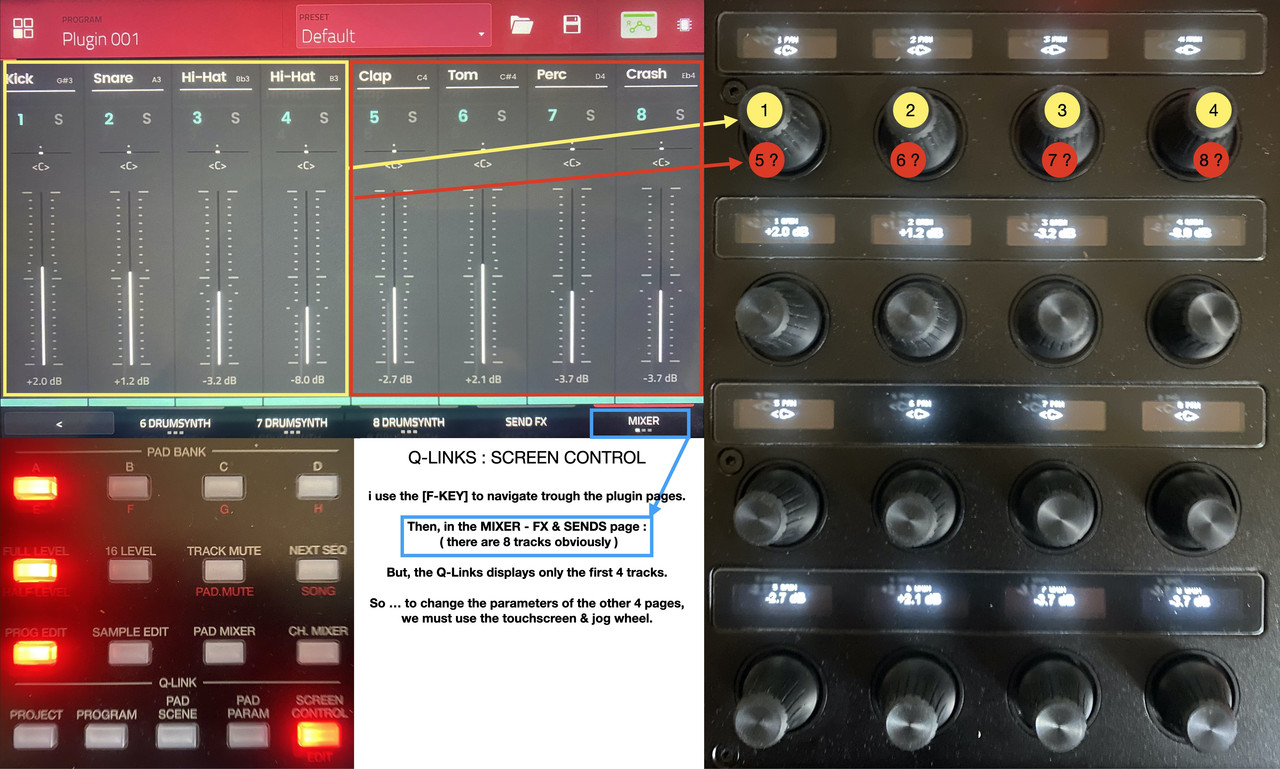
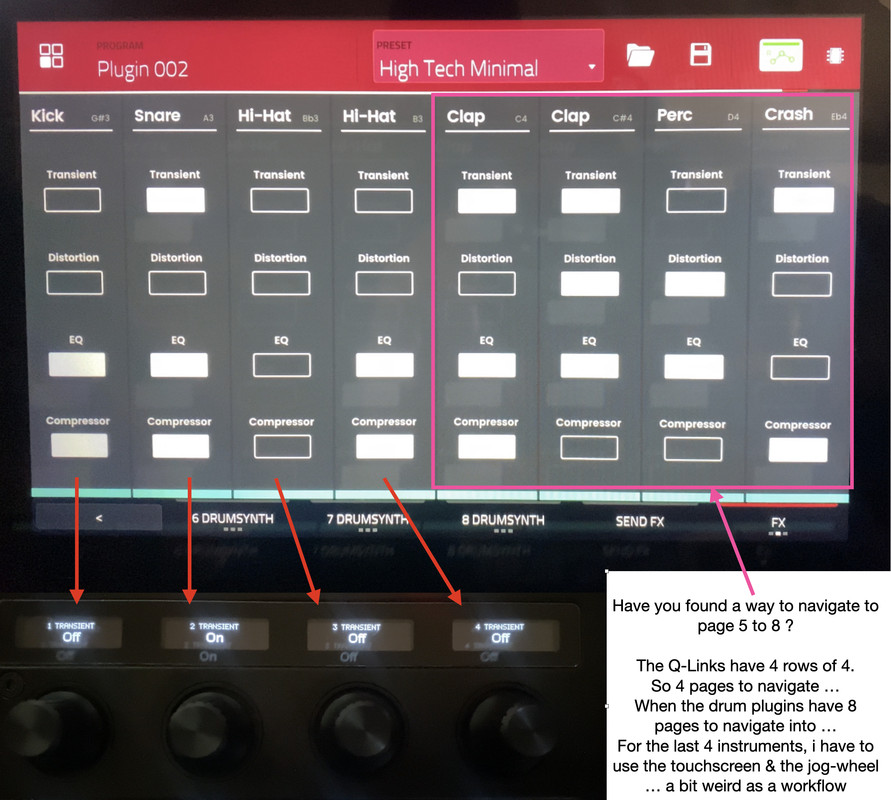
1st of all, don't get me wrong, i love my Mpc X, i do appreciate what the new update has to offer, the drum plugin is killer ... Now, i do have a silly request ... When you load a drum plugin with the full kit, you then have 8 tracks to play with ... The Q-Links have 4 rows of 4 pages ...
Do you know how to navigate into the last 4 pages of the plugin ?
Because using the Q-Links for the first 4 tracks & the jog-wheel for the other 4, is not the most intuitive way to work ... it's a bit weird actually, like if Akai didn't finish the implementation of this new plugin ...
It feels a bit odd ...
Image


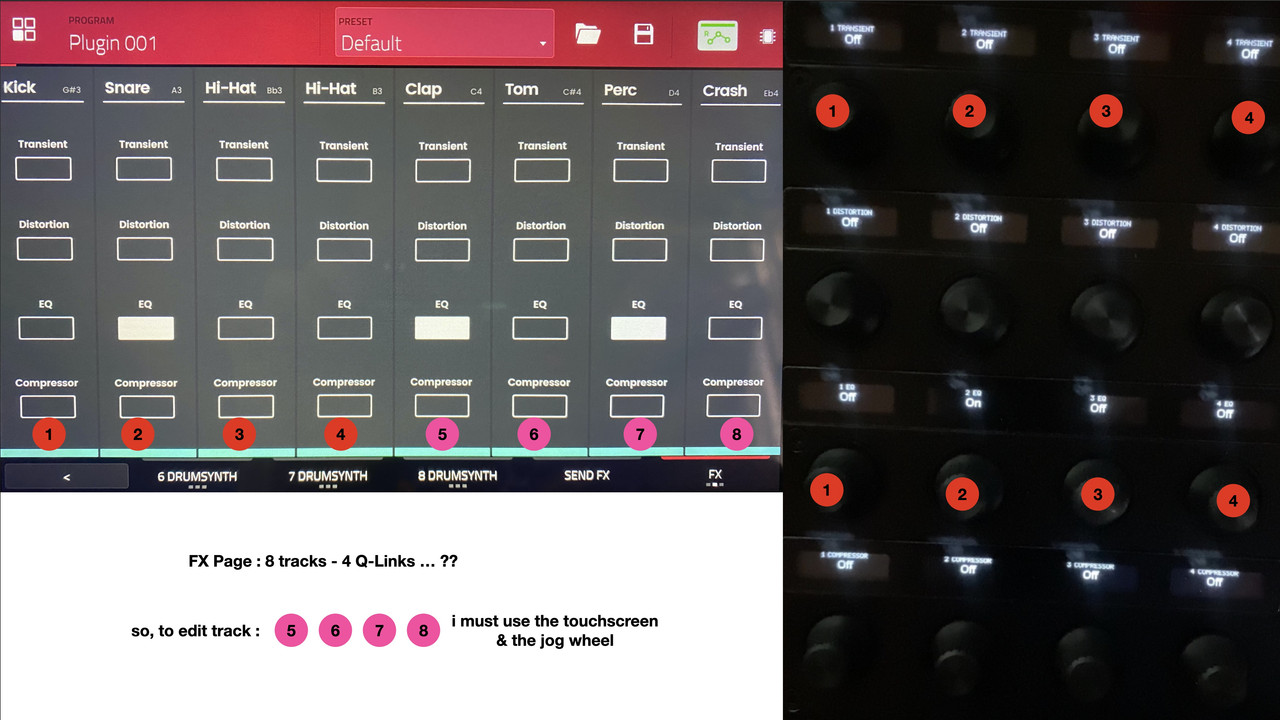
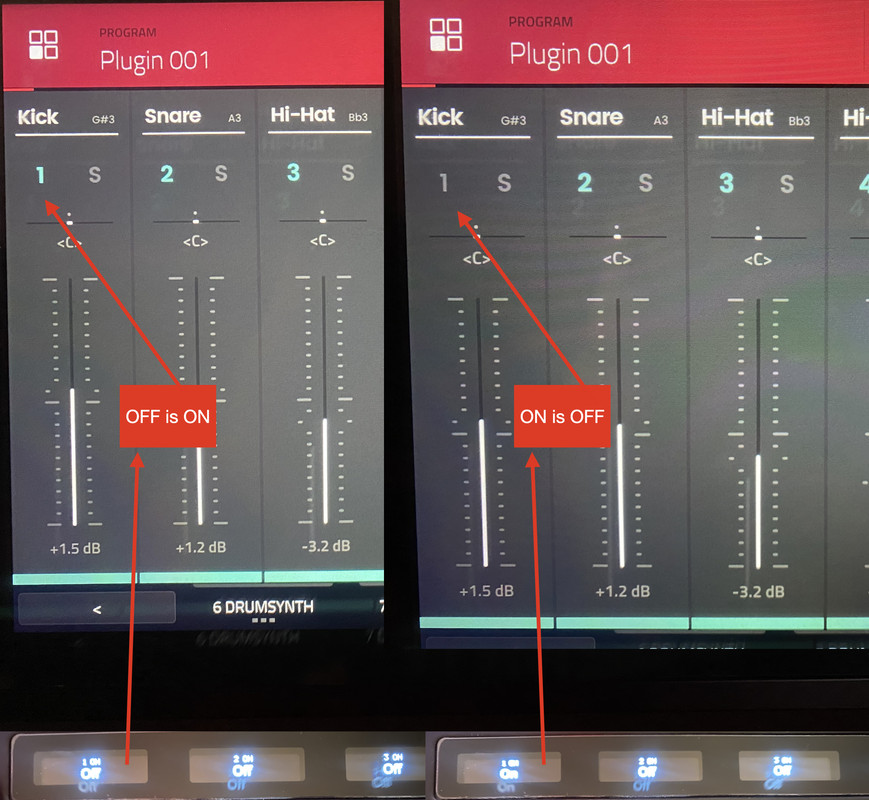
Also, the Q-Links visual is inverted : The On-Off shows Off-On on the Q-links ...
Image

Don't you find it a bit odd ?
By SakisX Mon Nov 30, 2020 1:12 pm
I suggest you report it to AKAI, the first one is known issue
User avatar
By ACRE Mon Nov 30, 2020 4:03 pm
SakisX wrote:I suggest you report it to AKAI, the first one is known issue

I did send a report to Akai.
Wait & see ...
User avatar
By ACRE Wed Dec 16, 2020 1:24 pm
Allright, Allright ... here's the reply i got from Akai, 3 weeks after the request ...
It is just a joke, it's unbelievable ...

Image

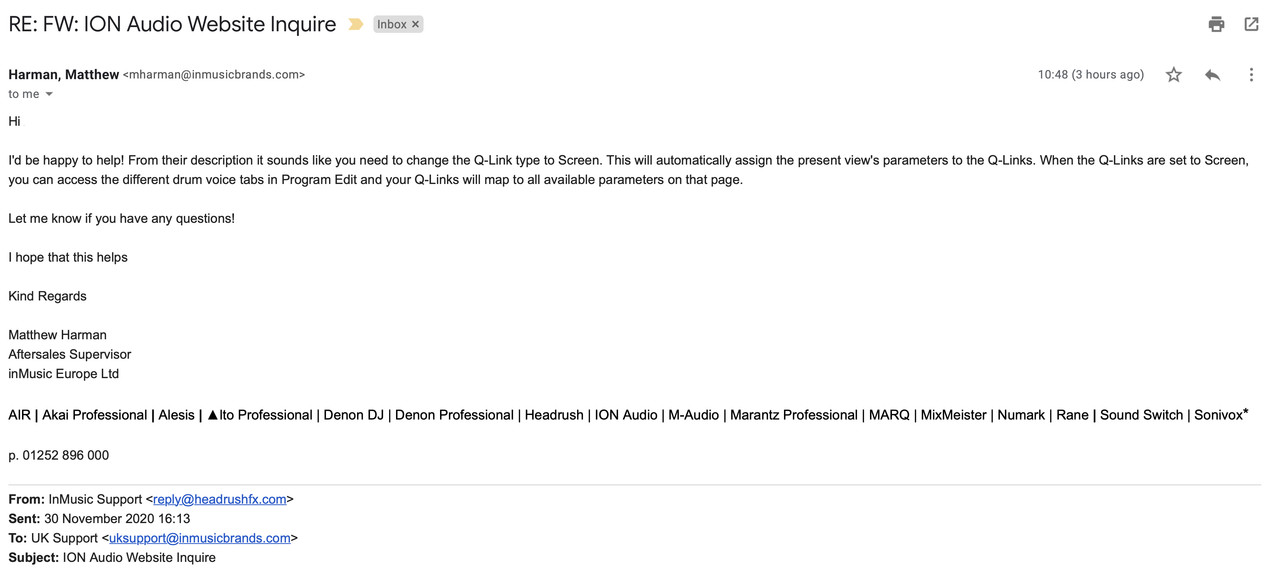
So, i've sent an other mail with a deeper explanation ...

Image
User avatar
By 83dude Wed Dec 16, 2020 3:21 pm
Q-Links 1-4 (in your bottom lane) show the exact values of the mentioned channels (screen) 5-8.

EDIT: Sorry, misunderstood you. :WTF:
User avatar
By ACRE Wed Dec 16, 2020 6:47 pm
83dude wrote:Sorry, misunderstood you. :WTF:


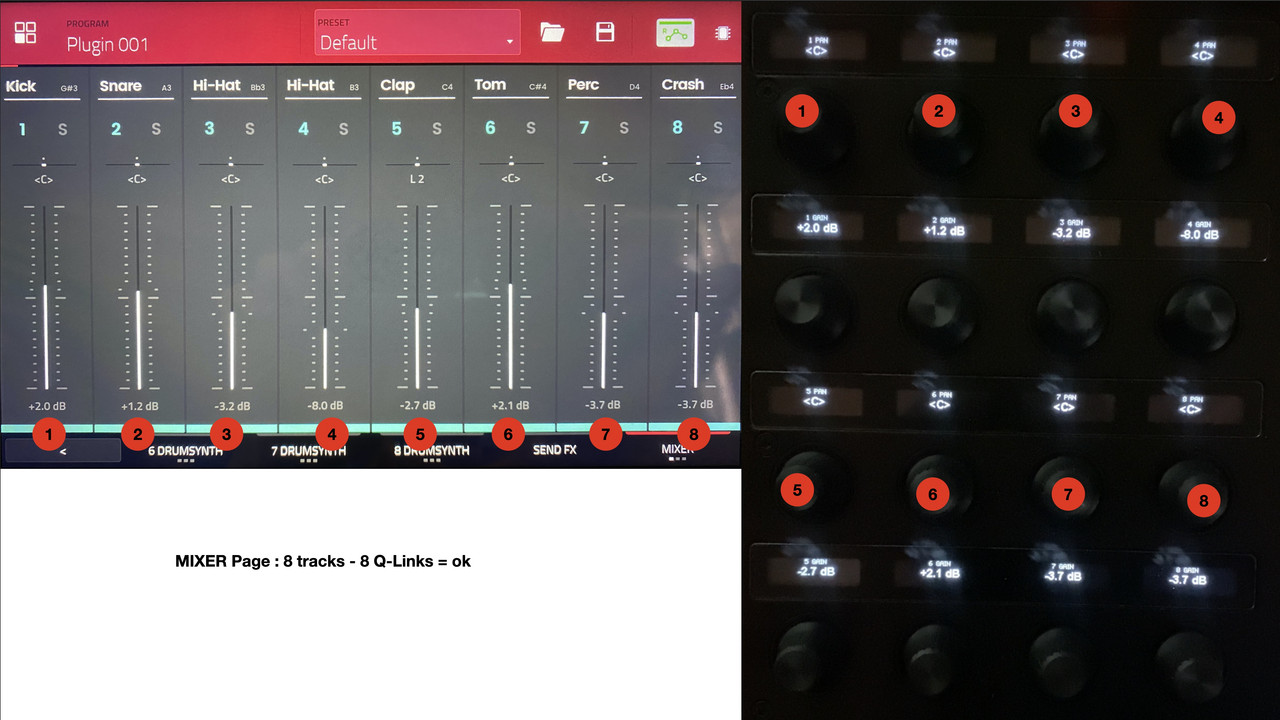
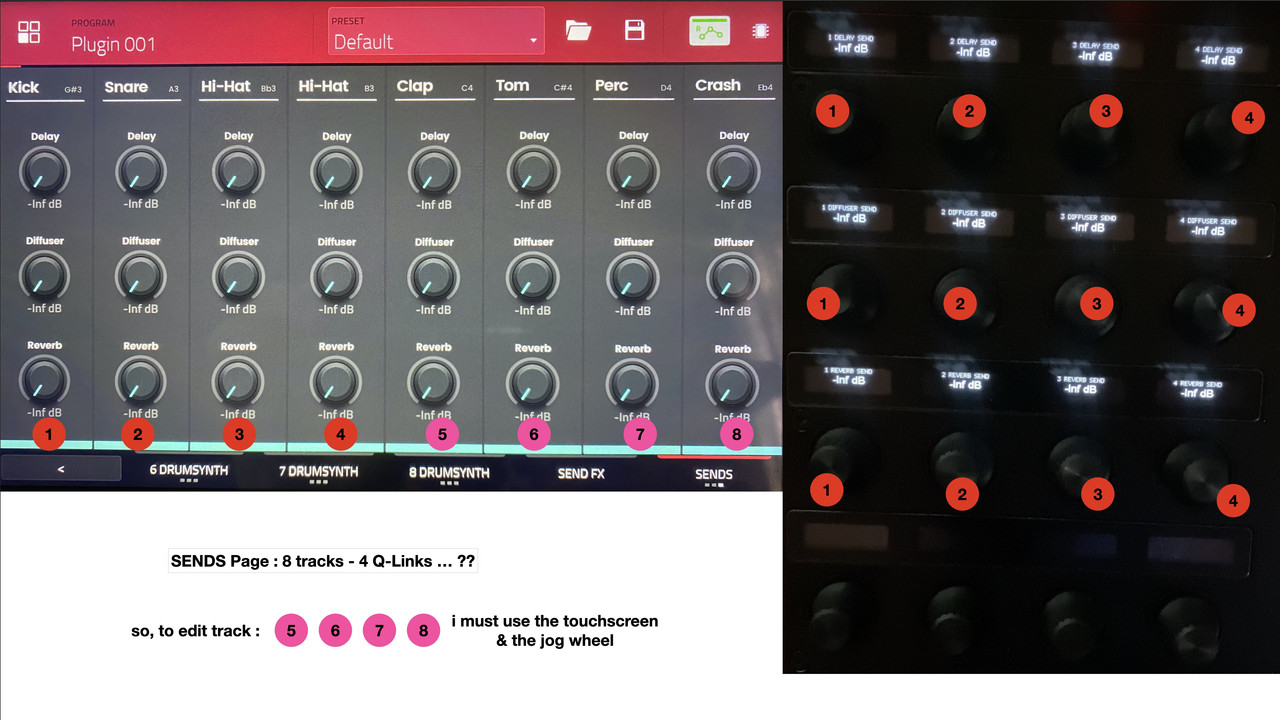
In the last Tab of the available settings, you have 3 pages of parameters [MIXER] [SENDS] & [FX]
In the MIXER section, the Q-Links displays the 8 tracks : OK.
In the SENDS & FX sections, the Q-Links only shows the 1st 4 tracks so , to change any parameter, i must use the touchscreen & the jog wheel ...
Do you guys know what i'm saying ?
By Komatos Records Wed Dec 16, 2020 9:31 pm
Maybe I’m misunderstanding your question or point, but it looks like you have an MPC X with the 16 Q-Link knobs and corresponding OLED displays above each knob. Looking at your (grainy) picture of the knobs and OLEDs it’s showing knobs 1-4 let you adjust pan for tracks 1-4, knobs 5-8 adjust the volume (+2 dB, etc.). If you look at the knobs below, knobs 9-12 allow you to adjust the pan for tracks 5-8, and knobs 13-16 allow you to adjust the volume for tracks 5-8. So, at least with the MPC X, I don’t see any issue with adjusting the parameters for all 8 tracks. At least from the screen you’re showing above.

If you mean from other pages, I can’t tell from the pictures above and haven’t tried the drum synth plugin to that extent on my MPC X yet. I just played with it a little the day it came out to make sure it worked and was stable/didn’t break anything else or introduce other errors. My 2.9 MPC X seems stable but I don’t push it nearly as much as y’all since I’m still learning the basics.
User avatar
By Lampdog Thu Dec 17, 2020 6:02 am
Image

Mute ON = Inst is not playing.

Qlinks acts as a MUTE control. No audio is heard when MUTE is on/enabled.

Greenish blue number is your ACTIVE inst indicator. Audio is heard when number is lit up.
User avatar
By Lampdog Thu Dec 17, 2020 6:27 am
Image

Pay close attention to how the default qlinks are setup on
the Qlink PROGRAM and/or Qlink SCREEN CONTROL buttons.

Qlink PROGRAM shows MUTE + GAIN for all 8 chnls.
Qlink SCREEN CONTROL shows PAN + GAIN for all 8 chnls.
GAIN layout changes between those 2 screens.

Qlink PROGRAM button layout
Qlinks 1 - 8 = MUTE for 1 - 8.
Qlinks 9 - 16 = GAIN for 1 - 8.

Qlink SCREEN CONTROL layout
Qlinks 1 - 4 = PAN for 1 - 4.
Qlinks 5 - 8 = GAIN for 5 - 8.
Qlinks 9 -12 = PAN for 9 - 12.
Qlinks 9 - 16 = GAIN for 9 - 16.
User avatar
By ACRE Thu Dec 17, 2020 2:18 pm
If you mean from other pages

yes, exactly. from the last 2 pages of this MIXER tab in the Drum Synth Plugin Program Edit.

Mute ON = Inst is not playing.
... no offense here, but come on , i know what is a mute ON.
Mute On, greenish indicator etc etc , i know what it indicates, but look at the Q-Links, the visual is inverted.
When no sound is heard, so the track is muted, the Q-link says the track is On.

Greenish blue number is your ACTIVE inst indicator. Audio is heard when number is lit up.

Come on buddy, is my English ( not my mother tongue obviously :lol: ) that bad ?? :hmmm:

Image

Image

Image
User avatar
By Lampdog Sat Dec 19, 2020 3:14 am
I explained it how I see it.
By TokinTone Fri Jan 03, 2025 4:18 pm
Did you ever get anywhere with this ? Really frustrating I abbot adjust the second half of the mixer page with the Q links
By T-Monk Sun Jan 12, 2025 7:06 pm
I think they changed it in Beta 3.x. I remember it being the way you describe in 2.15.


Now it works like this on my MPC One 3.4 for Drum Synth Multi
Q-Link 1 = Pan and Vol for Pad 1 and Pad 2
Q-Link 2 = Pan and Vol for Pad 3 and Pad 4
Q-Link 3 = Pan and Vol for Pad 5 and Pad 6
Q-Link 4 = Pan and Vol for Pad 7 and Pad 8
By T-Monk Sun Jan 12, 2025 7:20 pm
What you describe still happens on the Sends Tab - (Tab 10 Sub Tab 3)

Q-Link Bank 1 controls Kick
Q-Link Bank 2 controls Snare
Q-Link Bank 3 controls Hi-Hat 1
Q-Link Bank 4 controls Hi-Hat 2

There is no way to get knob control over Clap, Tom, Perc and Crash.