Support and discussion for all of Akai’s modern standalone MPCs including the MPC X / X SE, MPC Live 1, 2 & 3, MPC One / One+, MPC Key 37/61.
By CharlesRandolph Fri Jan 15, 2021 9:26 am
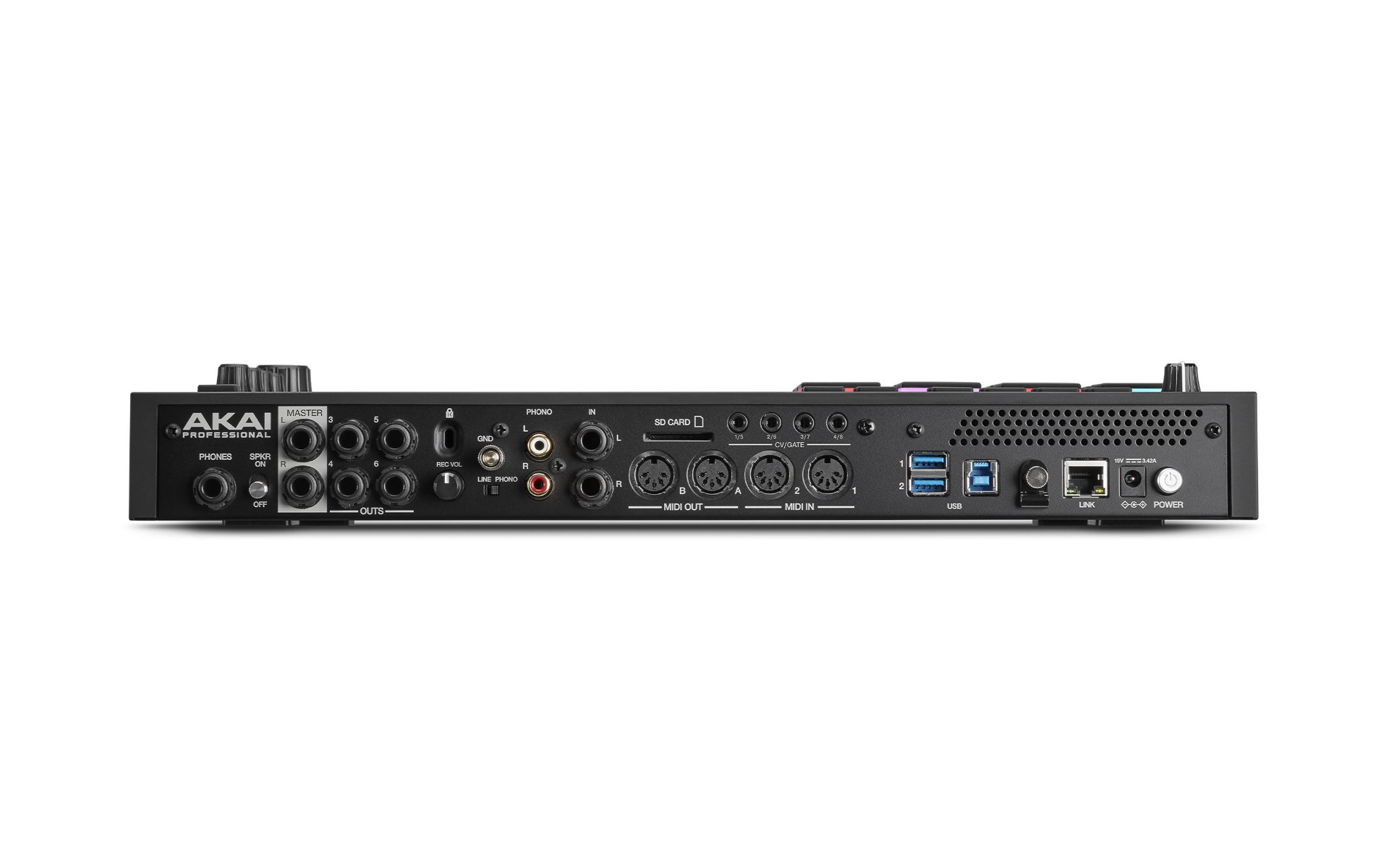
Are you using the full I/O capabilities of your MPC when composing? I'm talking all the MIDI INS/OUTS, all the CV/GATE, Audio Ins/Out, Ethernet, and all the USB ports. If you do, what limitations are running into? If you don't why do you choose not to fully use your machine? (No wrong answers or Judgement)


Image

Image

Image
User avatar
By NearTao Fri Jan 15, 2021 1:47 pm
Interesting topic... I have the MPC Live mk2. Since you were more focussed on hardware aspects, I'll skip the software components.

Capabilities I use
* Headphone outs, Main outs to speakers, 3/4 outs to Eurorack, 5 out to Akai S950, and 6 out to Akai S1000
* Line input... for sampling, monitoring other gear... etc... hooked up to whatever I need
* Kensington lock port... nope... if somebody has gotten into my home with the intent of taking stuff... the lock is not going to stop them
* SD Card Slot... I've got a card in the slot, but I hardly use it... I've been finding bouncing to USB a bit more streamlined I guess... though if I use up the USB ports... maybe I'll go back
* CV/Gate... yeah I use it... but not to the full capacity... mostly for generating Gate signals to sync clocks up... the CV out is decent when I want to record off a Euro patch I have made, but otherwise automating it I'd put into the "okay" bucket... but there are far more interesting things to do within Euro... if Akai added an Sync/Desync LFO with a few different shapes or similar though, could make CV more interesting
* Midi In/Out... use all these, wish I had more outs at least, but yeah, hooked up to Synths so I can record keys, pitch bend, CC#, etc...
* USB... I'm using one port for a drive, and the second I'm using for a keyboard... when doing some bigger work being able to type in names is a huge help
* USB 3 port... I do use this from time to time, mostly to transfer files, but not much to use the MPC in controller mode... I have used the MPC as an audio device for my computer a few times in a pinch... it's handy for sure.
* Ethernet... I have used this, it's good for sync'ing up with a hardwired computer, but for what it offers... feels kind of like overkill to me... or something they could actually build off of
* Speaker... I use this quite a bit... it's not great, but I'd say it's decent when you don't want to wear headphones, or want to work on something with somebody else... so far for me it hasn't been great for mixing... some day I'll bother to figure out what it's frequency response is and it'll probably answer where/why I am over/under mixing in some places
* Existing buttons... I use almost all of them quite frequently... menu+pad gets a ton of use from me and I have most of the combos memorized from using them so much
* New buttons... the TC gets a fair amount of use from me... step sequencer I didn't even really know it was there until I consciously looked at it... mix gets a *ton* of usage as well as a double tap for sampler (probably even more for sampler)... Mute gets a ton of use from me (probably even more for sample edit)... Next Seq... I don't think I've ever used this button
* Bluetooth... I know it's an internal... but there are some really great iPad apps and while yeah, there's a delay using Midi over bluetooth, you can do some serious magic with sequencers and synths... plus... if you don't have an audio out jack and a usb jack... well you can get the most important part which is the audio over a physical connection
* Internal storage... this gets the most use from me... I just went big so I can save different revisions of projects and hopefully never have to worry about it.
* Display... I enjoy it, it gets you a ton of information quickly, so for me there's lots to like here

Neutral... like I use it... but don't think about it
* Memory... obviously, but I'm rarely using more than a minute of audio... so unless I'm making or heavily using key groups... it's not really been an issue for me. I think I've gotten the memory warning two or three times... other than that I'm probably using less than 10% of available resources.
* CPU... this has never been a problem for me... while I dig into the FX, I'm not going buck wild... so I couldn't tell you what the highest note count song I have done with simultaneous events, but I've definitely had tracks with upwards of 40, maybe even 60, in place... and while the CPU monitor looked like it was getting higher... it never capped out for me
* Copy button... I've recently started playing with this more for a few of the #jamuary projects I've been working on... but by and large it hadn't been a go to button for me
* Q-Links... I'm neutral here... not because I don't use them or anything... but I do have to say the experience is just so much better on the X, and one of the reasons I might eventually go back to the X... but the screen overlay frequently makes working on end points and chopping a PITA because it's in the way of whatever you are working on... I have no problem doing this by ear, but when it irritates me is when I am trying to chop some longer material and don't want to listen to a long section to see if it is working in context and would just rather do the first pass visually...
* Pad lights... when I have time I do like to color code my patches, and it can be helpful when somebody has taken the time to do it themselves... but there's no standard followed for this... which is where I find it can make things more confusing
* Touch screen... like others, I'm not in love with it, and do hope a new iteration uses better technology here. Tapping once in a while is fine... but trying to do much of anything complicated just results in frustration. The on screen keyboard is passable... but I just as often reach for a keyboard.

Capabilities I do not use
* Phono input/ground... I don't have a turntable any more... and unlikely to get another one
* New Buttons... Apparently not even bothering to use Step Sequencer or Next Seq buttons
* Ethernet... I'm just not using it right now
* Wireless... not using this... set it up... not as good a solution as ethernet, and I could care less about Splice. Maybe I should try Splice out with the free trial, but I have a hard time caring about it right now. There are definitely some cool cloud features that Akai *could* implement with/through Splice... but loop distribution... meh... get me some cloud VSTs, even if I have to render it and wait a bit to get a higher quality stem it'd be more interesting than just grabbing canned loops... anyways
* Internal storage... I mean... sure I accidentally save stuff here once in a while... and nice that it is there in a pinch... but we all know why to avoid this.
* +/- buttons... I don't know who uses these over either the touch screen or data wheel... but these are something I find to be a huge waste of space... would have so much rather have seen arrow and enter buttons to moving around faster... or heck give me </<< and >/>> to move around the timeline.

Changes I would make
* Move the input volume knob to the top of the case, possibly by the Master knob
* Add 4 OLED displays to coincide with the QLinks and get rid of the qlink overlay
* Add a built in microphone... I know it's asking for feedback city... but it'd add a different spin on this being a portable device
* Or if not the previous... at least add flipping phantom power to the line inputs...
* CV/Gate inputs... would add a whole other level of Euro integration... actually maybe just 4 inputs in general... but DC coupled so we can use either audio or Euro
By CharlesRandolph Fri Jan 15, 2021 2:20 pm
With the way that you have thing connected, it seems you tend to track things out in real time. Do you tend to record two track or multi track stems? Also do you find yourself using the MPC LIVE 2 as a midi device and less a sound device? Also how does this effect the tonality of your music?


NearTao wrote:Interesting topic... I have the MPC Live mk2. Since you were more focussed on hardware aspects, I'll skip the software components.

Capabilities I use
* Headphone outs, Main outs to speakers, 3/4 outs to Eurorack, 5 out to Akai S950, and 6 out to Akai S1000
* Line input... for sampling, monitoring other gear... etc... hooked up to whatever I need
* Kensington lock port... nope... if somebody has gotten into my home with the intent of taking stuff... the lock is not going to stop them
* SD Card Slot... I've got a card in the slot, but I hardly use it... I've been finding bouncing to USB a bit more streamlined I guess... though if I use up the USB ports... maybe I'll go back
* CV/Gate... yeah I use it... but not to the full capacity... mostly for generating Gate signals to sync clocks up... the CV out is decent when I want to record off a Euro patch I have made, but otherwise automating it I'd put into the "okay" bucket... but there are far more interesting things to do within Euro... if Akai added an Sync/Desync LFO with a few different shapes or similar though, could make CV more interesting
* Midi In/Out... use all these, wish I had more outs at least, but yeah, hooked up to Synths so I can record keys, pitch bend, CC#, etc...
* USB... I'm using one port for a drive, and the second I'm using for a keyboard... when doing some bigger work being able to type in names is a huge help
* USB 3 port... I do use this from time to time, mostly to transfer files, but not much to use the MPC in controller mode... I have used the MPC as an audio device for my computer a few times in a pinch... it's handy for sure.
* Ethernet... I have used this, it's good for sync'ing up with a hardwired computer, but for what it offers... feels kind of like overkill to me... or something they could actually build off of
* Speaker... I use this quite a bit... it's not great, but I'd say it's decent when you don't want to wear headphones, or want to work on something with somebody else... so far for me it hasn't been great for mixing... some day I'll bother to figure out what it's frequency response is and it'll probably answer where/why I am over/under mixing in some places
* Existing buttons... I use almost all of them quite frequently... menu+pad gets a ton of use from me and I have most of the combos memorized from using them so much
* New buttons... the TC gets a fair amount of use from me... step sequencer I didn't even really know it was there until I consciously looked at it... mix gets a *ton* of usage as well as a double tap for sampler (probably even more for sampler)... Mute gets a ton of use from me (probably even more for sample edit)... Next Seq... I don't think I've ever used this button
* Bluetooth... I know it's an internal... but there are some really great iPad apps and while yeah, there's a delay using Midi over bluetooth, you can do some serious magic with sequencers and synths... plus... if you don't have an audio out jack and a usb jack... well you can get the most important part which is the audio over a physical connection
* Internal storage... this gets the most use from me... I just went big so I can save different revisions of projects and hopefully never have to worry about it.
* Display... I enjoy it, it gets you a ton of information quickly, so for me there's lots to like here

Neutral... like I use it... but don't think about it
* Memory... obviously, but I'm rarely using more than a minute of audio... so unless I'm making or heavily using key groups... it's not really been an issue for me. I think I've gotten the memory warning two or three times... other than that I'm probably using less than 10% of available resources.
* CPU... this has never been a problem for me... while I dig into the FX, I'm not going buck wild... so I couldn't tell you what the highest note count song I have done with simultaneous events, but I've definitely had tracks with upwards of 40, maybe even 60, in place... and while the CPU monitor looked like it was getting higher... it never capped out for me
* Copy button... I've recently started playing with this more for a few of the #jamuary projects I've been working on... but by and large it hadn't been a go to button for me
* Q-Links... I'm neutral here... not because I don't use them or anything... but I do have to say the experience is just so much better on the X, and one of the reasons I might eventually go back to the X... but the screen overlay frequently makes working on end points and chopping a PITA because it's in the way of whatever you are working on... I have no problem doing this by ear, but when it irritates me is when I am trying to chop some longer material and don't want to listen to a long section to see if it is working in context and would just rather do the first pass visually...
* Pad lights... when I have time I do like to color code my patches, and it can be helpful when somebody has taken the time to do it themselves... but there's no standard followed for this... which is where I find it can make things more confusing
* Touch screen... like others, I'm not in love with it, and do hope a new iteration uses better technology here. Tapping once in a while is fine... but trying to do much of anything complicated just results in frustration. The on screen keyboard is passable... but I just as often reach for a keyboard.

Capabilities I do not use
* Phono input/ground... I don't have a turntable any more... and unlikely to get another one
* New Buttons... Apparently not even bothering to use Step Sequencer or Next Seq buttons
* Ethernet... I'm just not using it right now
* Wireless... not using this... set it up... not as good a solution as ethernet, and I could care less about Splice. Maybe I should try Splice out with the free trial, but I have a hard time caring about it right now. There are definitely some cool cloud features that Akai *could* implement with/through Splice... but loop distribution... meh... get me some cloud VSTs, even if I have to render it and wait a bit to get a higher quality stem it'd be more interesting than just grabbing canned loops... anyways
* Internal storage... I mean... sure I accidentally save stuff here once in a while... and nice that it is there in a pinch... but we all know why to avoid this.
* +/- buttons... I don't know who uses these over either the touch screen or data wheel... but these are something I find to be a huge waste of space... would have so much rather have seen arrow and enter buttons to moving around faster... or heck give me </<< and >/>> to move around the timeline.

Changes I would make
* Move the input volume knob to the top of the case, possibly by the Master knob
* Add 4 OLED displays to coincide with the QLinks and get rid of the qlink overlay
* Add a built in microphone... I know it's asking for feedback city... but it'd add a different spin on this being a portable device
* Or if not the previous... at least add flipping phantom power to the line inputs...
* CV/Gate inputs... would add a whole other level of Euro integration... actually maybe just 4 inputs in general... but DC coupled so we can use either audio or Euro
User avatar
By NearTao Fri Jan 15, 2021 3:07 pm
CharlesRandolph wrote:With the way that you have thing connected, it seems you tend to track things out in real time. Do you tend to record two track or multi track stems? Also do you find yourself using the MPC LIVE 2 as a midi device and less a sound device? Also how does this effect the tonality of your music?


For how I have things setup right now...

I am having to record any external synths into the MPC in real time to audio tracks. A few times I have tracked my Iridium -> Virus -> MPC Line In... in one take... and while I know not to do that... was being lazy. As you know... this makes it *much* harder to mix later if levels/EQ/etc... are off. So I have definitely switched to tracking each sound in one at a time, but yeah, it's realtime to get it into the MPC, and needs to be done for each take/pass and can take up a long time. That's a big reason for wanting more inputs... but even the MPC X only lets you track in one pair at a time... so the software is not fixing anything here for me.

For me, the MPC is as much of an instrument as the synths I have connected. My workflow is to get the sounds from external synths in as appropriately a time as possible... so if I have something with no CC automation... I'll tend to auto sample the sound in as soon as possible to make a key group. If I'm doing something fancier though, like glides or filter sweeps I cannot recreate in the MPC, I'll tend to track out to audio. I'll do a similar workflow in Ableton Live or Reason Studio as well, but obviously with software you've got a ton more flexibility with processing power and memory to just throw more at the wall to see what sticks.

The last month and a half of #jam(whatever) doing a track a day with this setup... has absolutely changed the tonality of what I have been doing.

First, and while I didn't think it was a big deal... it actually is... I hadn't realized how much of a crutch all the software plugins with parametric EQ displays, being able to see peeks, and all that... how much I relied on it. My daughter has been telling me I am going deaf... and the last six weeks there's definitely been tracks where I think I need to get my ears checked. The price of attending mind splitting concerts, getting older, and thinking I can trust my ears more than I clearly believed.

Second, but related, I am super used to multi-tracking in Ableton Live through a MOTU interface... having 8-16 inputs, and being able to let something play while adjusting levels, peaks, all that... is a lot easier to manage for me over in the PC... The MPC can certainly do this, but the visual feedback (lack of a spectrum EQ as noted above), and meters are "okay"... but the fidelity is not the same. I'm definitely not in a "go DAWless" mindset, but this experiment has got me thinking I should consider a mixer. Never had one because I've always done it on the PC... but there also is something to having a dedicated panel to do all that work as well. Plus, while my patch bay system works fine... it's a little wonky for routing signals around...

Third, I used to be a "pristine signal" snob... everything digital where possible, limit analog, aggressively reduce noise floors... but the last few years I've moved into caring a lot less, and as a result gotten back into using gear that I had written off because it was too "noisy", such as the S950... plus it's given me an excuse to get the trusty old soldering iron out, schematics and stuff... to go back and repair some of this gear. There's fun to be had all around... and I don't think being an uptight signal snob (well maybe not that bad) really added that much to my sound. On the flip side, having a bit of noise in there, using filters judiciously to filter some of it back out... that definitely imparts tonality in a way that I had been ignoring.

So... I actually think its more the process and decisions I've made that are having a direct impact on my tonality, more than the actual hardware itself per se. Clearly the hardware/software has some influence here, but I'm leaning towards the tonality being a bit more weighted towards what I am actually doing and less than what I am specifically using.

By CharlesRandolph Fri Jan 15, 2021 3:33 pm
NearTao wrote:
For how I have things setup right now...

I am having to record any external synths into the MPC in real time to audio tracks. A few times I have tracked my Iridium -> Virus -> MPC Line In... in one take... and while I know not to do that... was being lazy. As you know... this makes it *much* harder to mix later if levels/EQ/etc... are off. So I have definitely switched to tracking each sound in one at a time, but yeah, it's realtime to get it into the MPC, and needs to be done for each take/pass and can take up a long time. That's a big reason for wanting more inputs... but even the MPC X only lets you track in one pair at a time... so the software is not fixing anything here for me.


Doing thing this way does it effect the timing of the music for you?

NearTao wrote:For me, the MPC is as much of an instrument as the synths I have connected. My workflow is to get the sounds from external synths in as appropriately a time as possible... so if I have something with no CC automation... I'll tend to auto sample the sound in as soon as possible to make a key group. If I'm doing something fancier though, like glides or filter sweeps I cannot recreate in the MPC, I'll tend to track out to audio. I'll do a similar workflow in Ableton Live or Reason Studio as well, but obviously with software you've got a ton more flexibility with processing power and memory to just throw more at the wall to see what sticks.

The last month and a half of #jam(whatever) doing a track a day with this setup... has absolutely changed the tonality of what I have been doing.


NearTao wrote:First, and while I didn't think it was a big deal... it actually is... I hadn't realized how much of a crutch all the software plugins with parametric EQ displays, being able to see peeks, and all that... how much I relied on it. My daughter has been telling me I am going deaf... and the last six weeks there's definitely been tracks where I think I need to get my ears checked. The price of attending mind splitting concerts, getting older, and thinking I can trust my ears more than I clearly believed.


Listening and low to moderate levels and getting back into the practice of mixing with ears first, emotion seconds, and eyes last. Also this is where having that second and third ear really counts.


NearTao wrote:Second, but related, I am super used to multi-tracking in Ableton Live through a MOTU interface... having 8-16 inputs, and being able to let something play while adjusting levels, peaks, all that... is a lot easier to manage for me over in the PC... The MPC can certainly do this, but the visual feedback (lack of a spectrum EQ as noted above), and meters are "okay"... but the fidelity is not the same. I'm definitely not in a "go DAWless" mindset, but this experiment has got me thinking I should consider a mixer. Never had one because I've always done it on the PC... but there also is something to having a dedicated panel to do all that work as well. Plus, while my patch bay system works fine... it's a little wonky for routing signals around...


I bounce between 1 and 1 and Bus mixing all the time. Currently is track everything 1 to 1 and Buss/Group mixing.


NearTao wrote:Third, I used to be a "pristine signal" snob... everything digital where possible, limit analog, aggressively reduce noise floors... but the last few years I've moved into caring a lot less, and as a result gotten back into using gear that I had written off because it was too "noisy", such as the S950... plus it's given me an excuse to get the trusty old soldering iron out, schematics and stuff... to go back and repair some of this gear. There's fun to be had all around... and I don't think being an uptight signal snob (well maybe not that bad) really added that much to my sound. On the flip side, having a bit of noise in there, using filters judiciously to filter some of it back out... that definitely imparts tonality in a way that I had been ignoring.


That can hold things back, but it's a good thing as well. Control the noise you want, but that usually means sticking to an consistent chain. A nice summing mixer or software DAW with enough inputs will make your tracking easier.

NearTao wrote:So... I actually think its more the process and decisions I've made that are having a direct impact on my tonality, more than the actual hardware itself per se. Clearly the hardware/software has some influence here, but I'm leaning towards the tonality being a bit more weighted towards what I am actually doing and less than what I am specifically using.


So with this current process and chain of using the MPC LIVE II, you're feeding signals into lots of different machines. Does the 950 add something that the S1000 or your Euro-rack doesn't? Also how much of difference are the over sonic between them and the MPC LIVE?
User avatar
By NearTao Fri Jan 15, 2021 4:27 pm
CharlesRandolph wrote:
NearTao wrote:
For how I have things setup right now...

I am having to record any external synths into the MPC in real time to audio tracks. A few times I have tracked my Iridium -> Virus -> MPC Line In... in one take... and while I know not to do that... was being lazy. As you know... this makes it *much* harder to mix later if levels/EQ/etc... are off. So I have definitely switched to tracking each sound in one at a time, but yeah, it's realtime to get it into the MPC, and needs to be done for each take/pass and can take up a long time. That's a big reason for wanting more inputs... but even the MPC X only lets you track in one pair at a time... so the software is not fixing anything here for me.


Doing thing this way does it effect the timing of the music for you?

I measure about 968 samples of latency doing it this way... or 968/44,100 works out to about .0219 seconds of latency... so 21 to 22 milliseconds of latency... nothing I'm going to lose sleep over. Sure delay compensation could make it easier to manage... but I personally find it acceptable.

CharlesRandolph wrote:Listening and low to moderate levels and getting back into the practice of mixing with ears first, emotion seconds, and eyes last. Also this is where having that second and third ear really counts.

For sure, and this is why I did like music production with others... never did the band thing, but did quite a few collaborations... and having those people around when you'd be thinking "yo check this, it's dope"... and having them say "nah that's whack" can really help. Last eight years I've just been solo for better or worse... more because of life than anything else... probably getting to be time to find somebody to collaborate with again.

CharlesRandolph wrote:
NearTao wrote:On the flip side, having a bit of noise in there, using filters judiciously to filter some of it back out... that definitely imparts tonality in a way that I had been ignoring.


That can hold things back, but it's a good thing as well. Control the noise you want, but that usually means sticking to an consistent chain. A nice summing mixer or software DAW with enough inputs will make your tracking easier.

Yeah... Ableton Live is my go to jam for this... and I do like the mixer in Reason as well... when I get situated I'm definitely going to reassess my situation and figure out what I really want/need.

CharlesRandolph wrote:So with this current process and chain of using the MPC LIVE II, you're feeding signals into lots of different machines. Does the 950 add something that the S1000 or your Euro-rack doesn't? Also how much of difference are the over sonic between them and the MPC LIVE?

As a straight up sampler comparison, the S1000 is cleaner (to be expected) than the S950. To the extent that patches made in the S950 will be a closer representation of what you recorded when played back on the S1000. Which is kind of weird, but also interesting...

The reason I have kept both over the last few years is how interesting I find the pitching algorithms when you push them down into areas they were never really intended to go. When working on ambient music, you can get completely different tonal textures out of sounds that you'd never expect, and for me, that can be fun. When dropping a sample down 2-3 octaves (or more) you can get a related, but very different result on the S950 and S1000, which I'll then use as something I can modulate/morph between to get a further evolving sound. If I was ever going to be a YouTube personality, I'd be the guy who'd be making ambient sounds using older samplers instead of messing with tape... and talking about how I love scaring little kids on halloween by taking odd samples and pitching them down into the most evil dark sounds you could imagine.

As for Eurorack... I'll be honest, in some ways there is a lot of overlap between what I have there and what I have in hardware/software synths in some ways. It's been a lot more personal for me though, and is kind of a weird therapy of building something up as a moment in time, and then tearing it all down by unplugging everything. Specifically for samplers though... the Morphagene and Assimil8r are two modules that I have that do cover much of the sampler ground... and when you get into the modulation of either of these devices, I think you'd be hard pressed to replicate what they are doing... Midi CC can certainly modulate, but the frequency and depth are unable to keep up with what these modules can do. Plus, as targets for modulation, and single function devices, they can be far more heavily tuned to operating in certain ways than a general purpose sampler can.

Overall though... I am on a continued path to reduce what I have for gear... sampler, synth, or otherwise. Last year I offloaded about 10k in gear, swapped a bunch of stuff out, and I think more or less only added the Waldorf Iridium and a handful of guitar pedals. This year I'll probably be selling another 5k or so in music gear and likely banking it. There's certainly plenty of stuff that looks cool such as the S2400, but at the same time I don't think most of it adds anything that I cannot already do.
By CharlesRandolph Fri Jan 15, 2021 6:40 pm
NearTao wrote:
The reason I have kept both over the last few years is how interesting I find the pitching algorithms when you push them down into areas they were never really intended to go. When working on ambient music, you can get completely different tonal textures out of sounds that you'd never expect, and for me, that can be fun. When dropping a sample down 2-3 octaves (or more) you can get a related, but very different result on the S950 and S1000, which I'll then use as something I can modulate/morph between to get a further evolving sound. If I was ever going to be a YouTube personality, I'd be the guy who'd be making ambient sounds using older samplers instead of messing with tape... and talking about how I love scaring little kids on halloween by taking odd samples and pitching them down into the most evil dark sounds you could imagine.


When doing ambient music on the MPC, are you using one long sequence or are you splitting them up into smaller sequences? For me this is when the MPC really start to show it's limitations.
User avatar
By Lampdog Fri Jan 15, 2021 7:18 pm
CharlesRandolph wrote:
Lampdog wrote:Nope, not even close.

But whenever I do decide to use it’s other capabilities I want them there.


What's the furthest you've pushed MPC in an actually session?

I don’t have those metrics, I’ve never taken notes on how far in any Project.
User avatar
By Menco Fri Jan 15, 2021 7:59 pm
Yes and no. No because I run JJOS1 on my 2500, so by upgrading I could get more out of my machine software wise.

But hardware wise and inside JJOS1 I push it quite far. I’ve tracked out through the 8outs till a couple of years ago. Now I am planning on doing that again by running the outs through the Tascam Model 12 and do mix downs on there. Just waiting until it’s back in stock.

I use one midi in for a midi keyboard, but only 1 of the 4 midi outs sometimes to sequence my SP404A. I use the Q-Links the control the mixer and record automation. I use the numbering pad to enter values. Use the auto chop in Trim mode sometimes, resample my drumsounds through it’s EQ and compressor. Once you get to know those FX they are more useful than I ever thought they would. Also use that reverb from time to time as a send when I want to get a quick mix inside the MP, applying those master FX too. Global program edit, LFO’s for sounddesign and of course both the filters. I use those filters a lot pushing sounds around in the frequency spectrum.

I use song mode and record track mutes or do them live while recording two tracks in DAW to make full arrangements. That USB 1 slot sees a lot of action as well.

In Sequence Edit mode I copy, paste, delete and insert events and bars, transpose, move, timing shift and add velocity values to full tracks.

Do a lot of extensive editing in Step Edit mode.

I have multisample programs I use for basslines and strings, use the 16 levels a lot, note repeat and Timing Correct for snares sometimes.

I sample, chop, do sounddesign, make drumkits, mix and arrange when necessary all on my MPC.

Only thing I never use is Grid Edit.
By Tabletop Fri Jan 15, 2021 8:25 pm
NearTao wrote:* +/- buttons... I don't know who uses these over either the touch screen or data wheel... but these are something I find to be a huge waste of space... would have so much rather have seen arrow and enter buttons to moving around faster... or heck give me </<< and >/>> to move around the timeline.


Gotta agree with that! The only time I use them is when I accidentally bump it while chopping samples and it switches the sample... :Sigh: :oops: :x
By CharlesRandolph Fri Jan 15, 2021 8:38 pm
Do you find the 10 outs on the 2500 limiting when it comes to tracking? Are you able to use the digital out, main outs and 8 outs all at the same time, while giving you 14 direct independents outs?

Menco wrote:Yes and no. No because I run JJOS1 on my 2500, so by upgrading I could get more out of my machine software wise.

But hardware wise and inside JJOS1 I push it quite far. I’ve tracked out through the 8outs till a couple of years ago. Now I am planning on doing that again by running the outs through the Tascam Model 12 and do mix downs on there. Just waiting until it’s back in stock.

I use one midi in for a midi keyboard, but only 1 of the 4 midi outs sometimes to sequence my SP404A. I use the Q-Links the control the mixer and record automation. I use the numbering pad to enter values. Use the auto chop in Trim mode sometimes, resample my drumsounds through it’s EQ and compressor. Once you get to know those FX they are more useful than I ever thought they would. Also use that reverb from time to time as a send when I want to get a quick mix inside the MP, applying those master FX too. Global program edit, LFO’s for sounddesign and of course both the filters. I use those filters a lot pushing sounds around in the frequency spectrum.

I use song mode and record track mutes or do them live while recording two tracks in DAW to make full arrangements. That USB 1 slot sees a lot of action as well.

In Sequence Edit mode I copy, paste, delete and insert events and bars, transpose, move, timing shift and add velocity values to full tracks.

Do a lot of extensive editing in Step Edit mode.

I have multisample programs I use for basslines and strings, use the 16 levels a lot, note repeat and Timing Correct for snares sometimes.

I sample, chop, do sounddesign, make drumkits, mix and arrange when necessary all on my MPC.

Only thing I never use is Grid Edit.
Last edited by CharlesRandolph on Fri Jan 15, 2021 8:44 pm, edited 1 time in total.