Support and discussion for all of Akai’s modern standalone MPCs including the MPC X / X SE, MPC Live 1, 2 & 3, MPC One / One+, MPC Key 37/61.
By Terrico Fri Feb 05, 2021 6:21 pm
I have all of the cables and adapters, I connected my phone to the MPCX via (input 3/4) and I cannot get a signal.
Ive selected input 1/2 & 3/4 in the software/mpcx still no signal. Ive tried selecting both stereo and mono as well. I think I covered all the bases and I am still not getting a signal.

Does anyone know where I may be going wrong here or can someone walk me through how to get a signal from my phone. Thanks

User avatar
By Lampdog Fri Feb 05, 2021 7:22 pm
Go into “sampler”, choose your input.

Face of X, use the correct gain knob.
Face of X, use “direct/main”. Set it in the middle to heard both, main out AND input audio.

Back of X, phono or line.
User avatar
By Lampdog Fri Feb 05, 2021 7:24 pm
Run over your troubleshooting checklist, what are you doing exactly, step by step. Let’s hear it.
By Terrico Sat Feb 06, 2021 1:57 am
ok good news. I can hear music from my phone, so I think my connections are good. Im not getting a signal though.

On the Sampler screen I have input 1,2 @ stereo selected. I have line selected at the back. RCAs with adapter plugged into input 3/4 at back of mpc . The input are not color coordinated, so does it matter where the red & white goes?
User avatar
By NearTao Sat Feb 06, 2021 2:01 am
the RCAs on the back of the MPC are intended for phono level inputs... I forget if there is a switch to change between line level/phono level... but you probably want to use the 1/4" jacks at any rate... regardless... if you have the RCAs into 3/4, then you need inputs on the X to also be 3,4 to be able to record it.
By Terrico Sat Feb 06, 2021 2:58 am
With input1,2 selected Im barely getting a signal and when sampled it is very low and muffled.
When inputs 3/4 are selected I get not signal at all.

how do I control the volume level I want to record at
User avatar
By EnochLight Sat Feb 06, 2021 2:44 pm
Terrico wrote:With input1,2 selected Im barely getting a signal and when sampled it is very low and muffled.
When inputs 3/4 are selected I get not signal at all.

how do I control the volume level I want to record at


With both the volume on your iPhone (crank it all the way up), and the gain knobs on your X. Are you sure your cables aren't bad? Are you using a Lightening to 3.5mm jack that came with your iPhone or is it an older model? I use this when sampling from my iPhone or iPad into my Live 2:

Image

Also, the iPhone earbud port (older models) and the Lightening to 3.5mm adaptors accommodate 3-ring jacks for earbud/microphones combos, and often if your cable isn't the right one it won't seat right on the rings, causing a low signal or none at all.
By CharlesRandolph Sat Feb 06, 2021 3:13 pm
Terrico wrote:I have all of the cables and adapters, I connected my phone to the MPCX via (input 3/4) and I cannot get a signal.
Ive selected input 1/2 & 3/4 in the software/mpcx still no signal. Ive tried selecting both stereo and mono as well. I think I covered all the bases and I am still not getting a signal.

Does anyone know where I may be going wrong here or can someone walk me through how to get a signal from my phone. Thanks


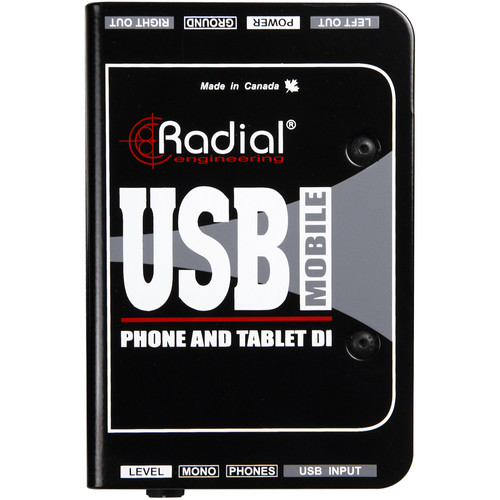
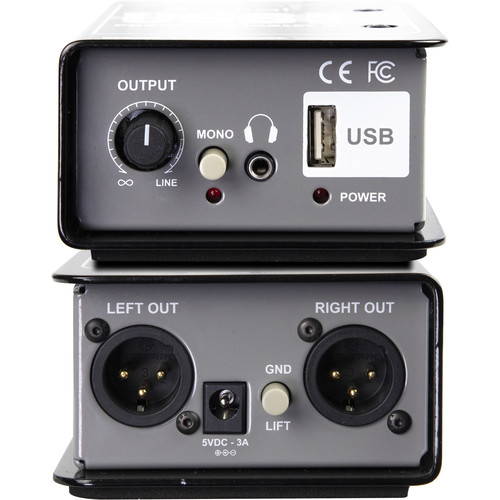
In the future look into something like this for iOS Devices. It will see it as an two channel audio interface. I was able to test them using the latest Apple iPad Pro 12.9 via USB C. It hasn't hit store yet, but I'm sure it will be out sometime this year.

Image

Image
User avatar
By justineastwick Sun Feb 07, 2021 1:39 pm
EnochLight wrote:
Terrico wrote:With input1,2 selected Im barely getting a signal and when sampled it is very low and muffled.
When inputs 3/4 are selected I get not signal at all.

how do I control the volume level I want to record at


With both the volume on your iPhone (crank it all the way up), and the gain knobs on your X. Are you sure your cables aren't bad? Are you using a Lightening to 3.5mm jack that came with your iPhone or is it an older model? I use this when sampling from my iPhone or iPad into my Live 2:

Image

Also, the iPhone earbud port (older models) and the Lightening to 3.5mm adaptors accommodate 3-ring jacks for earbud/microphones combos, and often if your cable isn't the right one it won't seat right on the rings, causing a low signal or none at all.


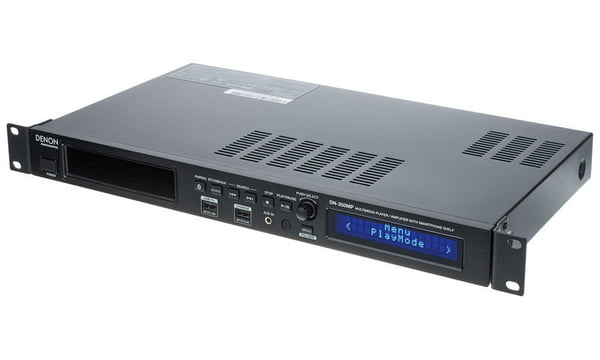
What I did to remedy having adapters and cords is buying a Denon DN-350MP - it’s a Bluetooth receiver. I just use Bluetooth to stream into the DN-350MP and the outputs of that you could connect to your MPC X.

I feel like it’s a “passive” approach to sampling: I don’t have to be tethered to a cord and I free that port up on my iPhone for charging.
User avatar
By Lampdog Sun Feb 07, 2021 3:28 pm
Don’t need to spend money to sample from mobile device.
We all most likely have these cables laying around somewhere.
By CharlesRandolph Sun Feb 07, 2021 7:31 pm
Lampdog wrote:Don’t need to spend money to sample from mobile device.
We all most likely have these cables laying around somewhere.


If Akai allowed sampling audio via USB then this process would've been much easier. The new iphone/ipads no longer have DAC so that radial pieces helps especially for live concerts.
By Cockdiesel Sun Feb 07, 2021 7:45 pm
You can get a Alesis control hub for under 40 bucks used, I think like 80 bucks brand new. Works pretty good to play synths or connect midi to iPhone/iPad. My only gripe is sometimes I need more volume on some of the apps I use, but it's really when I try to mix in other sources and my mixer has solutions for that.
By Tabletop Sun Feb 07, 2021 7:46 pm
CharlesRandolph wrote:If Akai allowed sampling audio via USB then this process would've been much easier. The new iphone/ipads no longer have DAC so that radial pieces helps especially for live concerts.


If Apple would have kept a headphone jack it wouldve been much easier.
By CharlesRandolph Sun Feb 07, 2021 7:57 pm
justineastwick wrote:What I did to remedy having adapters and cords is buying a Denon DN-350MP - it’s a Bluetooth receiver. I just use Bluetooth to stream into the DN-350MP and the outputs of that you could connect to your MPC X.

I feel like it’s a “passive” approach to sampling: I don’t have to be tethered to a cord and I free that port up on my iPhone for charging.


I've never seen this piece before. Shame it only plays 16 bit files. But I do like the solutions how does it sound?


Image