Support and discussion for all of Akai’s modern standalone MPCs including the MPC X / X SE, MPC Live 1, 2 & 3, MPC One / One+, MPC Key 37/61.
User avatar
By epps Sat Jun 26, 2021 9:48 pm
My computer is not compatible with the software so just wondering if there’s a way to get a xpn file on to the mpc without the software. Trying to take advantage of this sound of summer sale lol
User avatar
By Lampdog Sat Jun 26, 2021 10:21 pm
xpn is mpc pattern right, a sequence file?

Put it on an SD card and load it into the hardware mpc just like you would and old .SEQ
on the legacy mpc’s.

User avatar
By epps Sat Jun 26, 2021 10:28 pm
Lampdog wrote:xpn is mpc pattern right, a sequence file?

Put it on an SD card and load it into the hardware mpc just like you would and old .SEQ
on the legacy mpc’s.


I think it’s a file for an expansion pack. I tried the SD thing but when I plugged it back in the mpc wasn’t showing it when I went into browse
User avatar
By Lampdog Sat Jun 26, 2021 10:35 pm
When browsing pay attention to the icons that filter what you are browsing.
Make sure to tap the mpc folder all the way on the right (has a strike through it) so you can view projected folder data as well.
User avatar
By epps Sat Jun 26, 2021 10:59 pm
MPC-Tutor wrote:Xpn is the MPC software expansion installer. You can extract it with zip software, put the resulting folder in the expansions folder on your MPC disk


Thank you sir!!
By 40Beatz Mon Jun 28, 2021 1:27 pm
If you have a PC, I've been successful Unwrapping the XPN file with the 7-Zip Program. Once you unzip the XPN, you'll see the XPM and other files. I've created an "Expansion" Folder in the Root Directory of my SD Card/HDD, and I toss the XPM folder in there, so the MPC recognizes my Expansions
User avatar
By epps Wed Jun 30, 2021 12:09 pm
40Beatz wrote:If you have a PC, I've been successful Unwrapping the XPN file with the 7-Zip Program. Once you unzip the XPN, you'll see the XPM and other files. I've created an "Expansion" Folder in the Root Directory of my SD Card/HDD, and I toss the XPM folder in there, so the MPC recognizes my Expansions


I’m using a Mac so not sure if that will work but I’ll give it a try
User avatar
By epps Wed Jun 30, 2021 12:11 pm
MPC-Tutor wrote:BTW, if your zip software has problems extracting an .xpn file, try changing the file extension to .zip.


I changed it to a zip but when I unzip (pause) it goes back to xpn. Sorry I’m kind of illiterate when it comes to computers lol
User avatar
By Ibunshi Thu Jul 01, 2021 10:32 am
My computer is not compatible with the software either.. but I can still put it in controller mode and the mpc finds the computer.. This way I can at least transfer stuff to the hard drive that I installed in my X.


However, I had previously also been led to believe that I would not be able to use expansions, something about it needing to be installed via the software.. Which was not an option for me..

So I'm going to have to test this unzip method :D
User avatar
By MPC-Tutor Thu Jul 01, 2021 11:08 am
Ibunshi wrote:My computer is not compatible with the software either.. but I can still put it in controller mode and the mpc finds the computer.. This way I can at least transfer stuff to the hard drive that I installed in my X.


However, I had previously also been led to believe that I would not be able to use expansions, something about it needing to be installed via the software.. Which was not an option for me..

So I'm going to have to test this unzip method :D


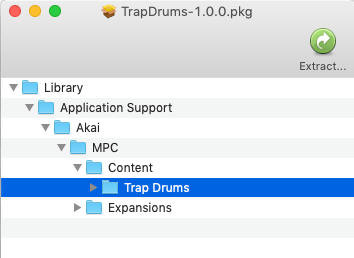
If the expansion is in 'XPN' format (most third party expansions are), then you can use the zip method. If the expansion is in a computer installer format such as .exe, .dmg or .pkg then you can first install this on your computer (MPC Software not required for installation), you'll then need to locate the installed folder (on a Mac this is usually Library > Application Support > Akai > MPC) and copy the expansion contents folder to your MPC.

Alternatively you might be able to directly pull the expansion folder out of the .exe./.pkg file. you might need additional software to do this, there's an app called 'payloadextractor' that does this on a Mac. Seems discontinued, but you can get it here: https://www.macupdate.com/app/mac/45385 ... -extractor

Here's what it looks like when you run it on a pkg file:
Image


