Support and discussion for all of Akai’s modern standalone MPCs including the MPC X / X SE, MPC Live 1, 2 & 3, MPC One / One+, MPC Key 37/61.
By YakirBT Thu Aug 05, 2021 10:46 pm
Hi everyone,
An issue with Q links (Project mode)
Firmware 2.10 MPC Live Standalone mode:
-reset preferences - done.
-opening empty project.
-assigning q links in project mode (tried several destinations)
-saving project
-shut down mpc
-turning back on and load the saved project.
-Q links missing. Forgotten.

Anyone else has encountered this issue?
Thanks in advance

*My last hope on my side is to make some free space in the internal drive. Gonna try it out and update if it helped.
By Interstellarfunk Fri Aug 06, 2021 4:14 pm
Hi,

Since ive updated my MPC the midi out doesnt work anymore. I usually use my mpc as a midi keyboard, but since the update it doesnt give any midi signal out anymore. Any idea?
By Selahl Tapes Fri Aug 06, 2021 7:02 pm
Hello! I have come across a bug when loading some samples or programs from my external SSD. I try to load a set of samples and get a black screen with a error message Your MPC has recovered from a internal error. I am trying to figure out what is causing this. It’s seems to be with programs and samples that have been specifically convert to MPC format!? Hello Samples Raw Vermona Vol 2 MPC 16bit format is triggering this bug every time I try to load block party program. All sorts of issues here. I’m going to roll back to 2.9 I see if this bug is there. Will report back soon. Let me know if you can test this to. Peaceeeee
By Joblessjahbless Fri Aug 06, 2021 8:52 pm
Does anyone have a screen pop up that says MPC is not plugged in when you try to update firmware. I can’t seem to update the MPCONE hardware. Can someone explain where I **** up, because I can follow instructions. Maybe I turned on the computer or something I’m at the end of the rope and I’m ready to throw out the window. Thanks.
User avatar
By synaptyx Sat Aug 07, 2021 7:27 am
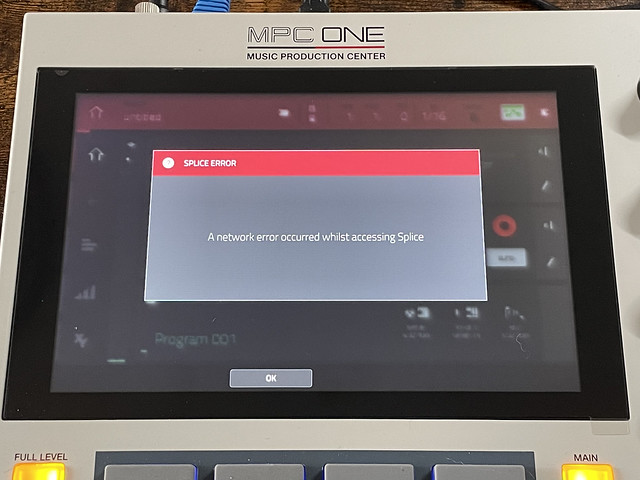
I get this every time I boot the MPC One Image When I go to settings and tap sync, there's no error.
By Fletchnyc Sat Aug 07, 2021 2:46 pm
When attempting to audition drum sounds while using an Expert Sleepers ES-9 audio interface, the auditioned sounds crackle and distort when being played. For example, a sequence is playing, and I want to audition different drum files to see which will sound best with my song. While auditioning these drums sounds they sound distorted, and it’s difficult to hear them. The issue does not exist when using the internal audio device. Only when using my audio interface.
By HouseWithoutMouse Sat Aug 07, 2021 3:20 pm
- When undoing an audio recording, it doesn't necessarily mute the undo'ed audio from playing, leaving you thinking that undo didn't work. I tried to nail an 8-bar loop, with auto-recording at loop start. After every recording, when the MPC entered "overdub" (which doesn't overdub for audio tracks), I turned off recording and pressed Undo. About every second time, undo did NOT mute the audio, so I thought it didn't undo, and pressed undo many times more. Realized it's undoing a lot of other things already. Pressed Stop and Play - OK, it did actually somehow undo the recording, because when I stop and play, the track doesn't play anymore. But sometimes it DID immediately mute the recording.
- When loading samples in the browser, auditioning/play doesn't always play the samples, no matter how many times you press play.
By HouseWithoutMouse Sat Aug 07, 2021 7:14 pm
With some USB audio interfaces, output sample values are not properly clipped. Here's what happens with Soundcraft Notepad 8FX
Image

But if I insert an AIR Limiter into master outputs 1/2, the wave is gracefully clipped without overs.
By Harmdasher Sun Aug 08, 2021 9:00 am
I have multiple bugs:
Older Profects lost their Data,
The Odyssey Sinth does not stop playing even if I hit Stop.
Some Projects are sounding completely different.
If I hit program edit on the new plug-ins I can’t return to the main page when pressing program edit.
The MPC crashed on today’s session twice.
I hope there will be a bug fix soon.
By otoc Sun Aug 08, 2021 7:14 pm
I just sent this in to Akai Support. Not sure if its related to 2.10.0 - but it only started happening with this firmware update.

Currently:
Shortly after powering on the MPC, and navigating to the file browser to load up samples/programs - the touch screen remains responsive but the rest of the MPC is unresponsive. None of the physical buttons, or knobs work. And there is also no sound coming out of it if I audition samples or something from the touch screen.

I have to power cycle to get back in, but even after that the freezing repeats itself.

I should also mention that the power cycle itself is glitchy. I press the power button, confirm shutdown, and then it gets stuck on the “shutting down” screen until I force shutdown by long-pressing the power button. After that, I cycle power again and the shutdown works the second time. However - it goes back to the initial problem of the MPC becoming unresponsive except for the touch screen.

Previously:
Previously the problem I would have is the rotary encoder would become unresponsive, but it would become responsive again if I navigated out of the file browser window and back in. Not sure if this is related to the current problem of the machine freezing up.

MPC Live 2 Retro
MPC Firmware 2.10.0
Control Surface v0.34
By BeatWilson Mon Aug 09, 2021 5:48 am
Those dont sound good. How long you had the Live2Retro? If its in days of returning it I would possibly do that.
Maybe try refiring up the firmware or doing the reset preferences.
By HouseWithoutMouse Mon Aug 09, 2021 6:58 pm
Manual page 37 "To rename your samples:" ... it forgets to mention that the Trim/Chop tab-switch in the bottom of the screen has to be in Trim position, or otherwise there will be no keyboard icon next to the sample name at the top of the screen.
By Jarritos Tue Aug 10, 2021 5:35 am
My mpc records and works fine on new projects I create after the update, but doesn’t let me go back and record on projects I made prior to the update. I can hear my sample loaded on my pad, but zero playback. even when my track is armed i dont have anything. Tried resetting data but same situation. Works on the new, not on the old.
By Keys me Thu Aug 12, 2021 7:29 am
Hallo!
Ich habe bereits mehrfach versucht, das komplette 2.10 Update von der Akai-Page downzuladen Soweit funktioniert auch alles. Leider gibt es mit dem Solina Plugin ein Problem. Es wird leider nicht von meiner Live Mk 1 erkannt. Bei genauerer Überprüfung habe ich festgestellt, dass der Solina-Ordner zwar den Contentordner in einer knapp 96000kb .big Datei enthält, es fehlen aber der Plugin Skins und der Presetordner. Falls hier schonder Fehler liegt, wäre es toll, wenn mir jemand die fehlenden Ordner oder den gesamten Ordner für das Solina Plugin zukommen lassen könnte.
Vielen, vielen Dank
Kai Förster