By Hero81
Sun Jan 02, 2022 10:23 am
Hi all,
I know the MPC Live is primarily seen as a standalone device, however I also want to be able to integrate it with my DAW setup.
This turned out much more troublesome than expected.
I have connected the MPC Live 2 via Midi to my Audio Interface, and when I create a project with a Midi Track/Program on the MPC and configure the Channel accordingly, it does send out MIDI events when I press the pads.
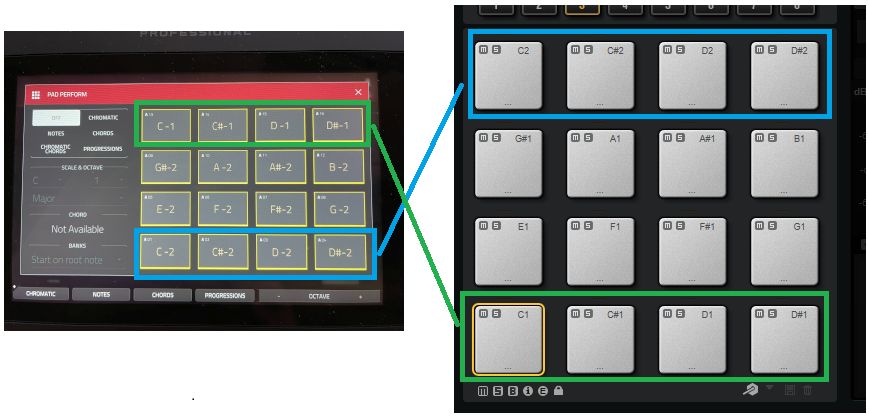
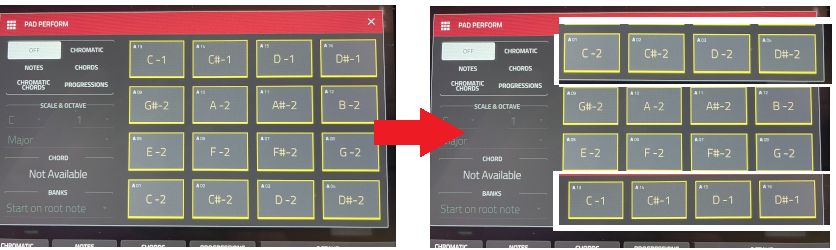
The problem I am facing now is that Cubase/Groove Agent uses a different pad layout than the MPC. With PAD perform mode OFF in the MPC, it sends C1 when pressing the A1 pad instead of sending C2. E.g. the TOP and BOTTOM rows of the MPC pad layout is reversed. Triggering a pad on the bottom rows, triggers the top row and vice versa. I think the layout on the MPC is funky. The Pad 1 (A1) is assigned to C-2 and PAD 13 (A13) is assigned to C-1. It should start with C1 on the bottom Pad and then go up..
Groove Agent has a feature called "Use Hardware Controller Mapping", with the Options "Default", "E-Drum Controller 1" and "Yamaha DTX-900", but none of them work.
I could off course go through all the PADS in Groove Agent and MIDI-CC learn them to the pads of the MPC, but I am not sure this is the best approach. I would rather tell the MPC Live to remap itself to the way Cubase/Groove Agent is configured (e.g. see image above)
What is the best approach here? This seems way to uncesserarily complicated to me..
Thanks
I know the MPC Live is primarily seen as a standalone device, however I also want to be able to integrate it with my DAW setup.
This turned out much more troublesome than expected.
I have connected the MPC Live 2 via Midi to my Audio Interface, and when I create a project with a Midi Track/Program on the MPC and configure the Channel accordingly, it does send out MIDI events when I press the pads.
The problem I am facing now is that Cubase/Groove Agent uses a different pad layout than the MPC. With PAD perform mode OFF in the MPC, it sends C1 when pressing the A1 pad instead of sending C2. E.g. the TOP and BOTTOM rows of the MPC pad layout is reversed. Triggering a pad on the bottom rows, triggers the top row and vice versa. I think the layout on the MPC is funky. The Pad 1 (A1) is assigned to C-2 and PAD 13 (A13) is assigned to C-1. It should start with C1 on the bottom Pad and then go up..
Groove Agent has a feature called "Use Hardware Controller Mapping", with the Options "Default", "E-Drum Controller 1" and "Yamaha DTX-900", but none of them work.
I could off course go through all the PADS in Groove Agent and MIDI-CC learn them to the pads of the MPC, but I am not sure this is the best approach. I would rather tell the MPC Live to remap itself to the way Cubase/Groove Agent is configured (e.g. see image above)
What is the best approach here? This seems way to uncesserarily complicated to me..
Thanks