Support and discussion for all of Akai’s modern standalone MPCs including the MPC X / X SE, MPC Live 1, 2 & 3, MPC One / One+, MPC Key 37/61.
User avatar
By Ultros Thu Mar 24, 2022 7:37 am
I couldn't stand another boot starting at that stock boot splash... much better. So, yes it's possible... not convenient though... takes some work and some linux / programming / graphics / pixel format knowledge to pull off..
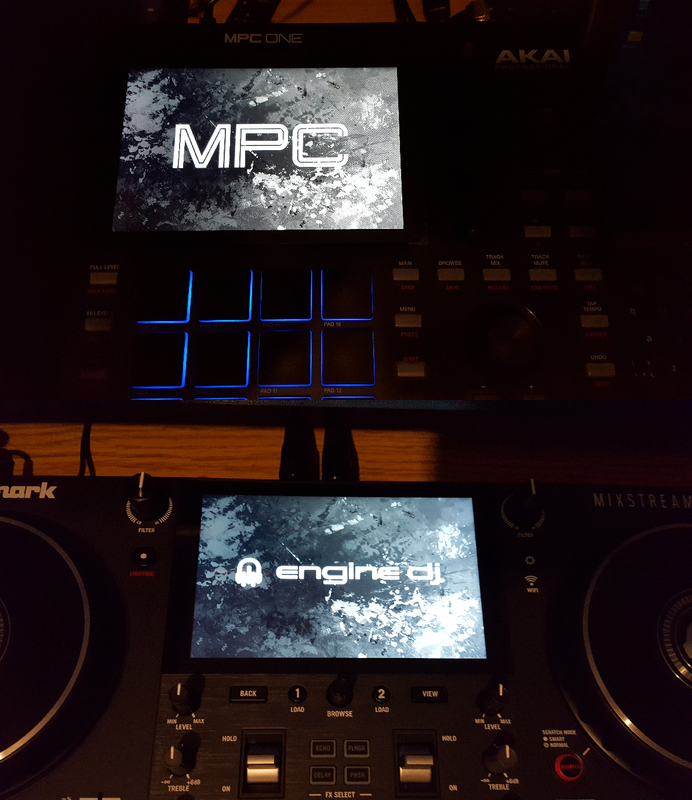
Image
User avatar
By J.D. Sat Mar 26, 2022 7:36 am
Nice!
Is it so complicated?
I would love a custom bootscreen, just because it would be cool to have a customized one, but is it worth the effort?
Can you brock something by doing it?
User avatar
By Ultros Sun Mar 27, 2022 8:59 am
Here i made you something just now, it will flash my custom splash to your MPC. There are two versions "mpc-x" and "all others" obviously choose the update image from whatever folder you think best represents your MPC and copy it to your usb card then install from the settings menu.

if for some reason your splash screen comes up upside down, just flash the other image and it will correct it. One is right side up, the other is upside down because some units have a weird display rotation.

CUSTOM BOOT SPLASH UPDATE IMAGES
https://github.com/RedHate/Custom-MPC-Splash-Update
By s3c4187 Sun Dec 11, 2022 3:59 pm
Ultros wrote:Here i made you something just now, it will flash my custom splash to your MPC. There are two versions "mpc-x" and "all others" obviously choose the update image from whatever folder you think best represents your MPC and copy it to your usb card then install from the settings menu.

if for some reason your splash screen comes up upside down, just flash the other image and it will correct it. One is right side up, the other is upside down because some units have a weird display rotation.

CUSTOM BOOT SPLASH UPDATE IMAGES
https://github.com/RedHate/Custom-MPC-Splash-Update


is there any way to change it back to the original once you do this?
User avatar
By mr3rown Thu Apr 27, 2023 9:25 pm
Hi,
Would love to know how to add my own picture to the process. Can you provide a tutorial on how you created this mpc image.

btw I'm comfortable with Linux and programming so it should not be confusing for me, just would like to know what steps you took to change the picture, thanks
User avatar
By Lampdog Thu Apr 27, 2023 9:56 pm
WUDDUP MAN!
User avatar
By Ultros Thu Apr 27, 2023 10:47 pm
Dump the splash partition off the mpc, use gimp to open the raw 4mb 1280*800 image. modify it, flip the pixel format to match abgr, rather than argb. After the image is formatted properly save it and dd it back to the splash partition. in my case i have image packing stuff (not public) for creating installable MPC update images.
User avatar
By Ultros Fri Apr 28, 2023 12:36 am
was last year now certified. thread got bumped by dude asking how to.