
Support and discussion for all of Akai’s modern standalone MPCs including the MPC X / X SE, MPC Live 1, 2 & 3, MPC One / One+, MPC Key 37/61.
By Max Hanna Wed Apr 13, 2022 6:18 pm
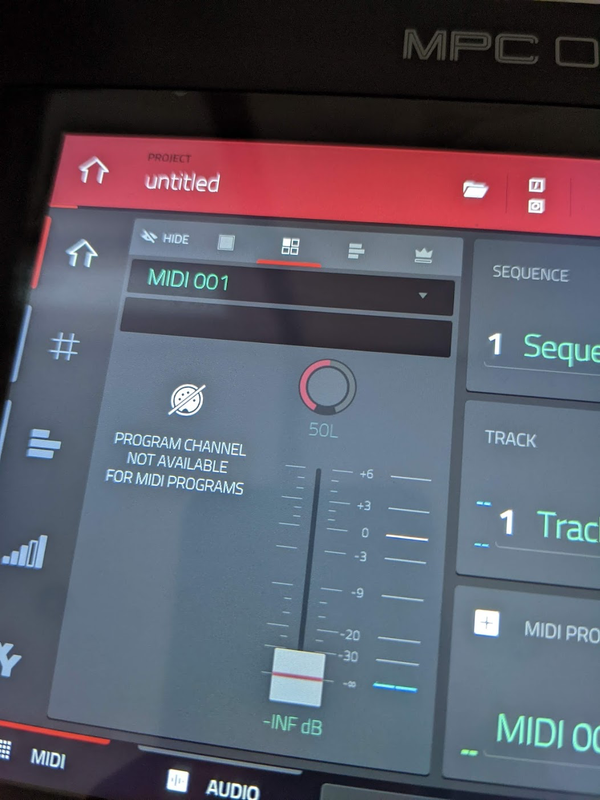
Hi, I'm quite new to the world of producing and I recently got the MPC One. I wanted to see if I could connect my external Roland DS88 onto the MPC so I could use the sounds from that synth on the machine. I watched a few videos and did what most people say, connect the midi cable out from the synth into the MPC then, put your audio out from the synth into the MPC audio inputs. I switch to the midi track and I can see that it is detecting input but there is no sound coming from it and when I go onto the next step, https://photos.app.goo.gl/hAfDrHLMhkyRkDGY6 (photo for reference) it comes up with this, "Program channel not available for midi programs." So yeah I'm pretty confused and I hope someone can help me sort it out. Thanks.


Image
User avatar
By Lampdog Wed Apr 13, 2022 10:15 pm
Welcome to Mpc=Forums!

On sample page, this is one place to configure audio input. Check that out.

The midi on your pic is for internal pads, not input audio.
By Max Hanna Thu Apr 14, 2022 5:18 pm
Elijah wrote:Select the Audio track tab on the main screen, set the InputConfig > Monitor setting (currently OFF) to "IN".

I tried it and still no sound, and when I look under audio tracks and press the note key on the synth, there is no input at all under audio tracks, But there is still input through the midi track area. But thanks for the suggestion.
By Max Hanna Thu Apr 14, 2022 5:23 pm
Lampdog wrote:Welcome to Mpc=Forums!

On sample page, this is one place to configure audio input. Check that out.

The midi on your pic is for internal pads, not input audio.


Thanks for the info, how would I be able to input my own audio from the synth then?
By mdgarp Thu Apr 14, 2022 5:29 pm
if you just want samples, unplug the midi. use only L&R ​​cables, behind the mpc cable they must be inserted in INPUT not in MAin. in the internal program you select the input channels on 1 and 2, not on L&R. arm track to auto or in, then go back to the sampler and work
By Max Hanna Thu Apr 14, 2022 5:53 pm
mdgarp wrote:if you just want samples, unplug the midi. use only L&R ​​cables, behind the mpc cable they must be inserted in INPUT not in MAin. in the internal program you select the input channels on 1 and 2, not on L&R. arm track to auto or in, then go back to the sampler and work

Is this for using the samples from my synth or from the MPC?
By mdgarp Thu Apr 14, 2022 9:45 pm
Max Hanna wrote:
mdgarp wrote:if you just want samples, unplug the midi. use only L&R ​​cables, behind the mpc cable they must be inserted in INPUT not in MAin. in the internal program you select the input channels on 1 and 2, not on L&R. arm track to auto or in, then go back to the sampler and work

Is this for using the samples from my synth or from the MPC?
By mdgarp Thu Apr 14, 2022 9:45 pm
Max Hanna wrote:
mdgarp wrote:if you just want samples, unplug the midi. use only L&R ​​cables, behind the mpc cable they must be inserted in INPUT not in MAin. in the internal program you select the input channels on 1 and 2, not on L&R. arm track to auto or in, then go back to the sampler and work

Is this for using the samples from my synth or from the MPC?


in this way the synthesizer audio comes out of the mpc
By DokBrown Fri Apr 15, 2022 12:28 am
This is rather simple, check utube videos for an actual example.


I also rec you setup a template this time next year, so all the set-tings are the way you like them. The MPC default settings are not good in my opinion.
User avatar
By Lampdog Fri Apr 15, 2022 2:42 pm
Max Hanna wrote:
Lampdog wrote:Welcome to Mpc=Forums!

On sample page, this is one place to configure audio input. Check that out.

The midi on your pic is for internal pads, not input audio.


Thanks for the info, how would I be able to input my own audio from the synth then?


Synth analog audio out ~> mpc analog audio in.