Support and discussion for all of Akai’s modern standalone MPCs including the MPC X / X SE, MPC Live 1, 2 & 3, MPC One / One+, MPC Key 37/61.
By icepro Wed Jun 15, 2022 12:07 pm
The gear that im using :
- Mpc Live ii
- Zoom H6
- Cables

The case :

So recently I tried to record the entire live session, using the recorder zoom h6 , by sending line output from mpc live ii ( master output L& R) to the line input in the zoom h6.

It worked but the quality of the sound is bad and not clean, its not the same quality when I hear it directly in the mpc.

I used the zoom h6 as an interface but I cant use it as a recorder in the same time .

I dont know what exactly is the problem,

1- Maybe the cables that im using to link these two are old and not good .

2- Maybe the gain input ,.. but im not sure if its the gain yes i can see thats the is loud , when i try to balance it still its not that clear.

3- Maybe its something with the master output that i need to understand.

4- I did a lot of searching but I didn’t find what could help in my case .

I hope someone explains what should I do and how can I fix this issue.

Thanks Guys
User avatar
By NearTao Wed Jun 15, 2022 1:03 pm
I have found that the Zoom H6 doesn't perform well when recording content over about -3db to -9db... it starts getting weird audio distortion.

Personally... I'd try running a sine wave from the MPC with a constant volume, and the increase the gain on both the MPC and the Zoom H6 slowly, until you hear distortion. From there you should be able to get a sense for where you are having problems.
By icepro Wed Jun 15, 2022 2:54 pm
NearTao wrote:I have found that the Zoom H6 doesn't perform well when recording content over about -3db to -9db... it starts getting weird audio distortion.

Personally... I'd try running a sine wave from the MPC with a constant volume, and the increase the gain on both the MPC and the Zoom H6 slowly, until you hear distortion. From there you should be able to get a sense for where you are having problems.


Thank you !

Now I understand, I will try that .
I saw a person on YouTube he is using zoom h4n pro performing live outside , his output is clean and good , I was thinking maybe its the zoom h6 is my problem, I dont know ,

But now you explain it for me , and I will try what you said.

Thanks again !
By 40Beatz Wed Jun 15, 2022 7:22 pm
My Outputs are Clean! Check the Cables?
User avatar
By Lampdog Wed Jun 15, 2022 8:46 pm
One for LEFT and one for RIGHT. TRS. 3 metal w/ 2 plastic rings.

Image
User avatar
By Lampdog Thu Jun 16, 2022 1:57 pm
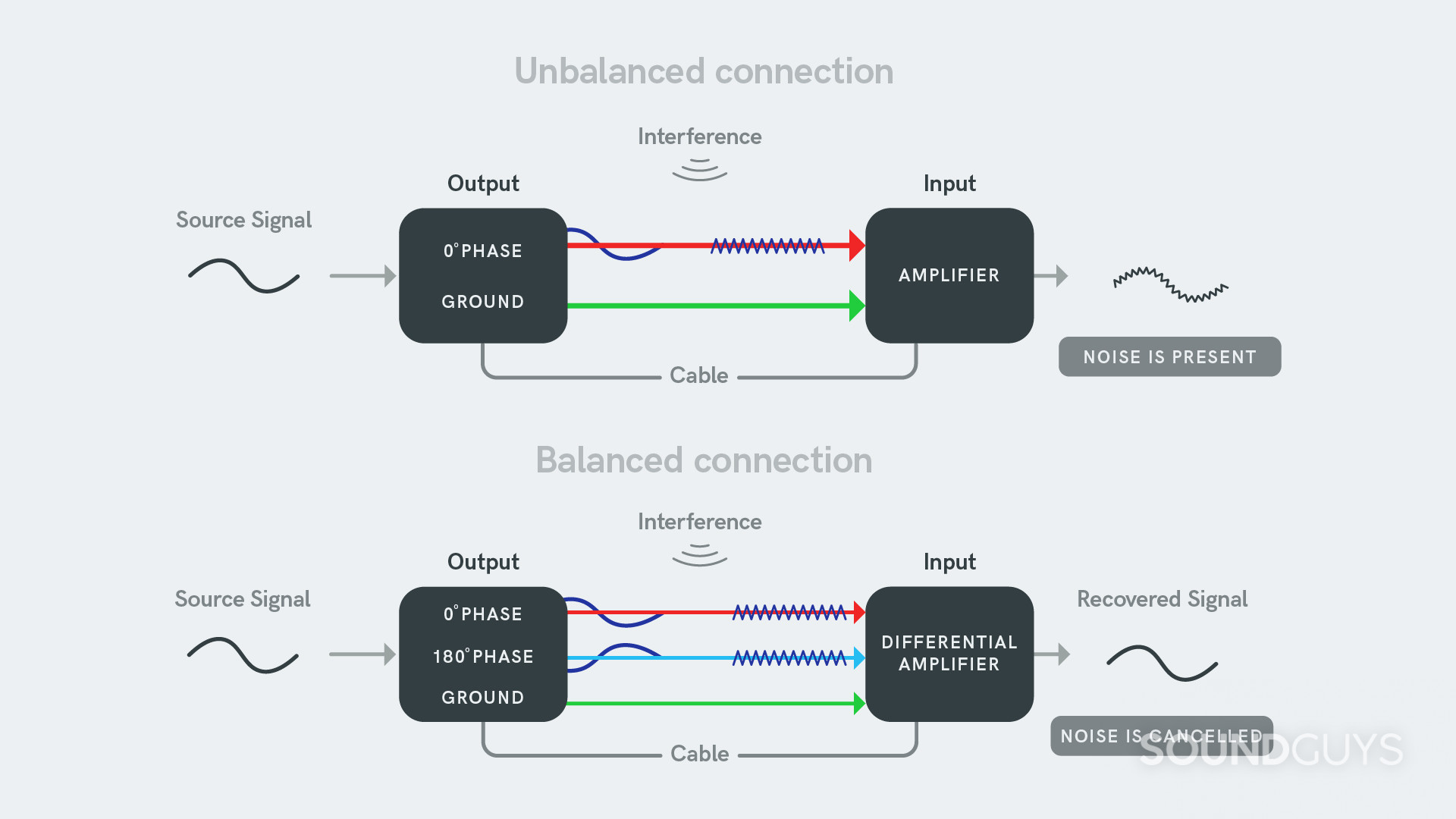
If your ports your plugging into on both sides are “balanced” then balanced cables will make a difference. Check your gear manuals to see what you have.

Image
By icepro Tue Jun 21, 2022 1:48 am
Lampdog wrote:If your ports your plugging into on both sides are “balanced” then balanced cables will make a difference. Check your gear manuals to see what you have.

Image


Thank you !
I changed my cables , I bought balanced high quality gold plated cables , the sound is balanced good no fuzziness !
By icepro Tue Jun 21, 2022 2:13 am
Thank you so much Guys , the problem is solved .

Problem : the output is not clean when i try to record my mpc live ii session to the zoom H6 recorder . The sound is fizzy and harsh.

Solution :

1- changing cables, getting high quality balanced gold plated cable ( Warm Audio Premier Series TRS Cable (3′))

https://audioshopdubai.com/product/warm ... s-cable-3/

2- Also I balanced the gain input in the zoom h6 , also I lowered the master output volume in the mpc live 2 ,

* when you will listen to what u are recording through the zoom h6 headphone line, the sound will be lower even tho if u are maxing out the headphone line volume.
* but once you listen to your music through the laptop, it will be clean and good .

Thanks everyone for the help, hopefully this post will help others that face the same problem.