Support and discussion for all of Akai’s modern standalone MPCs including the MPC X / X SE, MPC Live 1, 2 & 3, MPC One / One+, MPC Key 37/61.
By Genereal G Sun Jul 17, 2022 11:21 pm
I saw a video with Keyboard control wich allowed scale lock. There is a dedicated button on the key 61 but where do I find the same function on my MPC live 2?

User avatar
By Lampdog Mon Jul 18, 2022 3:56 am
There’s no keyboard control options on X, Live & One because there’s no keyboard.

Many things specific to the machine are not options in the others OS.
By Genereal G Mon Jul 18, 2022 2:47 pm
Lampdog wrote:There’s no keyboard control options on X, Live & One because there’s no keyboard.

Many things specific to the machine are not options in the others OS.


I have two keyboards connected to my Live 2 and Reason 12..........
User avatar
By MPD MPK RAY Tue Jul 19, 2022 4:45 am
Image

Do you think it strums and chords like Scaler 2 connected to the STANDALONE MPC X?
Does it slave to the MPC tempo when I hit record and allow synced strumming?

I'm about to do some research and hit "Purchase" for my X
:worthy:
Image

This the ONLY keyboard on the market that can run standalone and do THIS?
:popcorn:
By Rank31 Tue Jul 19, 2022 6:42 pm
I don’t know scaler 2 but I think it’s more powerful than the Keystep37.

You should watch test videos on YOuTube before ordering. There’s a lot.

But to answer to your question.

Yes I slave it to the MPC tempo. You just have to tweak the switches at rear side of the KS37 (USB for example) and it will slave to MPC tempo. It will sequence, create arpeggios or strum your chords in tempo.

The KS37 is a step sequencer (up to 64 steps). It can seem useless when you have a MPC but in fact I found it easer to use than the MPC step sequencer.

The KS37 can produce arpeggios. This is not very useful when you have a MPC.

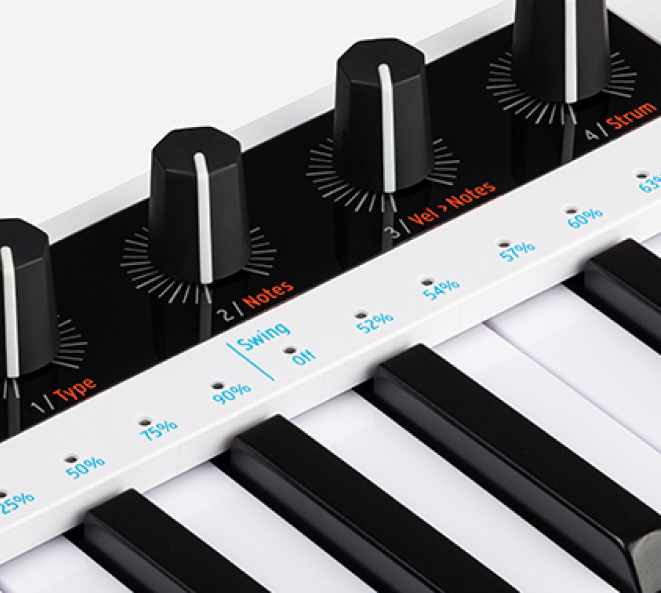
But above all he can produce chords. You have an automatic scaling for chords but also notes: Major, Minor, Blues or User.
But the most incredible thing for me is the note automatic calculation: You put your fingers on the keyboard to produce a chord, you turn the knob called “notes” from 3 to 4 for exemple and it will automatically detect your chord and produced itself the 4th note of the chord. And it can go up to 16 notes. Incredible.

This is this function and the strumming which made me ordered it.

And yes, as far as I know, this is the only standalone keyboard able to do that.

MPD MPK RAY wrote:Image

Do you think it strums and chords like Scaler 2 connected to the STANDALONE MPC X?
Does it slave to the MPC tempo when I hit record and allow synced strumming?

I'm about to do some research and hit "Purchase" for my X
:worthy:
Image

This the ONLY keyboard on the market that can run standalone and do THIS?
:popcorn:
By Genereal G Wed Jul 20, 2022 1:29 am
MPC Key 61 also includes a new Keyboard Control menu for customizing how its 61-key keybed is used.
To access Keyboard Control, press the Keyboard Control button on your MPC Key 61. You can then edit the following parameters.
Keyboard Input
Transpose: This determines the amount of transposition to the keyboard, up to 36 semitones up or down. MIDI Channel: This determines which MIDI channel (1–16) the keyboard input will use to receive messages. Aftertouch (Channel Pressure): This determines whether aftertouch is enabled (As Played) or not (Disable).
Note On Velocity: This determines the incoming velocity of note on messages. For velocity that is responsive to your playing, select As played. Alternatively, you can set a fixed velocity for all note on messages, at 12%, 18%, 25%, 31%, 37%, 43%, Half, 56%, 62%, 68%, 75%, 81%, 87%, 93% or Full velocity.
Scale Filter
Filter Input: This determines how specific notes are filtered. Select As Played to apply no filtering, Snap to Scale to shift non-scale notes played to the nearest scale degree, or Filter to Scale to disable non-scale notes from playing entirely.
Root Note: This determines the root note of the set scale.
Scale: This determines the type of scale used for note filtering. The available scales are:
Chromatic
Major
Natural Minor Harmonic Minor Pentatonic Major
Pentatonic Minor Dorian
Phrygian
Lydian Mixolydian
Aeolian Locrian Blues Flamenco Gypsy
Hungarian Gypsy Persian
Major Bebop Whole Tone
Internal Keyboard Routing
Keyboard Route: This determines where MIDI data from the keyboard is sent. Select from the following
options:
Local Off: Keyboard MIDI data is only sent to the MIDI out. This may be useful if working with external sound modules.
Global: Keyboard MIDI data will always go to the current track.
Tracks: The Keyboard will appear as a port in the list of available track MIDI Inputs.
Global and Tracks: Keyboard MIDI data will go to the current track and be available as a track MIDI input.
By Genereal G Wed Jul 20, 2022 1:31 am
KeyStep 37

Activate scale mode to quantize any notes you play to a scale of your choice. Choose from chromatic (default), major, minor, blues, or a user-defined scale. Use with the sequencer or arpeggiator to freely sketch, compose or improvise ideas in perfect harmony.
By Rank31 Wed Jul 20, 2022 7:37 am
I think Akai is developing the MPCs in the right direction. It's just not a question of FX or plugins for me. We need tools to help us composing and IMO Akai well understood that. They added the notes probabilities and ratcheting in . This is a really good thing.

Now it would be cool to go even further by updrading the :

    Strumming (up or down) of chords like on KS37. And why not be even more innovative by proposing up-down strumming.
    Automatic production of additional notes based on the chord played like on KS37.
    Step probabilities: Probabilities applied to all the notes of a track step
    Possibility to record our own patterns in standalone mode in the arpeggiator page (only possible in the software)