Support and discussion for all of Akai’s modern standalone MPCs including the MPC X / X SE, MPC Live 1, 2 & 3, MPC One / One+, MPC Key 37/61.
By cchimi Sun Oct 30, 2022 12:06 am
This is almost definitely a dumb question, but I can't solve it and haven't found any tutorial that helps me to solve it. I'm trying to help my friend with his MPC Key 61.

Let's say I have a project with two sequences, each representing a song (this is obviously simplified). These sequences are used in a live show and will be called up by MIDI Program Changes. Each sequence has only one track, which itself has just one sound on it, for example:

Sequence 1: Song 1
Track 1: Piano
Program 1: Yamaha C7

Sequence 2: Song 2
Track 1: Mellotron
Program 1: Flute

The problem is that when we move from Sequence 1 to Sequence 2 the sound the keyboard plays is still the Yamaha C7 Piano, even though the track name displays as Mellotron. I don't understand the linkages between sequences, tracks, and programs, apparently. It seems to me that the sequence and track might be linked, but not the tracks to programs.

What are we doing wrong? Why doesn't the program change correctly when we change sequences?

Any help will be appreciated.

Carl
User avatar
By Telefunky Sun Oct 30, 2022 3:08 am
Program Change is a track property, not a sequence property.
(a sequence can have many tracks and you may want to change the program manually on specific tracks, f.e. in a live situation)
Afaik PC is off initially until you dial in a number.
By cchimi Sun Oct 30, 2022 3:47 am
Just to be clear, when I talk about a "Program Change", I mean a MIDI Program Change to change from one Sequence to another. The MPC word "Program", meaning the sound you elect to hear on a given MIDI track on the MPC, is an entirely different, although related, term.

I'm using the MPC in a live performance situation. I want each song to be represented by a Sequence on the MPC. I can use the MIDI PCs to select the correct sequences. But when I do the Program (sound) from the previous Sequence is left in place, even though the Track name is correct for the new Sequence.

I've got about 25 years of MIDI experience. I'm not an expert, but I have done some fairly complex MIDI setups. MIDI's not the problem here. It's that the program (sound) is not changing when I change the sequence. I feel intuitively that I'm missing something simple.
User avatar
By Lampdog Sun Oct 30, 2022 4:29 am
All seqs belong to 1 project. No matter if you think you have 2 “songs”. You don’t. 1 song per project.

Sequence 1:
Track 1: Piano
Track 2: Mellotron (TRACK MUTE)
Program 1: Yamaha C7

Sequence 2:
Track 1: Piano (TRACK MUTE)
Track 2: Mellotron
Program 2: Flute

Image

User avatar
By Lampdog Sun Oct 30, 2022 5:15 am
cchimi wrote: I can use the MIDI PCs to select the correct sequences. But when I do the Program (sound) from the previous Sequence is left in place, even though the Track name is correct for the new Sequence.


This is because mpc’s are 1 project machines.
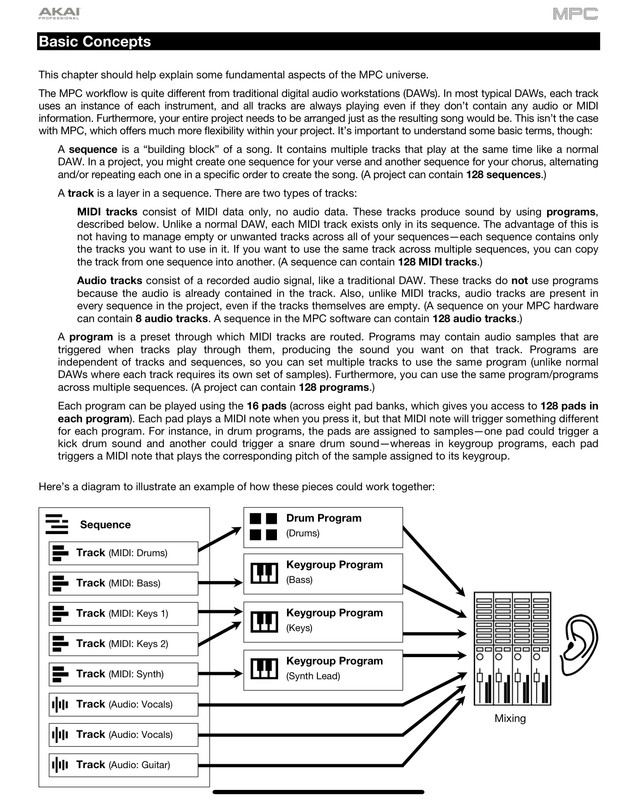
All seqs are tied to 1 big project/song. On the main screen the hierarchy is seq > trck 1-99 > program.

Mpc requires all tracks aligned, to get around that use tracks mutes and different tracks for diff instruments/patches/programs.

Once a program is assigned to a track don’t reuse that same track on another seq.
By cchimi Fri Nov 11, 2022 3:00 pm
Thanks to everyone who replied here. I did finally figure it out yesterday. What I wasn't getting was the relationship between the Program and the SOUND associated with that program. In other words, I kept leaving the program the same, but changing the sound that program was associated with. A real nooby mistake. Now I can use MIDI Program Changes to change sequences and each track within a sequence points to the correct program for the sound I want. It's simple, but my brain took a long time to grasp how it works. It's very different from other musical systems I've worked with, but really powerful once it begins to make sense.

Thanks again. Especially to Lampdog, whose replies helped me to think it through and visualize the solution.

Carl
User avatar
By Lampdog Fri Nov 11, 2022 3:07 pm
No doubt, happy beatmaking!!

Experiment with every button, menu, feature while making beats and see how things react. Don't mess with the internal default drive though, use external storage!
By mikem Fri Nov 11, 2022 11:32 pm
I think the best way to visualize it is that the MPC is organized like a studio with different devices in it. You have a MIDI sequencer in the middle (sequences/tracks) and programs, which are like synths or drum machines connected via MIDI to the sequencer. When you change the program on a track, you're not not changing the sound on the outboard gear, you're changing the device the sequencer sends its notes to.

This system is bit strange when coming from a DAW, and the UI doesn't help in making clear what's actually going on, but once you understand that sequences/tracks in the MPC work like an old school MIDI sequencer and not like what you find in modern DAWs where plugins are tied to tracks, it becomes clear what's going on, and it's not a big deal to work with it. And it has its advantages, I like having the option of sending multiple tracks to the same device for example, especially for drums.