Support and discussion for all of Akai’s modern standalone MPCs including the MPC X / X SE, MPC Live 1, 2 & 3, MPC One / One+, MPC Key 37/61.
By Synthetica Mon Dec 26, 2022 8:29 pm
Synthetica wrote:And another one , OS 2.11.6, Live II

Have a Midi Track on MPC set to Midi Port A and a specific channel (Channel 1 for example, the default is ALL)

Have a controller sending Midi in on Midi Channel 8 and Midi Port A and out to another synth on Channel 6

Because the track is set to a specific channel in I would expect no midi to be sent to the Midi out port but it still is sent (BAD)

Midi monitor clearly shows midi received on channel 8 and sent on channel 6 even though the track is set only to receive midi on channel 1.


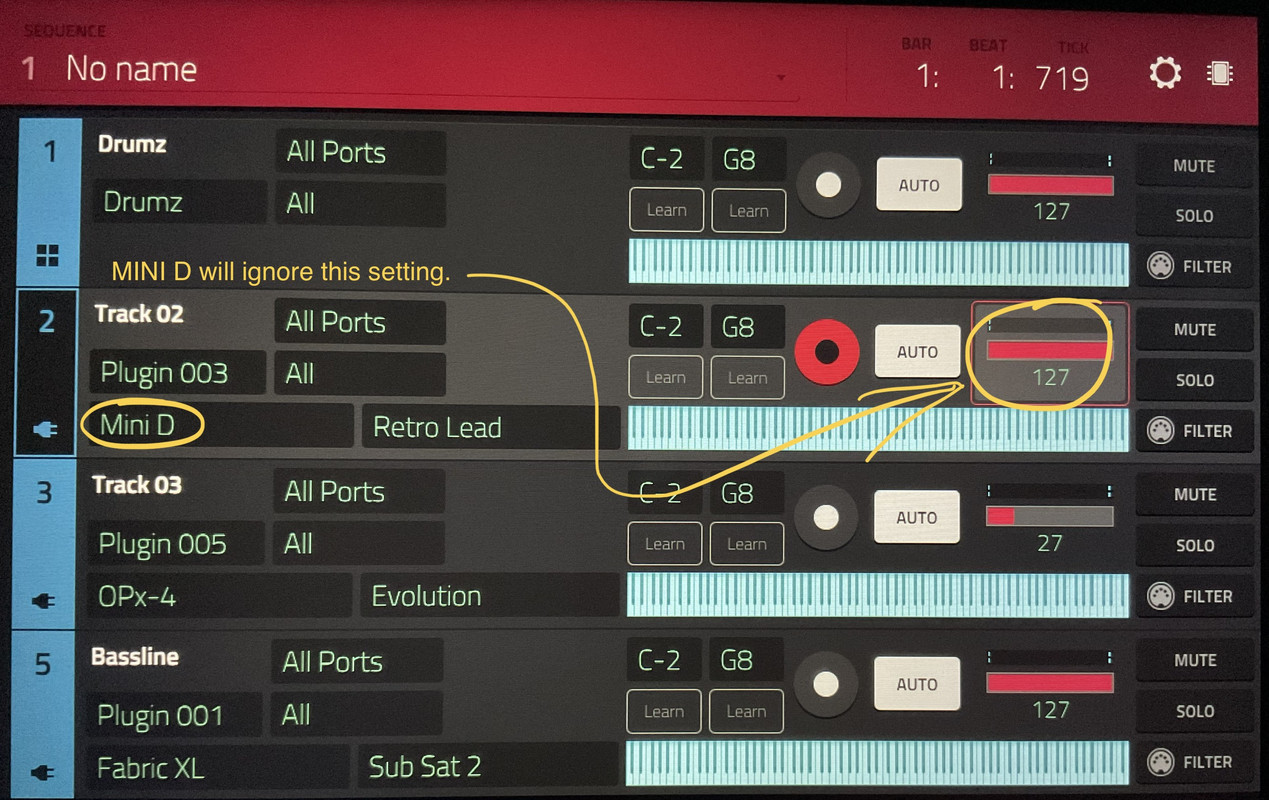
Ok looks like not a bug after further testing, I have Global enabled for the specific Midi Port I am using so that I can receive Midi clock from another device in my Midi setup. If global is enabled it will ignore the incoming Midi channel and respond on all incoming Midi channels. A bit weird but seems to work as designed. My work around send my Midi controller data on a different Midi in Por, disable global and have control of different channels.

By ck4000 Thu Dec 29, 2022 11:12 am
ck4000 wrote:Here is the bug I reported for the MPC One - Anyone else experiencing this issue?

It's been like this since 2.11 update.

1. Open any sample in Sample Edit mode
2. Zoom in 100%
3. Select start or end value field
4. Turning the Data Dial now increases and decreases the selected value by 2 instead of 1
5. Pressing the + and - Buttons now increase and decrease the selected value by 2 instead of 1

This bug is still present in 2.11.7
By Lancerben Sat Dec 31, 2022 1:01 am
Well yet another bug here.. And it's big one and seems uncommon, searched and found nothing. I used to be able to save my presets and see them in user section and save them as favorites. Now I lost my user tab completely... Files are still there I can load them manually by browsing.. I also lost the ability to make new favorites (it defaults to the first preset)...

So I suspect that my mpc keys 61 lost track of the user folder or some other bug is going on. File never moved..

This happened after I messed with the mpc 2 and usb connection... Maybe that software wrecked something in the order or things on my internal drive...

Anyhow I spend wayyy more time troubleshooting then actually playing anything. Very frustrating.
By Lancerben Sat Dec 31, 2022 4:51 am
For anyone that may have an idea what to do here I made some possible progress on the issues with User presets not showing up in menu and favorite saving as default sound of the category. I reconnected to MPC software and in controller mode I can save to favorite and my user preset shows up (but only the few I made while connected to software not my standalone ones. Also I noticed some of my plugins do not show up in MPC software half of them or more. Even thought they are all downloaded and activated. This may be related to this problem. It seems to have happened after me trying the MPC software via USB.
User avatar
By Lampdog Sat Dec 31, 2022 5:04 am
Controller mode is ALL computer software, the hardware mpc is only a “remote front end” for that software. What you do in controller mode is ON COMPUTER and has nothing to do with standalone.

Plugins will have to be installed on standalone and again on computer software.
By Lancerben Sat Dec 31, 2022 6:16 pm
Lampdog wrote:Controller mode is ALL computer software, the hardware mpc is only a “remote front end” for that software. What you do in controller mode is ON COMPUTER and has nothing to do with standalone.

Plugins will have to be installed on standalone and again on computer software.

Yesi know this... But something happened since then. I did install all plugins and activated them via serial numbers in my inmusic account. Problem is since that USB connection... There is no more user tab and I can't save a new favorite. I did do an expansion install through the MPC software and that may have something to do with it. It wrote directly to my MPC keys 61
User avatar
By Lampdog Sat Dec 31, 2022 7:05 pm
I started with an empty project on my MPC Keys61, 2.11.7 and this works perfectly for me.
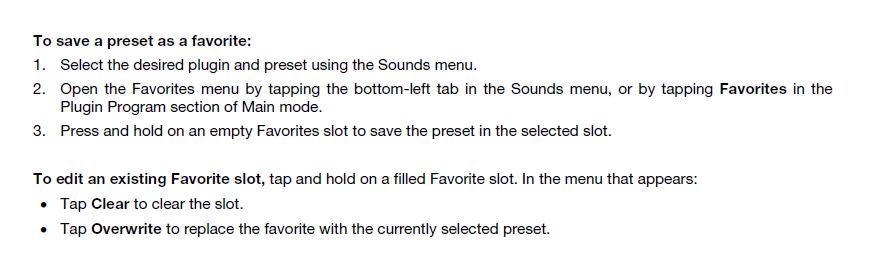
I was able to successfully follow this. Taken from MPC Manual 2.11, pg 475.

Maybe re-install your firmware and afterwards perform a preferences reset.

Image
By Lancerben Sat Dec 31, 2022 9:06 pm
Lampdog wrote:I started with an empty project on my MPC Keys61, 2.11.7 and this works perfectly for me.
I was able to successfully follow this. Taken from MPC Manual 2.11, pg 475.

Maybe re-install your firmware and afterwards perform a preferences reset.

Image


Yes this used to work fine for me.. And still works in controller mode but not stand-alone anymore... Since using the controller mode.
Already reset preferences did a hard shut down and unplugged 60 seconds to be sure it's a solid reset. What's left is doing a factory reset... It sucks.

I did do the lastest firmware that just came out. It could be that too.
By Lancerben Sat Dec 31, 2022 9:17 pm
User preset tab invisible and no ability to save favorite presets Problem fixed .. Rolled back to 2.11.16... From 2.11.17 so wasted 8h trying to resolve this because I did a ton of changes the same day. Didn't think about th. Firmware should have been the first thing I did...
User avatar
By Lampdog Sun Jan 01, 2023 12:29 am
When nothing else works, try firmware, it’s why I suggested it.
Also, not every firmware download will be 100% functional, there have been duds in the past.
By Lancerben Sun Jan 01, 2023 2:13 am
Lampdog wrote:When nothing else works, try firmware, it’s why I suggested it.
Also, not every firmware download will be 100% functional, there have been duds in the past.

Absolutely, I should have thought about it, I'm far from new in the troubleshooting realm that's what I do for work. Thanks for reminding me of it.
By Lancerben Mon Jan 02, 2023 6:53 pm
So I believe this is a known problem with the 16 iteration... Can't bounce to Audio... Work around saving to audio mix done with the section I want with the part in solo. .. Then import it again.

Version 17 fixed that but then I lose my ability to save favorites and to see my numerous user presets. I modify pretty much every sound I touch so it's important. Now the audio bouncing is a inconvenient but I can work around.
User avatar
By Lampdog Mon Jan 02, 2023 7:05 pm
Do you have pictures pointing where on screen you used to see a favorites tab and/or where you expect it to be?

I’m able to see, use, recall favorites on mpc keys61, am I looking at the same place your looking?
By Lancerben Tue Jan 03, 2023 9:04 am
Lampdog wrote:Do you have pictures pointing where on screen you used to see a favorites tab and/or where you expect it to be?

I’m able to see, use, recall favorites on mpc keys61, am I looking at the same place your looking?

With firmware 16 the favorites work fine and I can see my user preset. But I have issues bouncing track to audio it freezes on the 16 the 17 I believe fixed that but can't add any favorite but I do see my old ones u made. However I can't see my user presets in the drop down menu of the plugins on version 17. I may try running firmware 17 again because I want to be able to bounce audio. I can always find my user presets by browsing for them as a workaround.