Support and discussion for all of Akai’s modern standalone MPCs including the MPC X / X SE, MPC Live 1, 2 & 3, MPC One / One+, MPC Key 37/61.
By DrSbaitso Tue Feb 28, 2023 12:16 am
I want to add some extra MIDI ports to my MPC and I see in the manual that this is supported with USB MIDI interfaces. Does anybody have anybody experience with doing this? I want another 4-6 in's and outs.

User avatar
By Lampdog Tue Feb 28, 2023 2:53 am
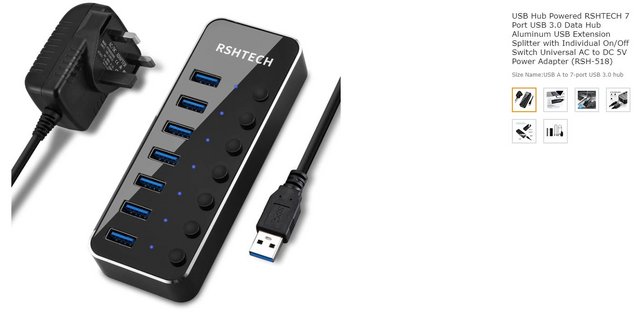
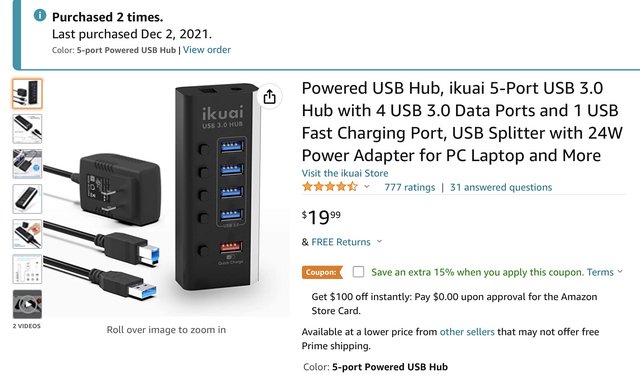
Powered usb 3.0 hub with the amount of usb ports you need +2.
Manual suggests a powered usb 3.0 hub.


Image

Image
By DrSbaitso Tue Feb 28, 2023 3:13 am
Lampdog wrote:Powered usb 3.0 hub with the amount of usb ports you need +2.
Manual suggests a powered usb 3.0 hub.


Image

Image


OK and I understand, the MPC can't power an arbitrarily big MIDI interface, but my question is, which ones work? Does anybody here have experience with them?
User avatar
By Monotremata Tue Feb 28, 2023 6:03 am
Find an old Emagic AMT8/Unitor8, but one of the later ones with USB. I bet you can pick em up cheap. I've had mine for 22 years or so and it still works on both my Mac and the MPC.
User avatar
By Lampdog Tue Feb 28, 2023 1:50 pm
DrSbaitso wrote:
OK and I understand, the MPC can't power an arbitrarily big MIDI interface, but my question is, which ones work? Does anybody here have experience with them?

I actually use one of the pics I posted. The purchase pic is my own amazon purchase pic.

MPC TUTOR uses the other.

They both work.
User avatar
By MPC-Tutor Tue Feb 28, 2023 1:57 pm
I don't have a dedicated MIDI interface, but as long as its class compliant (i.e. no drivers 'required', although it might have some platform specific drivers for additional/optional functionality) it should work without any problem with the MPC, it's only audio interfaces that seem to be experiencing issues.
User avatar
By Lampdog Wed Mar 01, 2023 5:16 am
Use din midi to usb adapters on old gear.
Use a usb 3.0 hub on X.

Connect all usb to the hub. Have several midi channels.
By LivePsy Wed Mar 01, 2023 9:20 pm
Lampdog wrote:Use din midi to usb adapters on old gear.
Use a usb 3.0 hub on X.

Connect all usb to the hub. Have several midi channels.


Multiple adapters? Each midi usb adapter appears as a separate midi port. How do you keep everything going to the right synth as you change gear and cabling. Your setup is never static, right?
User avatar
By Lampdog Wed Mar 01, 2023 10:32 pm
Nope, I change shit all the time.
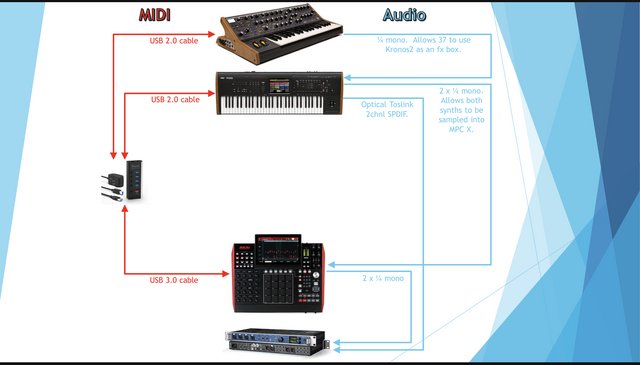
X’s main menu, I can dial in specific midi channel for specific gear where ONLY that which I specify plays. I feel more people should dig into midi options right there in the main menu for better exclusive control (in prefs you’ll also need to highlight midi control, track, etc.)
Everything is usb midi except emu turbo phatt using a din to usb midi adapter, WORKS GREAT!

All gear to multi-port usb 3.0 powered hub for midi.
That hub to usb in back of X, done.
User avatar
By Lampdog Thu Mar 02, 2023 1:52 am
This image needs gear additions, no changes to what’s already represented though. Yep, I can bang out Kronos2 drums using MPC X pads.

Image
By DrSbaitso Mon Apr 24, 2023 7:06 am
I got a MOTU Midi Express 128 but I can't seem to get IO to work with the MPC. I have it hooked to USB and the devices hooked to it show activity when I play my keyboard for instance. But it doesn't route midi to the instruments at all nor do the pads trigger midi notes any more.
User avatar
By NearTao Mon Apr 24, 2023 11:35 am
The MOTU Midi devices require special drivers. They are, sadly, not class compliant. The only way you can use it with the MPC would be to use your MPC's Midi In/Out to the MOTU Midi Express 128.

I know this, because I used to use several different MOTU Midi interfaces. I have since sold off all my MOTU Midi gear, and went with the iConnectivity mioXL, which works perfectly with the MPC and Force.