Support and discussion for all of Akai’s modern standalone MPCs including the MPC X / X SE, MPC Live 1, 2 & 3, MPC One / One+, MPC Key 37/61.
By Fred23 Sat Feb 03, 2024 9:18 pm
Hello everyone,

I am discovering the world of modern MPCs.
Forgive me if this question has already been asked:

I would like to know if it is possible to control the MPC tracks via midi. Simultaneously

I tried with a cirklon 2 but I control only the current track.
I mean, the track selected on the MPC.

Is it possible to control all tracks simultaneously ?
For example, via the midi input, I would like to control track 1 on midi channel 1 then track 2 on midi channel 2 etc...

I see that there are two midi inputs but I don't understand the use if it's not possible to control each track on a dedicated channel.

Could a kind soul explain to me ?

thanks a lot

User avatar
By Lampdog Sun Feb 04, 2024 12:59 am
No.
Instruments/ patches use midi channels, not tracks.
By jamos Sun Feb 04, 2024 5:28 am
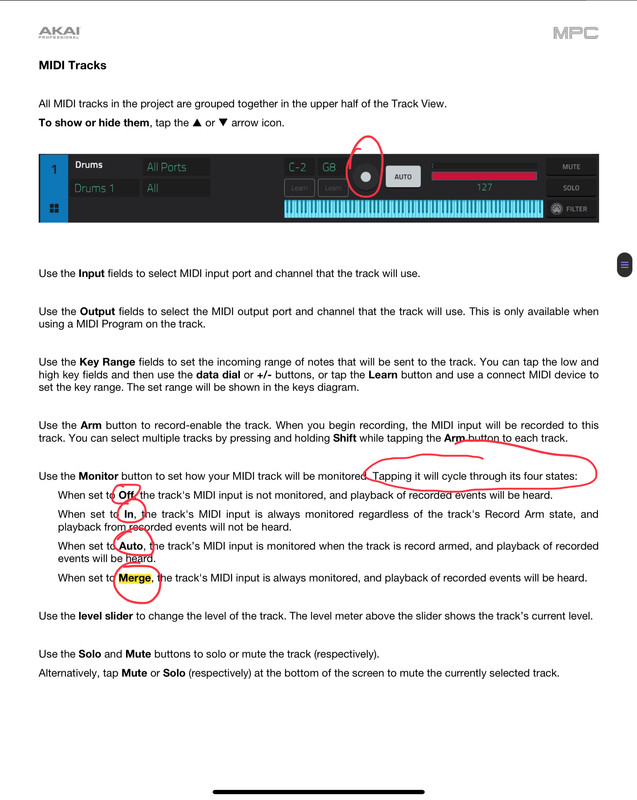
Yes, very much. Set each track that you want to use to its own MIDI channel. Set its monitor mode to In. Assign the program that you want to the track.

Pfft. Done.
User avatar
By Lampdog Sun Feb 04, 2024 7:26 am
Track has it’s own midi, ur right, not instrument, jamos is right.

What’s worse is I do this all the time and I my brain left me just now.
By Fred23 Sun Feb 04, 2024 6:03 pm
Thanks guys.

So it's possible with sample tracks but not with plugin tracks, right?
hmm... ok, I'll try to use the second midi input port for a possible instrument and the first for sample based tracks.

Cool, thanks !
By Fred23 Sun Feb 04, 2024 6:29 pm
Hmm.. I'm probably missing something

Here is my configuration on the MPC :
Image

I can play one track at a time.

From the cirklon I send two tracks, one which plays the break (MPC1 channel 2) and the other which plays a sample (MPC1 channel 1). But I only hear the selected track.

Where am I going wrong?
User avatar
By Lampdog Sun Feb 04, 2024 6:36 pm
I see what your getting at now. This works on PLUG-IN tracks also, try it.

Image
By Fred23 Sun Feb 04, 2024 7:17 pm
:hmmm: I don't get any better results. I can arm both tracks by pressing shift but I don't see the point.

Maybe there is something to tinker with the midi preferences? but I don't understand because I tried all the combinations. Global, control, track.

The goal is to use the Cirklon as a sequencer and the MPC as a sort of module/sampler but without worrying about its internal sequencer or its recording functions.
By Calcaire Sun Feb 04, 2024 7:23 pm
Check in the settings _ Midi page.
Looks like you have midi input set to " master" enabled , which cause this behavior. Enable only control and notes in from the cirklon . Should work, the mpc is quite a powerful intuitive hands on " expander" this way , I use it on 8 channels in from my novation sl mk3 , driving lots of internal programs and external hardware.
User avatar
By Lampdog Sun Feb 04, 2024 7:36 pm
I use mpc as master/sequencer.
Other midi gear going into it. My settings wouldn’t work for you.
By Fred23 Sun Feb 04, 2024 7:44 pm
I had global and control enabled on MPC1 midi input.

I just changed to this :
Image

But it doesn't play the sequences programmed on the cirklon.
User avatar
By Lampdog Sun Feb 04, 2024 10:11 pm
What exact midi cables are connecting mpc to cirklon?

MPC usb a (round) will only accept mpc software.

MPC usb b (flat) will accept midi controllers, sound modules.

The only way I’ve made mpc x/key61 a slave device was using midi din cables.
By Fred23 Mon Feb 05, 2024 10:11 am
Yes i configured the midi channel via the eyeball view.

I think I have understood.

There were several problems on both sides. Cirklon and MPC.

On the Cirklon side, the instruments must send to the desired midi port in multi mode with the polyspread option set to "off"

On the MPC side my setting was good but there is a slightly strange behavior when I am on the "tracks" page where you see all the tracks. In this view, if I select a track, all the midi tracks of the cirklon are played on it... this is not the case if I am on the main view. weird to me but there is probably a rational explaination ?

In preferences / midi page, I checked all three options. overall, control, monitoring.

I'll keep trying to refine it but for now I'll settle for this.

Thanks a lot for your help.