For discussion about setting up your studio and advice on the gear and equipment within it.
User avatar
By PRAYTHEPO Mon Apr 29, 2024 9:28 am
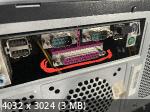
Is it possible or not? Will it blow my AKAI or blow itself?
I know about Adaptec SCSI expansion cards, but I want to know if I can connect directly to 25pin port without any additional stuff.

I am using old 478 socket PC with Pentium 4 on board, Windows XP 32bit for this task.

Image
User avatar
By Telefunky Mon Apr 29, 2024 11:39 am
That 25pin port on your PC is NOT a SCSI port, so connecting the Akai is pointless.
And yes... there‘s a solid chance you‘ll blow something up because there‘s power on the SCSI port of the sampler. :shock:

ps: greetz from another socket 478 user :mrgreen:
User avatar
By PRAYTHEPO Mon Apr 29, 2024 5:22 pm
Telefunky wrote:That 25pin port on your PC is NOT a SCSI port, so connecting the Akai is pointless.
And yes... there‘s a solid chance you‘ll blow something up because there‘s power on the SCSI port of the sampler. :shock:

ps: greetz from another socket 478 user :mrgreen:


So what to do? Buy Adaptec SCSI device?
User avatar
By richie Wed May 01, 2024 1:53 am
PRAYTHEPO wrote:
So what to do? Buy Adaptec SCSI device?


Here's a mini Faq :

1- open new browser, http://www.google.com
2- in search window, type "how to connect pc scsi to akai sampler"

If your computer doesn't have a web browser for the internet, then what I would do is purchase a PCI SCSI card, any make should be fine however ADAPTEC still has available drivers online to do whatever you want.

Lastly, you don't need to work that old with a 478 system, unless that is what makes you feel more analog. You can use a newer system if you want, and have windows XP in a virtual machine connected to the sampler, it works when I did it.
Last edited by richie on Wed May 01, 2024 2:05 am, edited 1 time in total.
User avatar
By richie Wed May 01, 2024 1:53 am
Telefunky wrote:That 25pin port on your PC is NOT a SCSI port, so connecting the Akai is pointless.
And yes... there‘s a solid chance you‘ll blow something up because there‘s power on the SCSI port of the sampler. :shock:

ps: greetz from another socket 478 user :mrgreen:


But what if he wants to print a word document to his sampler?
User avatar
By PRAYTHEPO Wed May 01, 2024 8:02 am
richie wrote:
PRAYTHEPO wrote:
So what to do? Buy Adaptec SCSI device?


Here's a mini Faq :

1- open new browser, http://www.google.com
2- in search window, type "how to connect pc scsi to akai sampler"

If your computer doesn't have a web browser for the internet, then what I would do is purchase a PCI SCSI card, any make should be fine however ADAPTEC still has available drivers online to do whatever you want.

Lastly, you don't need to work that old with a 478 system, unless that is what makes you feel more analog. You can use a newer system if you want, and have windows XP in a virtual machine connected to the sampler, it works when I did it.


Nothing to laugh about.
Anyway: I use old PC to work with WinXP/Win98 in case of some software not working on newer OS.
User avatar
By Lampdog Wed May 01, 2024 8:34 am
richie wrote:use a newer system if you want, and have windows XP in a virtual machine connected to the sampler.


Been doing this exact same thing in Win7, Win10 and Win 11 with MPC 4000 + AK.SYS for 15+ yrs.

Virtual Win Xp (Virtual Box).
User avatar
By Telefunky Wed May 01, 2024 7:48 pm
Lampdog wrote:
richie wrote:use a newer system if you want, and have windows XP in a virtual machine connected to the sampler.


Been doing this exact same thing in Win7, Win10 and Win 11 with MPC 4000 + AK.SYS for 15+ yrs.

Virtual Win Xp (Virtual Box).

With SCSI ? :hmmm: it was USB, wasn‘t it ? ;)
Imho SCSI isn‘t the most easy connection, starting with proper choice of the PCI card...
(but of course it’s possible to lookup a working config and „copy“ that).

ps: I really like my S478 system, Win7/32, Asus P4C800, 2 Ghz P4 mobile, reduced Core voltage, the most cool and quiet Pentium I ever had, 5 PCI slots with tremendous data throughput.
(needed for a Creamware Scope system with up to 6 Adat busses) :smoker:
User avatar
By richie Fri May 03, 2024 1:06 am
PRAYTHEPO wrote:Nothing to laugh about.
Anyway: I use old PC to work with WinXP/Win98 in case of some software not working on newer OS.


Who is laughing at anything?

I literally told you what you can do to resolve your question and also provided you with an alternative that you can look into in the future, works better than relying on an old system and doesn't cost much to do.

You should be thanking me for blessing you with a response. I love you.
User avatar
By richie Fri May 03, 2024 1:13 am
Lampdog wrote:Been doing this exact same thing in Win7, Win10 and Win 11 with MPC 4000 + AK.SYS for 15+ yrs.

Virtual Win Xp (Virtual Box).


What kind of workstation are you using, SCSI card, etc?
User avatar
By richie Fri May 03, 2024 1:17 am
Telefunky wrote:It‘s not a good idea to print Word documents anyway... :mrgreen:


Speaking of which, I was sifting through resumes and saw that some people still like to use their hotmail and yahoo email from when they were teenagers as a point of contact.

I can tell you, that [email protected] definitely didn't have a big booty, she was just fat.

By the way, how many PCI slots do you utilize right now?
User avatar
By Telefunky Fri May 03, 2024 12:56 pm
I use 3 for 3 DSP Pulsar II cards, 18 Sharc DSP total, which is „just enough“ to get along.
(they are the old ADSP 21065L type)
The most crucial fact is that each card gets it‘s own IRQ not shared with anything else, because the 21065 has few on-chip memory and uses mobo RAM for certain operations.
Which may result in a hell of PCI traffic. :shock:
My most favorite feature of the system is the virtual Adat implementation (VDAT) which can be driven by an original BRC Alesis remote control. Nostalgia at it‘s best... :smoker:
(I know I‘m nuts...) :mrgreen:
User avatar
By richie Sun May 05, 2024 10:22 am
Telefunky wrote:The most crucial fact is that each card gets it‘s own IRQ not shared with anything else, because the 21065 has few on-chip memory and uses mobo RAM for certain operations.
Which may result in a hell of PCI traffic. :shock:


Interesting - The reason why I asked was to potentially determine "newer" systems with multi core and native PCI slots in them, should you ever need them.

I'm currently using an HP Z600 from 2010 which has 2 native PCI slots, so I utilize that for my "XP Machine" so I can load my old projects with my M-Audio Delta card as well as an old SCSI Card in it, funny enough it's still turned on right now. I've tried Windows 10 on the system as well, the PCI cards detect fine however the only short coming with the M-Audio card was I had difficulty with SPDIF. Obviously if it were a cheap RME PCI card, their drivers will work until 2099.

Alternatively, you can easily find LGA1156 motherboards on the cheap, which will have upwards of 4 native PCI slots on them, SATA3, PCIE as well. I have a couple of those motherboards for backup, with nice cheap $10 Xeon chips with 4 core 8 thread.

Hopefully your board doesn't die on you but at least there's more readily available options for the future.