Support and discussion for all of Akai’s modern standalone MPCs including the MPC X / X SE, MPC Live 1, 2 & 3, MPC One / One+, MPC Key 37/61.
By Robert Mathews Wed Jun 26, 2024 11:48 pm
Hi guys I’m new to the MPC and just got myself a One. Have picked up the basics fairly quickly but have a major issue that’s driving me mad and preventing me from making multiple sequences/songs.

After I’ve sampled sounds, edited/saved etc and assigned to my pads in a new Sequence and go ahead and make a new intro all is well. I am using multiple samples per sequence and I use a new drum programme for each sample in the same track. I then copy sequence 1 over to Sequence 2 and add drums or a new sample in a new programme. This is where the issue starts.

When I’m finished and move on and copy these sequences with the samples and I start playing the Sequences consecutively to listen to progress, once it moves to Sequence 2,3 etc the samples from Sequence 1 or the prior sequence stop playing except the ones I assigned while making that sequence!! :Sigh:

I’ve tried looking at tutorials and vids on YouTube and no else seems to have this issue. I know I must have some kind of setting turned on/off that is causing this.
Any help would be much appreciated guys as this is essentially making it impossible to make anything more than a single sequence of music!! Any ideas?
User avatar
By MPC-Tutor Thu Jun 27, 2024 10:21 am
Your terminology is all over the place so it's not clear where you are going wrong. But in a nutshell:

Assign your samples to a program, not a sequence.
Assign that program to a track in a sequence.
Record a performance on that track (e.g. drums)
Select a different track in the same sequence and assign a program to that track. This could be the same program or a different program, including keygroups and plugins. Let's say you use a bass patch from the Tubesynth plugin.
Record a bass performance on that track.
Press play to hear the two tracks play together.
Record more tracks as required, one for each instrument (e.g. piano track, pad track, etc). This multi-track sequence could be, for example, your intro sequence.

Now if you want to create a new section for your song, (e.g. verse) set this up on a different sequence. But this sequence should have the same track structure as your intro sequence (e.g. drums track 1, bass track 2 etc). You might want to initially just copy your intro sequence to this new sequence. You can then make changes accordingly (e.g. overdub new parts, re-record, edit in grid view etc).

Repeat this for each unique section of your song. Then go to song mode and chain it all together into a complete song.

There are other ways of working, but stick with the 'classic' song mode method first and you can look into the other ways later.
By Robert Mathews Thu Jun 27, 2024 1:52 pm
Hi thanks for replying to my question and apologies for the terrible wording.

I do get the basic theory and have composed consecutive sequences in a project with different programmes and seperate tracks for instruments (drums, bass, keys, spoken word samples etc). E.g. all samples of strings/vocals are used on Track 1 of a project. When I play back my intro it sounds fine, and all samples are playing at the correct intervals I played. Great. I then copy that sequence over.

I now assign a new sample to a new drum programme in sequence 2 Track 1, play/record, then move on to the third sequence. There are now multiple drum programmes available to scroll through with the wheel. The samples from Sequence 1 have been copied to the first drum programme (and are visible on Track 1) and the new sample is visible on drum programme 2 of the same track.

When I play these back - Sequence 2 (with the single drum programme sample) - is only playing back that new sample, without the copied over parts from Sequence 1/Track 1 (which is still available on the drum programme list). Is there some setting I don’t have turned on that is preventing the first sequence playing while the second sequence is playing?

I can’t seem to work out whey they aren’t playing together. It’s very infuriating
User avatar
By MPC-Tutor Thu Jun 27, 2024 2:10 pm
Is there some setting I don’t have turned on that is preventing the first sequence playing while the second sequence is playing?


You can only play a single sequence at a time.

Let's assume your 'intro' sequence, seq 1, contains drums on track 1, and bass on track 2. When you copy this to seq 2 to make the next part of your song, and want to add, say, some piano chords, you need to select an unused track in seq 2, e.g. track 3, and assign a piano instrument (e.g. plugin, keygroup etc) and record your piano to track 3.

Now this seq 2 will contain the drum and bass performances that you copied over from seq 1 (on tracxks 1 and 2), plus they'll have the additional piano on track 3.

Now copy seq 2 to seq 3 and on track 4 you could add another instrument, e.g. a lead sound. You can also make changes to the drums, bass and piano to add variety. Changes you make to any sequence will not affect the contents of your other sequences.

Now head to song mode to chain it all together into a single song playlist.
By Robert Mathews Thu Jun 27, 2024 3:13 pm
Sorry I didn’t explain it clearly.

There are two drum programmes on Sequence 2 (the samples copied over from Sequence 1 + the new sample(s) from programme 2) and three drum programmes on Sequence 3 and so forth. When I play back each sequence the copied over drum programmes from the previous sequence are not playing, ONLY the programme recorded on that specific sequence (such as the single sample recorded on Sequence 2)
User avatar
By MPC-Tutor Thu Jun 27, 2024 3:24 pm
Terminology is still confusing, so it's really hard to work out what what you've done wrong.

There are two drum programmes on Sequence 2 (the samples copied over from Sequence 1 + the new sample(s) from programme 2)


Sequences are made up of tracks, not programs. The tracks contain the MIDI data that triggers the sounds in the program assigned to that track. Strictly speaking you don't copy over samples or the programs, you copy over the tracks and their MIDI data.

I assume in your new copied sequence you've done something like change the program assigned to the 'existing' tracks so they are all playing a different program. Could you take some photos to show the structure of each sequence? In track view and 'main' if possible. Upload them to somewhere like https://postimages.org/
By Robert Mathews Thu Jun 27, 2024 7:40 pm
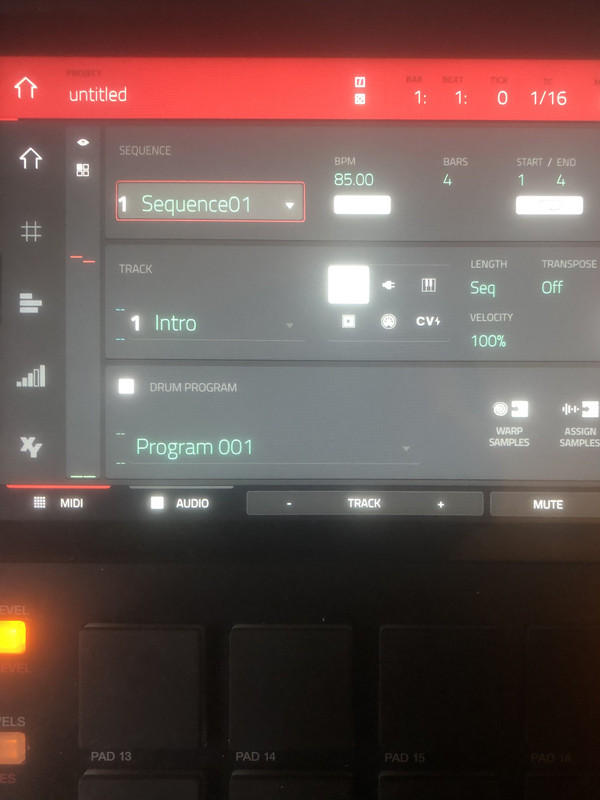
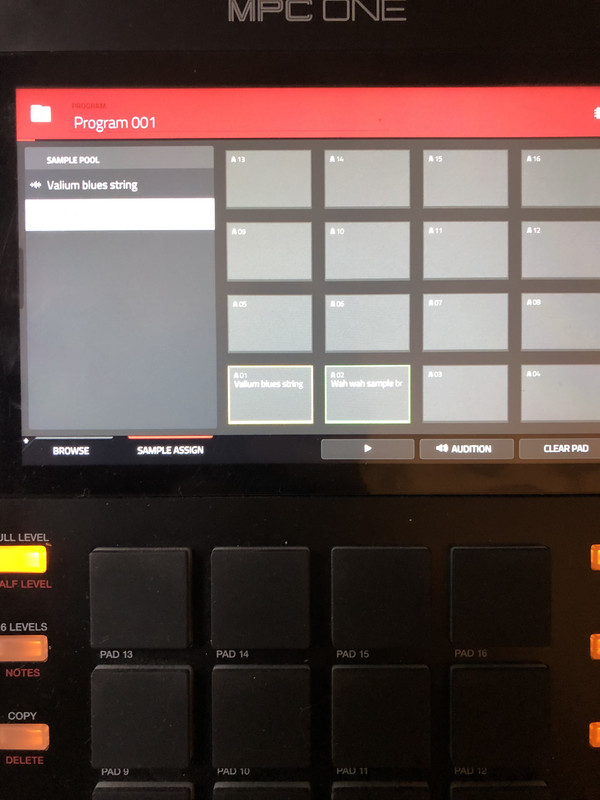
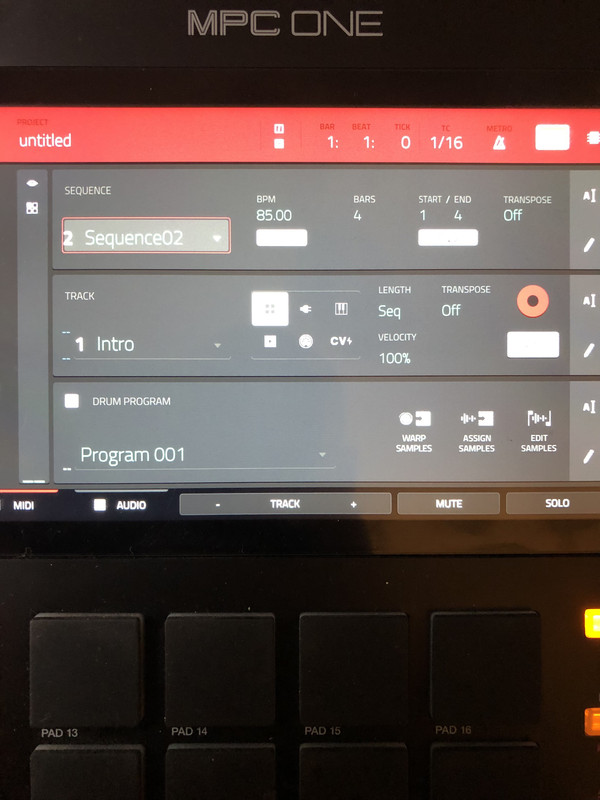
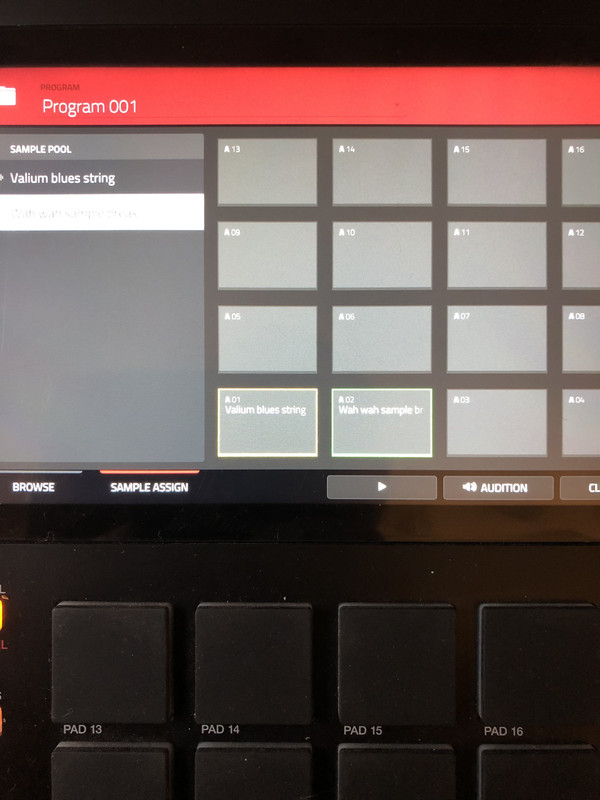
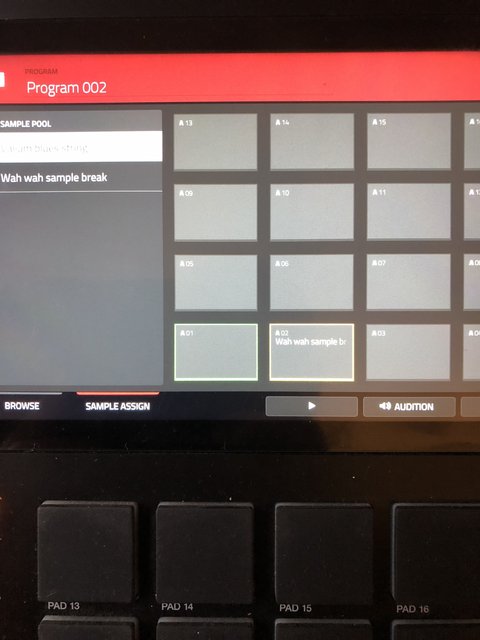
Hey I’ve taken a few screenshots of the ‘main’ view with Sequence 1/2 screens and the ‘assign samples’ screens below:

https://postimg.cc/gallery/VNw1YRc

Both used samples have been time stretched to 85bpm from their originals (could this be causing the issue?). The Intro track on Sequence 1 has one long sample playing for 4 bars. Sequence 2 has one short sample in a new drum programme played twice at two points. Both samples are available in the ‘assign/sample pool’ screens.

When I am playing back Sequence 2, the long ‘Intro’ sample is stopping and retriggering at the timeline point the second sample starts to play and everything is sent off. It was originally playing through continuously.
Project bpm is set at 85bpm, and the two samples have been time stretched from their original tempos. Is there something ive done wrong here? This has happened in the three projects I have made so far and its literally driving me mad as I have made dozens of single sequences that are fine. This issue is only happening when moving on to the next sequence and the recorded samples seem to be throwing everything out of whack/tempo/retriggering from the previous sequence etc. Seems like the first pad/sample A1 is being triggered again by the new sample on pad A2 and clashing. This had happened with more complex sequences also.

Many thanks guys for the input or I’m gonna have a breakdown lmao

P.S forgot to say also that sometimes on the new drum programmes 2,3,4 etc on consecutive sequences, while playing back the sequence, the Intro samples or any previous samples used in prior sequences/programmes will not play either. The only sample that is audible in playback is the ‘current’ drum programme/sample e.g. Sequence 2/drum programme 2. This is after copying the prior sequence. It seems to vary between either sample clashing, or playing the current sample, NOT the whole copied over sequence.
Image

Image

Image

Image

Image
User avatar
By MPC-Tutor Thu Jun 27, 2024 8:22 pm
So in seq 1, is there just one track (track 1)? Is this just triggering the long string sample from pad A01?

And in seq 2, is track 1 still set to trigger A01?

What is this program 002 for? It seems pad A02 on this program is the same sample found on pad A02 in program 001. Why do you have two programs, with pad A02 being the same sample in both programs?

Which track is program 002 assigned to?

TBH it would be easier if you just zip up your project and upload it to dropbox or similar and we'll check it out.
By 40Beatz Fri Jun 28, 2024 1:29 pm
Sounds like he Nudged a Sample by mistake in one of his Programs. I do that sometimes. When I load a Sample from my Browser...WHILE STILL in one of my Programs instead of Loading a Sample from the Browser while in a Empty Program.

Then it just compounds into a Ghost Sample in my Project
User avatar
By BDRAKE Tue Jul 02, 2024 10:53 am
Lampdog wrote:These pics or explanation don’t tell the whole story enough to analyze/troubleshoot imo.


Exactly. Need to see the program data as well to see layout just for starters. Has me curious. :hmmm:
By MPClovehate Tue Sep 03, 2024 11:05 pm
I know the problem is already solved probably this is old but for anyone else having this issue..
I believe the problem is it’s set to multitrack
I found myself in the same situation
All of a sudden I had to arm the record button every time I would bounce a sequence and play over the next track would delete the track idk what exactly multitrack means in AKAI terminology but anyway just another confusing bs thing about these temperamental machines
Go to preferences sequence then single if it’s on multitrack not sure how the multitrack works and I don’t care to know as it was frustrating as f**k and not how I’ve ever laid out a sequence before
I have no clue how it got changed