Support and discussion for all of Akai’s modern standalone MPCs including the MPC X / X SE, MPC Live 1, 2 & 3, MPC One / One+, MPC Key 37/61.
By submo Fri Jul 19, 2024 11:47 am
denony wrote:I do not not what it is not working.

Thank you


Ok... I've probably got the Message Filter objects set the wrong way round, so you may need to invert the selection that I've done on those objects (or just delete them, but keep the channel remapper).

It was late when I put that together so didn't get time to check it. It will work though. I'll have another look when I'm home in a few hours time.
By denony Fri Jul 19, 2024 2:24 pm
submo wrote:Ok... I've probably got the Message Filter objects set the wrong way round, so you may need to invert the selection that I've done on those objects (or just delete them, but keep the channel remapper).

It was late when I put that together so didn't get time to check it. It will work though. I'll have another look when I'm home in a few hours time.

Yes, that's what I discovered! When there is a check mark on one of the filter items, then it deactivates it. So I reversed the checkmarks (and removed the filter on USB A which is therefore no longer useful) and now it works perfectly. :worthy:

I hope I didn't uncheck too many items for the last 3 pipelines.

Image

Thank you very much... Because for the Midicake ARP, which has 4 tracks only, it's perfect! :lol:
By submo Fri Jul 19, 2024 2:39 pm
denony wrote:Thank you very much... Because for the Midicake ARP, which has 4 tracks only, it's perfect! :lol:


No worries...

.....Yeah the filters were mainly to filter out any clock messages on the last three USB ports, as having duplicate clock signals from the same MIDI source is also kinda pointless. If I was you, I would check the clock, start, continue, and stop check boxes on all three of the 'Filters', and just use the first USB port for all clock/sync stuff.

Glad you got it working!
By noisy.music.boxes Sat Aug 03, 2024 6:49 pm
submo wrote:Right...

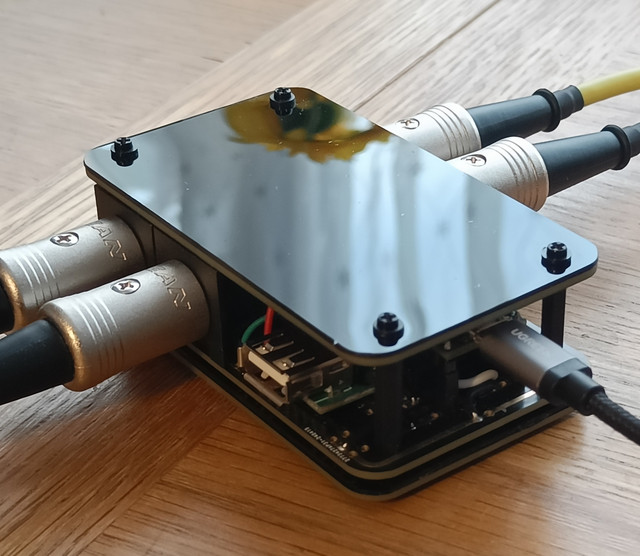
So I've made a very hacky work around to the very annoying multi channel midi input note off bug. Been bugging me for far too long so I've made a little USB Midi Device which can sort of get round this issue.

It's a USB Midi interface with a single Midi Din input. The USB Midi interface shows up as 16 different Midi ports on the Akai. Each Midi channel received at the Midi Din input is routed to it's own specific port. So Midi channel 3 is sent to USB port 3.. Midi channel 7 is sent to USB port 7, so basically each Midi channel gets it's own port.

By giving each Midi channel their own port, they don't get affected by the note off bug. It's a crude but effective work around if anyone like me REALLY needs to use multi channel Midi input, and can handle putting a few electronic components together in a breadboard. Parts are cheap, and it's Arduino/Teensy based so pretty simple to do.

I'm still hoping for a fix for this soon.... But I couldn't wait, so I needed some sort of solution. I've only just cobbled this together this morning, so it could do with more testing, but it seems to do the job!.

Happy to share what I've done if anyone is interested, but obviously there are risks to plugging homebrew stuff into the USB port on your Akai. Maybe I'll do a video once I've played/tested some more

Pic:

https://ibb.co/VCYp3R7

(McMIB (Multi-Channel Midi Input Bug))


Wow, this little project sounds amazing to me. Iam absolutly interested!
This is one of the last missing peaces, to use the MPC as the live / Studio Mainbrain with external sequencers....

I can solder, as far as is know, i have a teensy or / and arduino nanos and some octocoplers, etc. around. I can solder, so the hardware part is not that big thing for me. But iam struggeling with the software-part... :roll:

soo please give us or me ^^ some more infos About that. The schematics and Code, and some tips for it would be realy great :-D

thanks in advance :worthy:
By submo Sun Aug 04, 2024 7:45 pm
noisy.music.boxes wrote:thanks in advance :worthy:

No probs....
The Teensy boards are probably the best option. Here's a circuit diagram, and more info here:

https://www.pjrc.com/teensy/td_libs_MIDI.html

You only really need the Midi input circuit for this, so you don't have to add Midi out part.

If you do want to have Midi outs I probably wouldn't copy that Midi out circuit from the Teensy page. The output pins on the Teensy 4.0 can be a little weak (electrically), so it's probably safest to use a buffer like (74HC14N) to be safe.
There's a good circuit example here for that:
https://electricdruid.net/product/midi-inoutthru-pcb/

The Teensy boards use the Arduino IDE, so the setup is pretty simple. There's install instructions here:
https://www.pjrc.com/teensy/td_download.html

Once set up, just select your Teensy board type, set the USB type to MIDIx16 in a drop down menu (which makes the Teensy appear as a 16 port Midi device), and then just add your code. I just modified one of the pre existing examples to get this working.

Here's a link to the basic version I came up with.
https://drive.google.com/file/d/1rfSn8N ... p=drivesdk

Just double click the .ino file and it should open up in the Arduino editor if you installed it, or just open the .ino file in a text editor to just see the code.

I've tried this with the Teensy3.2 & Teensy4.0 boards and they seem to work OK. Once you get this working you can make tweaks if you want. I've added an additional Midi input so I can now get Midi from two seperate sequencers. You can also change the number of ports, so if your not gonna use all 16, you can drop it down to whatever your gonna need.

Happy to help, so feel free to ask if you need help with anything. And obviously be very careful... Plugging in homebrew stuff into your MPC comes with risks, so make sure your circuit is good before plugging into anything, and my code may have bugs I've not found (I'm still new to this myself)... Basically do this at your own risk 8)
By Bakai Fri Sep 27, 2024 2:08 pm
Hi!

Very cool arduino solution.

Do you think this upcoming CME product would be a relatively pain free solution, with its midi filtering capabilities?

https://www.cme-pro.com/h4midi-wc-usb-h ... 67906fe4ce

And also would you know if these current products would work?

MIDI solutions Event Processor:
https://www.midisolutions.com/prodevp.htm

Iconnectivity Midi4+:
https://www.iconnectivity.com/products/ ... tmidi4plus

As long as these can be setup to perform note off filtering on all channels on a per channel basis they should work, yeah?
By submo Fri Sep 27, 2024 4:18 pm
Bakai wrote:As long as these can be setup to perform note off filtering on all channels on a per channel basis they should work, yeah?


The idea here is not to filter out 'note off' messages, but to separate and route each Midi channel from a single Midi connection to its own USB port.

The CME H4 will work (I have one on preorder), but this will limit you to using only 4 Midi Channels as this device only gives you 4 USB ports to play with. You could push it to 5/6 Midi channels if you use the Din Midi outputs too.

I've previously used the CME U6 to do this, but that limited me to using only 3 Midi Channels, as the U6 only gives you 3 USB ports to play with.

The Midi Solutions one won't work, as it needs to be a USB Midi Interface.

I don't know enough about the Midi4+ to say for certain.
By Bakai Tue Oct 01, 2024 8:36 pm
OK, so I'm trying to better understand the iConnectivity Midi4+ capabilities from their manual, to solve this AKAI limitation, and I think it should work.

It states, for the MIDI4+:
* there are 64 MIDI ports available (each with 16 MIDI channels) - the ports can all be routed to each other using the iConfig app
* 4 DIN in & out jacks @ 1 port each [4 ports], 3 USB device jacks @ 16 ports [48 ports], a USB host jack [supports 8 ports - can be 1 port on eight MIDI devices, 8 ports on one MIDI device, or any combination], and Ethernet jack for midi over network [4 rtpMIDI or Network MIDI sessions; each session = 4 ports]
* the config setup for snapshots, filtering, routing, merging and remapping is stored in flash memory
* it is MIDI class compliant
* up to 19 devices may be connected (including eight USB MIDI devices on the USB Host jack, if using a powered USB hub, and up to 4 computers networked over the Ethernet)
* [note in manual says: "...USB MIDI allows 16 ports on each jack. That means each USB Device jack can connect to 16 other devices. Excluding itself, that leaves two devices unattached, but you can change the default routing to send the same port to two devices]

It seems to me that with the MIDI4+, one should be able to have one MIDI device routed singularly into 1 port at a time, and then that each of these are directed into 1 of 16 USB ports which then will feed the AKAI via the physical USB jack, correct? As you suggested in another post, it is also possible to direct individually into the AKAI MIDI DIN port(s) if needed too.

I'm actually not that familiar with the device yet, because I bought it used (for $80USD a few years ago) as a backup for my old M-Audio 8x8 MIDISport (connected to a 2007 Mac with really old OS to change configs, and then I boot it back to standalone mode - can get screwy whenever there is a power outage though) and an E-Magic Unitor 8 DIN MIDI rack hubs...these are both decades old and I never know when the compatibility with newer OS's will keep up. The Emagic got a relatively new update to many old school Emagic users' pleasure.
By submo Tue Oct 01, 2024 9:59 pm
Bakai wrote:OK, so I'm trying to better understand the iConnectivity Midi4+ capabilities from their manual, to solve this AKAI limitation, and I think it should work.

I've had a quick look at the Manual and watched a couple of vids, and it does look like it should work. Like I said, I can't say for certain without trying it for myself, but I can't see why it wouldn't work. You would obviously need to config the routing/filtering on Windows/Mac via it's software first, save the changes to the device, then hopefully it should all be good when you plug it into the MPC. From what I can tell, it would show up on the MPC as 16 USB ports (which would give you 16 Midi channels to play with).
By Bakai Tue Oct 01, 2024 10:04 pm
Thanks again for checking it out! It seems it might be a relatively affordable solution as these are available used frequently and at a reasonable cost.

I guess between these and the various MIO models they might do the job for those that aren’t savvy with arduino
By submo Tue Oct 01, 2024 10:22 pm
Bakai wrote:Thanks again for checking it out! It seems it might be a relatively affordable solution as these are available used frequently and at a reasonable cost.

I guess between these and the various MIO models they might do the job for those that aren’t savvy with arduino

Yeah. I was originally gonna go for the MioXM to get round this Midi problem, but thought I'd have a go at building my own first, I already had most of the parts lying around. I've added some extra Din ports now, which has turned out quite well.....

Image
By submo Wed Oct 02, 2024 3:48 pm
Bakai wrote:That is a wonderful neat build. Do you happen to have a BOM for the items / kit?

Thanks, I'll try to get a schematic done with a parts list. Most of the additional parts I got from Amazon (Din connectors, prototype PCB, etc). Might even get some proper PCB's made if I get time. Let us know how you get on with the Midi4+
By Bakai Thu Oct 03, 2024 10:59 pm
Hmm, for Mac, then maybe MidiPipe also works, in the same vein as Midi-OX for Windows?
A couple of links that might be useful...not sure as I haven't tried:
http://www.subtlesoft.square7.net/MidiPipe.html
https://www.macupdate.com/app/mac/10541/midipipe

denony wrote:Hello

Is there a way to simulate submo's hack using a PC running Midi-OX software between the "multichanel synth source and the MPC" , or using a MidiHUB from Blokas (https://blokas.io/midihub/)

Thank you

Regards