Support and discussion for all of Akai’s modern standalone MPCs including the MPC X / X SE, MPC Live 1, 2 & 3, MPC One / One+, MPC Key 37/61.
User avatar
By Logrinn Fri Jul 19, 2024 1:37 pm
denony wrote:Hello,

Logrinn wrote:I tried this just now, and I wasn't able to get this bug.
I sent a note on message (C3) on channel 1 and then a note off message (also C3) on channel 2 and the note on channel 1 keeps sounding.
So, yes, it seems fixed.
Perhaps someone else can confirm?


Did you try to record both Midi tracks in a sequence ?
I just tested, the "Multichannel Note OFF" bug still exists in 2.15 (on my MPC One)


I did not. I only sent midi messages to the synth engine (plugin) and didn't get this behavior.
So I tried what you are saying - sending several channels to the synth/plugin while recording. And this time I did encounter the bug.
Checked the list edit info, but I couldn't see any channel message info (just note and velocity value) so that didn't help me.
But as I recorded the first set of notes on track one using an external keyboard that sent on midi channel 1, I recorded the second set of notes on track two using the external keyboard now set to channel 2.
And the bug was there.
BUT - the both tracks when I tried this were using the same plugin. And when I assigned a second plugin to track two, I could hear both set of notes, from both track one and track two, and the note-off problem was no longer present.

So - in a way the bug is there, but in another way it's not. What I could gather the problem seem to be present when sending note on and note off messages for the same note number to a particular track or several tracks that are sharing the same synth/plugin.
It seems that the sequencer doesn't adhere to the basic channel messages or is set to some type of omni mode when one is recording to it from an external source. OR - from the internal keyboard as well (just tried that too although the same midi channel was used both times).
Two tracks recorded and the note off messages on track two kills the sounding notes on track one - IF the tracks share the same plugin. If they have separate plugins the problem is no longer there.

I'm using a Key 37.
By chrisroland Fri Jul 19, 2024 6:37 pm
my problem (at least using my MPC One with 2.1x) is that the bug doesn't just affect plugin synths. it's across all programs -- drum, multisample, plugin. so now i gotta spend another whatever it costs to get a MIDI filter i guess until AKAI can get their shit actually together and fix the one thing that everyone's been screaming at them for years at this point to fix. lovely . . .
By Jaymes Sun Jul 21, 2024 12:20 pm
When I split a bass and organ sound, the vibrato from the organ bleeds into the bass. When I hold an organ chord, then play a bass note the bass will take on a vibrato effect but If I play the bass before I hold an organ chord it is normal. I can not figure out why this is happening. It also happens with an Electric Piano that has vibrato. When the keys are played before the bass or simultaneously, The bass will emulate that vibrato sound. Stopping the EP and holding the bass note after playing both together sustains the vibrato in the bass. It's sounding like a wah wah effect on the bass which I don't want.
By dcarmich1 Tue Jul 23, 2024 11:46 am
When I saw a video that demonstrated the MIDI issue still being present with 2.15, I filed a ticket (#inMusic-381985) with inMusic support and they said: "It has been raised to our product teams, and I will be following up with them again to enquire further about the status of a resolution."
By moonlake Mon Jul 29, 2024 8:57 pm
The tuner in the sampler doesnt work for me.
It just shows either blank, or 50 Hz grid frequncy residue.
When there is input it goes blank. When the input fades away, it briefly shows something I cant read
cause its too fast and then it shows 50 Hz.
Maybe its my sound sources, but they do have a pitch, and my guitar tuner shows a pitch,
using the same mic. 2.15.
By wavejockey Mon Aug 05, 2024 1:31 pm
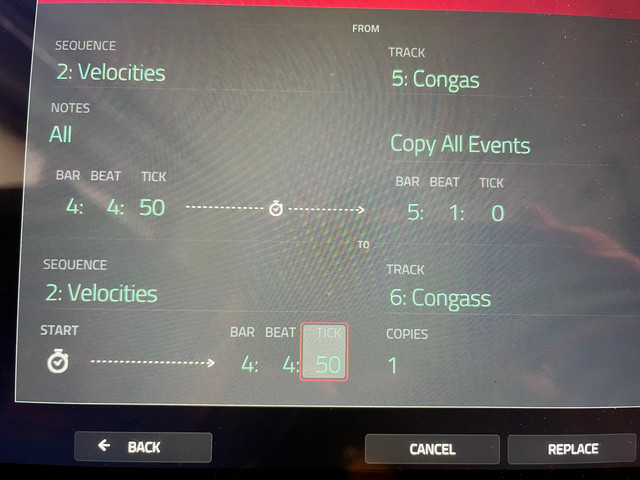
Image

when i copy events as above they get shifted

i want to copy all events between (e.g.) 4:4:50-5:1:0 so my assumption is MPC copy will keep the relative distances but it does not

when my events start at (e.g.) 4:4:55 and i copy to 4:4:50 it will place the copied events to exactly that place - which is not correct, i want to copy everything between those markers, including the empty ticks
this is specially difficult when you have multiple notes that you want to move/copy that are not starting at exactly the same place because the copy will move all events to the START position you set

also, why is the first time you enter this menu the start position set to 01:01:00 but at later times the START position is the previous one you used ?
By wavejockey Mon Aug 05, 2024 1:34 pm
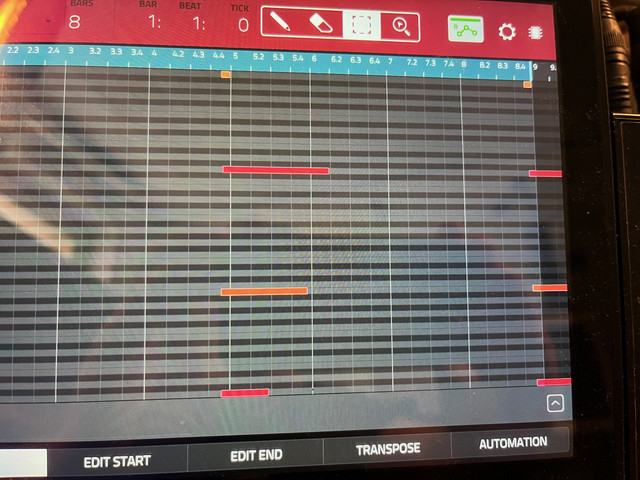
Image

when you move the (last notes) notes above to (e.g.) 5:1:0 and then move them back to 8:4:50 they get cut off

you never get the long notes as original, they will stop at the sequence end
By moonlake Fri Aug 09, 2024 8:20 am
Still a bug in 2.15:
When exporting a song as audio, the tail setting does not work.
I use a tail of 1 second, but the tail varies from several ( up to 10) seconds silence to immediate cutoff of audio, different from song to song, and seemingly independent of audio material
User avatar
By 83dude Mon Aug 12, 2024 6:05 am
Do you have reverbs or delays that might still tail off at the end? Don‘t know whether the MPC checks for that.
By moonlake Fri Aug 16, 2024 3:43 am
Thats what I thought when I got the long tails, that there might be a weak subsonic signal thats interpreted as song tail, from a delay probably.

But then I got this song that was cut immediately.
What I found out that this song was missing a note off in some track - the last note extended
beyond the tracks length.
When I extended the track length it was fixed.
By Cashman Tue Aug 20, 2024 10:02 am
Bug:
When my MPC live 2 is midi clock slaved to an external clock, AIR diffusion delay does not work if the delay sync button is on. :cry:
By moonlake Wed Aug 21, 2024 1:24 pm
the Q link pop-in menu freezes randomly, stays open and does not close again and I need to restart the machine to fix it.

This happened to me like 5 times within half an hour.

I *think* it occurs when either the first or second knob is touched while simultanously either the screen, another knob or external MIDI
send an event.
For instance *it seems* that while I turn knob 1 and incidentially touch knob 2 it freezes.
Most functions still seem to work but you cant use the interface when the menu is open,
and when you dont restart (shut off and on again) but just reload the project, the menue is closed but knob 2 doesnt work properly.

I am not sure this is a hardware issue or software only.

Possibly, if there is an extra processor (?) for interface and midi, it might be an issue with the software for that and not the main software.
User avatar
By Neodymium Thu Aug 22, 2024 5:54 am
Not a fix, but a workaround; do you know you can turn the pop up menu off. Hold the Q-Link button, then the Q-Links Menu appears. De-select 'show q-link status when touched.'

I sometimes get this issue, when I form the ground when touching the links, basically when I am barefoot.
By moonlake Thu Aug 22, 2024 10:26 pm
ah, thanks, no I didnt know you can turn it off.
Also interesting with the ground so it seems a mix of hard and software issue.
By CPM0003 Fri Aug 23, 2024 10:27 am
Hi, could one of you test the "Stereo > Mono" function (Sample edit/process). On my mpc one os 2.15 (and it doesn't matter the source, left, sum or right) it doesn't work, the sound remains stereo.

Thanks in advance and have a nice day.