Support and discussion for all of Akai’s modern standalone MPCs including the MPC X / X SE, MPC Live 1, 2 & 3, MPC One / One+, MPC Key 37/61.
User avatar
By astral_Signal Tue Jul 23, 2024 3:56 am
Hi all,

Wondering if it's possible to trigger a pad from one program to another?

Example:
Drum break - sampled chopped and converted to drum program.

Drum one shots - imported and converted to seperate drum program

Drum break program - Pad 01 Kick 01
Drum one shot program - Pad 01 Kick 01

In this example, I want to trigger pad 01 from the drum one shot program when pad 01 is triggered from the drum break program.

I know I can layer one shots over a drum break and trigger another pad from inside the same program, but is it possible to trigger from one program to another? At the end of the day it's just MIDI information right? I'm also aware than I can copy/ paste sequence data from one program to another, and this seems to be the only way to achieve this from what l've seen so far.

Let me know. Cheers!

Running the MPC Live 2 on v2.14
User avatar
By Lampdog Tue Jul 23, 2024 1:58 pm
B-Wise wrote:Send the MIDI from 1 program the other via the Track settings. You can send multiple tracks to 1 track if like.
User avatar
By astral_Signal Fri Jul 26, 2024 12:01 pm
B-Wise wrote:Send the MIDI from 1 program the other via the Track settings. You can send multiple tracks to 1 track if like.


Can you elaborate on this? Do you mean simply copy track in track settings?
User avatar
By Lampdog Fri Jul 26, 2024 12:40 pm
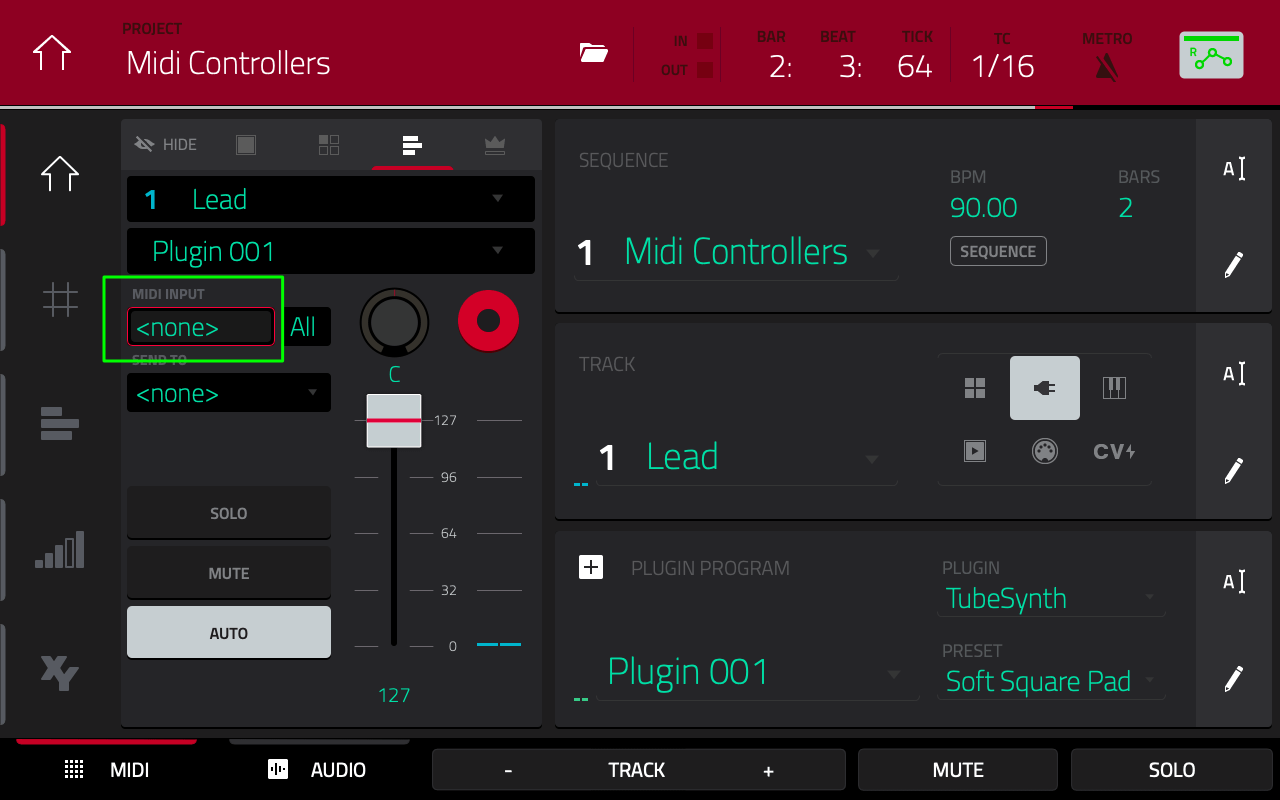
Pay no attention to the green square, focus on the SEND TO above SOLO. Dial in the destination track. The track will now play it’s own midi AND send it’s midi to the destination. Grid view on the destination won’t show anything for this because nothing is physically recorded on the track. The destination track needs to have a program in it in order for it to show up in the SEND TO box.

Image
User avatar
By astral_Signal Fri Jul 26, 2024 12:57 pm
Lampdog wrote:Pay no attention to the green square, focus on the SEND TO above SOLO. Dial in the destination track. The track will now play it’s own midi AND send it’s midi to the destination. Grid view on the destination won’t show anything for this because nothing is physically recorded on the track. The destination track needs to have a program in it in order for it to show up in the SEND TO box.

Image


Thanks! This works, but because I only want to trigger (in this example) a kick sample I needed to assign the pads on the receiving program to mimic the source program i.e. Bank B Pad 01

Do you know if its possible to send only the corresponding pad data over MIDI?
User avatar
By Lampdog Sat Jul 27, 2024 2:23 am
astral_Signal wrote:Do you know if its possible to send only the corresponding pad data over MIDI?

This will send the whole track, there are no options for anything else UNLESS 3.0 does more later. For now, this works in 2.1X, I use it all the time to “midi layer” tracks.
User avatar
By Ultros Sat Jul 27, 2024 4:34 am
dezamn! i never ever noticed that shit. how handy! i love that it doesnt douplicate all the events. keeps the project small and layering in unison is much easier than my old cut and paste method. kudos for this thread.
User avatar
By astral_Signal Sun Jul 28, 2024 2:21 am
Lampdog wrote:
astral_Signal wrote:Do you know if its possible to send only the corresponding pad data over MIDI?

This will send the whole track, there are no options for anything else UNLESS 3.0 does more later. For now, this works in 2.1X, I use it all the time to “midi layer” tracks.


Thanks. Seems odd that you cant route MIDI data internally in that way, it's either all or nothing in this example. But at least this method does work.
User avatar
By Ultros Sun Jul 28, 2024 2:32 am
Lampdog wrote:Lots of people just skip past this screen and keep going.

:lol:


Yeah i made a habit of never using that screen. using the erm ?track? screen to set up my midi ports and tracks. :lol: