Support and discussion for all of Akai’s modern standalone MPCs including the MPC X / X SE, MPC Live 1, 2 & 3, MPC One / One+, MPC Key 37/61.
By enzyme Fri Sep 20, 2024 5:16 pm
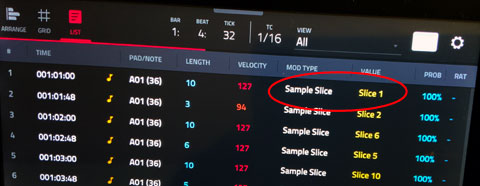
Using slice modulation has been improved (for example, now slice values can be locked per step, rather than having to lock the value on the previous step).

However, I had a fatal crash when trying to load a new layer of slices while my sequence was playing. MPC did a reset and I lost what I had been doing.
By Guilll Fri Sep 20, 2024 5:43 pm
When I record audio through my M-Audio Fast Track Pro audio interface, I get random clicks when playing the audio I recorded. The weird thing is, these clicks only happen when the audio is on the arrangement, not in sample edit mode. They also don't happen at the same time every time, so they don't appear to be part of the sample itself.
By Elijah Sat Sep 21, 2024 2:32 am
Wow! I didn't know that the slice setting is a parameter for notes (playable with 16 levels) as well as for automation. It's a good improvement.
Image
User avatar
By Lampdog Sat Sep 21, 2024 3:12 am
Guilll wrote:When I record audio through my M-Audio Fast Track Pro audio interface, I get random clicks when playing the audio I recorded. The weird thing is, these clicks only happen when the audio is on the arrangement, not in sample edit mode. They also don't happen at the same time every time, so they don't appear to be part of the sample itself.

Random non-uniform clicks could be an expired trial something something?!
By IvoryBlack589 Sat Sep 21, 2024 6:26 pm
Guilll wrote:When I record audio through my M-Audio Fast Track Pro audio interface, I get random clicks when playing the audio I recorded. The weird thing is, these clicks only happen when the audio is on the arrangement, not in sample edit mode. They also don't happen at the same time every time, so they don't appear to be part of the sample itself.

I noticed today that it was only happening during playback of a sequence/arrangement. Like I would literally stop and start the sequence and it'd start back up each time. It honestly feels like it is getting worse.

It's beta, but it's making me seriously doubt the reliability of USB audio interface support because after looking into it a lot of folks have had problems with it across the board.
Lampdog wrote:
Guilll wrote:When I record audio through my M-Audio Fast Track Pro audio interface, I get random clicks when playing the audio I recorded. The weird thing is, these clicks only happen when the audio is on the arrangement, not in sample edit mode. They also don't happen at the same time every time, so they don't appear to be part of the sample itself.

Random non-uniform clicks could be an expired trial something something?!

I wouldn't be surprised if it was some DRM sh*t impacting things, but damn
By substantialRip Tue Sep 24, 2024 10:52 pm
MPC ONE+ won't "load to pool" from file browser, even though it gives visual feedback saying the sample was added to the pool. So if I'm trying to add samples to layer 2, 3, etc on Bank A, I have to first load the samples onto Bank B pads, and then do a bunch of screen shuffling to assign them to the correct layers and clear out Bank B
By theshadowhost Wed Sep 25, 2024 8:45 am
on my MPC one+ the splice integration has stopped working since the upgrade. just says 'attempting to connect to network'.

the device seems to be connected to my wifi so not sure what the issue is. i've reported this to AKAI using their form.
By nickrosa Wed Sep 25, 2024 5:29 pm
Wrong sequence start point

Today I recorded a linear draft of a song (32 bars with plugin and vocals) in arranger mode all on sequence 1, I have duplicated the sequence to sequence 2, to start building the structure of the song. On sequence one I selected the first part of the song (bar 1 to 17) and looped it (worked fine), then went on sequence 2 looped the second bit of the draft I recorded i.e. Bar 17 to 32 (removing also the first bit of the song from Sequence 2 but leaving it starting at bar 17) and when played standalone was playing fine. Now I tried to play Sequence 1, and while the MPC was playing I selected go to Sequence 2. At the end of sequence 1 the MOC went to sequence 2 but instead of starting from Bar 17 started from bar 1 which does not make any sense.
By Elijah Thu Sep 26, 2024 8:24 am
Even in MPC2, sequences don’t start from the loop start when using Next Sequence (or when switching to the next sequence during playback). I agree that this should be fixed in MPC3, but there will likely be people who get upset if the behavior changes.
By dustyslices Thu Sep 26, 2024 4:39 pm
it means that my muscle memory is bugging out :WTF:
Could swear it didn't behave like that but hey, not a big deal anyway :lol:
By PhatBob Fri Sep 27, 2024 11:02 am
Don't know if it is a bug or wanted. So I prefer to have your point of view before reporting.
Live mkII

In QLink page:
The 4 active QLink show up vertically, like the physical QLinks (At least) in:
- Screen mode
- Project modes
- Track mode
But are highlighted horizontally in:
- Pad scen
- Pad parameter
- Track FX rack
- MIDI
- Volume
- Pan
- Send 1, 2, 3 and 4.

If it is done on purpose, really do not understand. Very non intuitive for me

By dustyslices Fri Sep 27, 2024 4:09 pm
that's "normal" and it occurs in midi program page, as well as in CV program page and many others.
It seems that "4 q-links" devices were an "afterthought" and internally akai still continue to separate configuration for two types of devices only. So we have "Q-links-8by1.json" - this type of config caters to the devices that have q-links lined up in one row (only FORCE for now but maybe in the future…), and then we have a normal "Q-Links.json" which caters to... 4x4 style of Q-links which you may find only in the X. Rest of the devices are configured by that 4x4 style config as well so this is the "point of failure". When you open that .json file, you will find "Bank Direction" entry which can be set to "Column" or to "Row" in 2.x changing this entry would fix the issue on 4x1 devices but flip the 4x4 q-links behaviour and vice versa, it doesn't seems to work on 3.x anymore as far as I remember (need to double check). Good news is that they will fix that at some point because they've finally made a distinction between all of the types of q-links and in the main executable you may find three entries now: "4by4", "1by4" and "8by1" which suggest they are working on it. I don't know how would they aproach this though as they would have to add/change Q-links definitions for every single page and every single plugin, because each of them run on a separate Q-Links.json config - you can easily check it by going into your "synths" directory, pick any random plugin then navigate to "Plugin Skins" directory where you will find a Q-link config for that particular plugin. For me it looks like a quite a lot of work to be done :/

PhatBob wrote:Don't know if it is a bug or wanted. So I prefer to have your point of view before reporting.
Live mkII

In QLink page:
The 4 active QLink show up vertically, like the physical QLinks (At least) in:
- Screen mode
- Project modes
- Track mode
But are highlighted horizontally in:
- Pad scen
- Pad parameter
- Track FX rack
- MIDI
- Volume
- Pan
- Send 1, 2, 3 and 4.

If it is done on purpose, really do not understand. Very non intuitive for me